Learn from the best! Meet the four finalists headed to the FINALS of the Power BI Dataviz World Championships! Register now
I would like to create a single calculation which I can re-use to apply the same conditional formatting for any measure. For example:
SWITCH( TRUE(), SELECTEDMEASURE() >=0,"green", SELECTEDMEASURE() <0,"red", "yellow" )
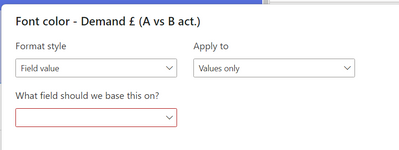
I expect to then be able to reference this using the "field value" in the conditional formatting UI:
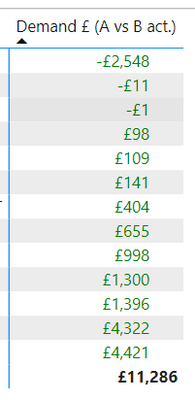
How can I do this? The above steps just colours all measure values green:
Using a calculation group I can dynamically change the text, but can't use it to colour the measure value accordingly. Regardless, I don't seem able to show my measure and the calculation group at the same time.
This does not seem to be as simple as I expected. The alternative is to apply a "rules based" conditional formatting to every measure, in every matrix which I would rather avoid.
Thanks for any help!
Have you found a solution for this? I'm needing the same. Thanks
| User | Count |
|---|---|
| 57 | |
| 44 | |
| 32 | |
| 16 | |
| 14 |
| User | Count |
|---|---|
| 82 | |
| 66 | |
| 42 | |
| 27 | |
| 25 |