Don't miss your chance to take the Fabric Data Engineer (DP-700) exam on us!
Learn moreWe've captured the moments from FabCon & SQLCon that everyone is talking about, and we are bringing them to the community, live and on-demand. Starts on April 14th. Register now
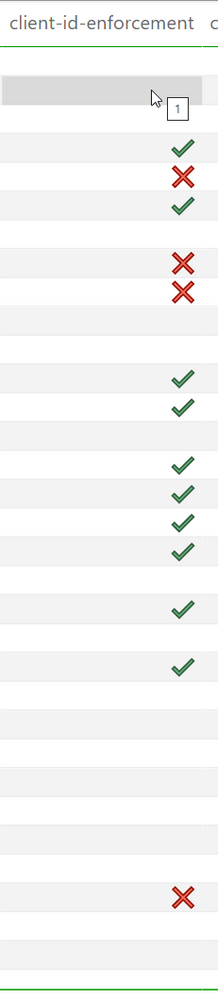
Hi, I have a data source of 1s and 0s, the data type is whole number. When I apply conditional formatting, the 0s all change to the cross icon, however only a selection of the 1s change to the tick icon, the rest are just blank cells. 100% of the fields are populated, there are no blanks or errors. There is no reasonable explanation for this. In the image you can see me hovering a blank cell, and it has the value of 1 but no tick. All the blank cells have the value of 1 as well as the cells with a tick.
Solved! Go to Solution.
Hi @amitchandak This is a whole number, I resolved the issue from switching from sum of the cell to average of the cell. Thank you
@HarveyM Hello, could you please make sure you don't have any column in your table visual that makes your current column values blank.
for example even if in your main table, this column is not blank and it is fully filled, maybe if you put date from date table in this visual that in specific date you didn't have any 0 or 1, it makes the cell blank.
So please make sure about other tables in relationship with this table/column, that you have added to this visual.
I hope it helps.
Hi @Anonymous There was no date relationships, or columns from other tables in the visual or filtering the visual. I solved the issue from switching the conditional formatting from sum of the cell to average of the cell. Thank you
Hi @amitchandak This is a whole number, I resolved the issue from switching from sum of the cell to average of the cell. Thank you
If you have recently started exploring Fabric, we'd love to hear how it's going. Your feedback can help with product improvements.
A new Power BI DataViz World Championship is coming this June! Don't miss out on submitting your entry.
Share feedback directly with Fabric product managers, participate in targeted research studies and influence the Fabric roadmap.
| User | Count |
|---|---|
| 53 | |
| 36 | |
| 33 | |
| 19 | |
| 17 |
| User | Count |
|---|---|
| 73 | |
| 72 | |
| 38 | |
| 35 | |
| 26 |