cancel
Showing results for 
Search instead for 
Did you mean: 

The Power BI Data Visualization World Championships is back! Get ahead of the game and start preparing now! Learn more

Reply
santoshreddyk95
Frequent Visitor

Adding Row data in new Column

Hi All, 


I have a huge data base that has rows for every calendar date (almost 2 years of data) . I need the data of one calendar date in one column and other calendar date in other column while importing. so i can calculate the increase/decrease between two different dates. 


Any suggestions on how to di it?

Currently I am able to filter rows based on only one date using this

= Table.SelectRows(#"Removed Other Columns", each [calendar_date] = Date.From(Date.AddDays( DateTime.LocalNow(),-1)))


1 ACCEPTED SOLUTION

Hi @santoshreddyk95 


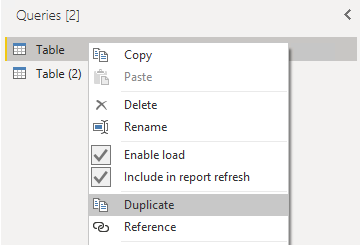
You want to calculate the increase/decrease between which two different dates? Every date and its previous date? If so, you can first duplicate the query.

vjingzhang_0-1652943746974.png


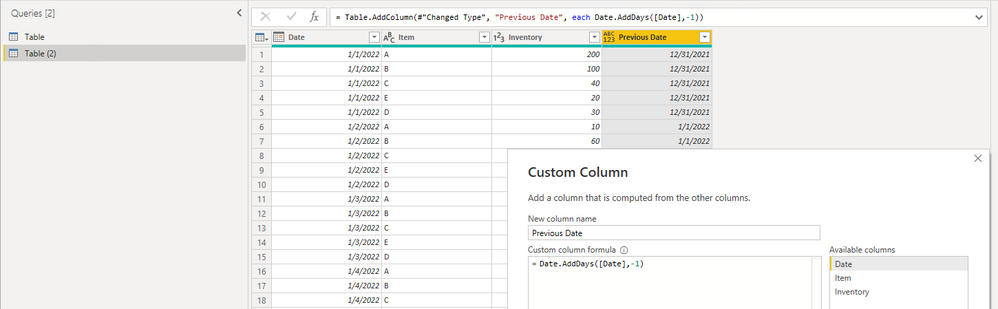
Then in the duplicated table, add a custom column to get the previous date. 

Date.AddDays([Date],-1)

vjingzhang_1-1652943932824.png


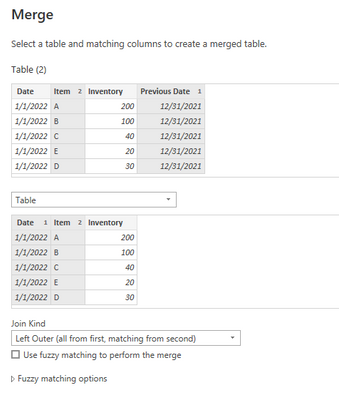
Then merge queries to bring data from the original table into the duplicated table. Hold on Ctrl key and select "Previous Date" & "Item" columns as matching columns in duplicated table. In the second table, select "Date" and "Item" columns. 

vjingzhang_2-1652944495637.png


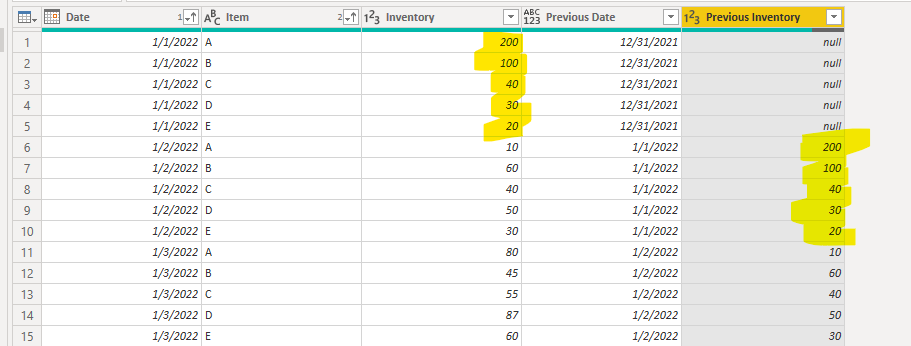
Expand the merged table column and select "Inventory" to add to the duplicated table. 

vjingzhang_3-1652944873876.png


You can then calculate the difference between two inventory columns to get the daily decrease/increase amount. 


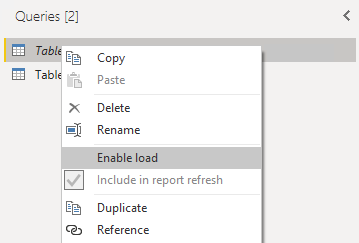
If you don't want to bring two tables' data into the data model, you can uncheck "Enable load" option for the original table. 

vjingzhang_4-1652945033780.png


Best Regards,
Community Support Team _ Jing
If this post helps, please Accept it as Solution to help other members find it.

View solution in original post

3 REPLIES 3
amitchandak
Super User
Super User

@santoshreddyk95 , Best is use a measure and time intelligence


example

This Day = CALCULATE(sum('Table'[Qty]), FILTER(ALL('Date'),'Date'[Date]=max('Date'[Date])))


Last Day = CALCULATE(sum('Table'[Qty]), FILTER(ALL('Date'),'Date'[Date]=max('Date'[Date])-1))


Last Day = CALCULATE(sum('Table'[Qty]), previousday('Date'[Date]))


diff =[This Day] - [Last Day]

Day Intelligence - Last day, last non continous day
https://medium.com/@amitchandak.1978/power-bi-day-intelligence-questions-time-intelligence-5-5-5c324...

Share with Power BI Enthusiasts: Full Power BI Video (20 Hours) YouTube
Microsoft Fabric Series 60+ Videos YouTube
Microsoft Fabric Hindi End to End YouTube

Each Calendar day has 1000+ rows which are distinct. Kind of Inventory details. For every row item i need a difference. Increase in inventory for every material. 

Hi @santoshreddyk95 


You want to calculate the increase/decrease between which two different dates? Every date and its previous date? If so, you can first duplicate the query.

vjingzhang_0-1652943746974.png


Then in the duplicated table, add a custom column to get the previous date. 

Date.AddDays([Date],-1)

vjingzhang_1-1652943932824.png


Then merge queries to bring data from the original table into the duplicated table. Hold on Ctrl key and select "Previous Date" & "Item" columns as matching columns in duplicated table. In the second table, select "Date" and "Item" columns. 

vjingzhang_2-1652944495637.png


Expand the merged table column and select "Inventory" to add to the duplicated table. 

vjingzhang_3-1652944873876.png


You can then calculate the difference between two inventory columns to get the daily decrease/increase amount. 


If you don't want to bring two tables' data into the data model, you can uncheck "Enable load" option for the original table. 

vjingzhang_4-1652945033780.png


Best Regards,
Community Support Team _ Jing
If this post helps, please Accept it as Solution to help other members find it.

Helpful resources

Announcements
Power BI DataViz World Championships

Power BI Dataviz World Championships

The Power BI Data Visualization World Championships is back! Get ahead of the game and start preparing now!

December 2025 Power BI Update Carousel

Power BI Monthly Update - December 2025

Check out the December 2025 Power BI Holiday Recap!

FabCon Atlanta 2026 carousel

FabCon Atlanta 2026

Join us at FabCon Atlanta, March 16-20, for the ultimate Fabric, Power BI, AI and SQL community-led event. Save $200 with code FABCOMM.