Join us in Barcelona for FabCon and SQLCon, September 28 - October 1, 2026.
This is best Fabric, Power BI, SQL and AI community event. How do we know? The last event sold out! Save €200 with code FABCMTY200.
Register now- Power BI forums
- Get Help with Power BI
- Desktop
- Service
- Report Server
- Power Query
- Mobile Apps
- Developer
- DAX Commands and Tips
- Custom Visuals Development Discussion
- Health and Life Sciences
- Power BI Spanish forums
- Translated Spanish Desktop
- Training and Consulting
- Instructor Led Training
- Dashboard in a Day for Women, by Women
- Galleries
- Data Stories Gallery
- Themes Gallery
- Contests Gallery
- QuickViz Gallery
- Quick Measures Gallery
- Visual Calculations Gallery
- Notebook Gallery
- Translytical Task Flow Gallery
- TMDL Gallery
- R Script Showcase
- Webinars and Video Gallery
- Ideas
- Custom Visuals Ideas (read-only)
- Issues
- Issues
- Events
- Upcoming Events
A new Data Days event is coming soon! This time we’re going bigger than ever. Fabric, Power BI, SQL, AI and more. Don't miss out.
- Power BI forums
- Forums
- Get Help with Power BI
- Desktop
- Re: Conditional Formatting based on previous Value
- Subscribe to RSS Feed
- Mark Topic as New
- Mark Topic as Read
- Float this Topic for Current User
- Bookmark
- Subscribe
- Printer Friendly Page

- Mark as New
- Bookmark
- Subscribe
- Mute
- Subscribe to RSS Feed
- Permalink
- Report Inappropriate Content
Conditional Formatting based on previous Value
Hi,
I have the above table as a Matrix in Power BI:
| MONTH | TICKETS UPDATED # | STOCK REPLENISHED # | INCREASED MPL / MDQ # |
| May 2019 | 9 | 48 | 10 |
| June 2019 | 11 | 47 | 9 |
| July 2019 | 8 | 52 | 8 |
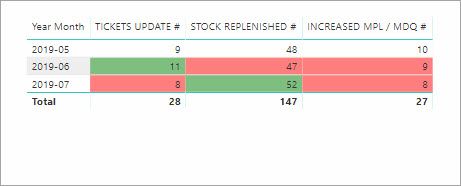
I would like to format as below:

I need to create a measure for each column, that will allow me to format as such:
IF( FOLLOWING MONTH Value > PREVIOUS MONTH Value , Green Color ,
IF( FOLLOWING MONTH Value < PREVIOUS MONTH Value , Red Color ))
Help would be really appreciated.
Regards,
Robin
Solved! Go to Solution.
- Mark as New
- Bookmark
- Subscribe
- Mute
- Subscribe to RSS Feed
- Permalink
- Report Inappropriate Content
Hi @Anonymous
I did an example for 1 column.
Create 2 new columns:
Previous Month Tickets =
VAR prev_month =
    PREVIOUSMONTH ( T13[MONTH] )
RETURN
    IF (
        CALCULATE (
            SUM ( T13[TICKETS UPDATED #] ),
            FILTER (
                T13,
                prev_month = T13[MONTH]
            )
        )
            = BLANK (),
        0,
        CALCULATE (
            SUM ( T13[TICKETS UPDATED #] ),
            FILTER (
                T13,
                prev_month = T13[MONTH]
            )
        )
    )
Colors =
IF (
T13[TICKETS UPDATED #] > T13[Previous Month Tickets],
"GREEN",
"RED"
)Then format according to field value
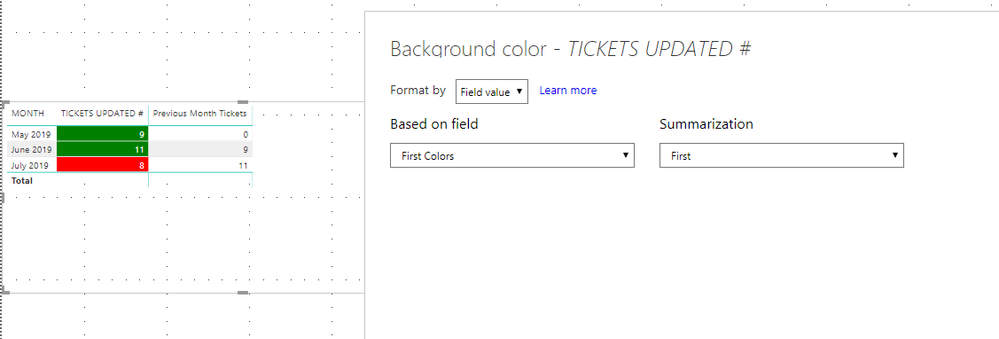
Cheers!
A


- Mark as New
- Bookmark
- Subscribe
- Mute
- Subscribe to RSS Feed
- Permalink
- Report Inappropriate Content
Hello @Anonymous
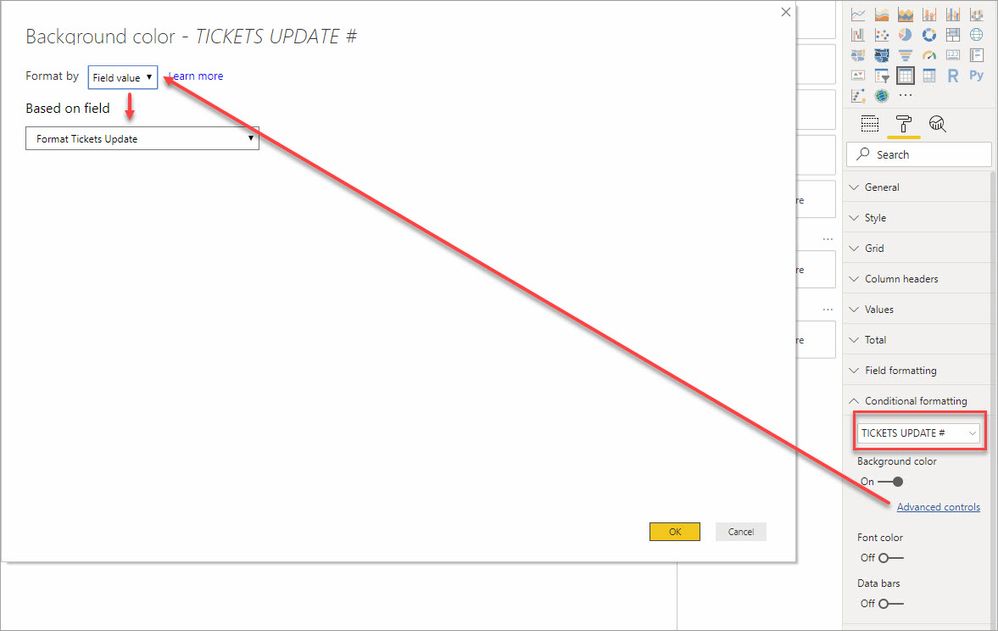
You can do this with measures that compare the prior month amount to the current month amount the return a color string based on the compare. I chose slightly lighter colors that the standard red and green.
Format Tickets Update =
VAR PriorMonthAmt = CALCULATE( [TICKETS UPDATE #] , PARALLELPERIOD(Dates[Date],-1,MONTH ) )
VAR Compare = IF ( ISBLANK( PriorMonthAmt ), BLANK(), [TICKETS UPDATE #] - PriorMonthAmt)
RETURN

SWITCH (
    TRUE(),
    Compare = 0, "none",
    Compare < 0, "#ff7f7f",
    Compare > 0, "#7fbf7f")
Format Stock Replenished =
VAR PriorMonthAmt = CALCULATE( [STOCK REPLENISHED #] , PARALLELPERIOD ( Dates[Date],-1,MONTH ) )
VAR Compare = IF ( ISBLANK ( PriorMonthAmt ), BLANK(), [STOCK REPLENISHED #] - PriorMonthAmt)
RETURN
SWITCH (
TRUE(),
Compare = 0, "none",
Compare < 0, "#ff7f7f",
Compare > 0, "#7fbf7f")Format MPL / MDQ =
VAR PriorMonthAmt = CALCULATE( [INCREASED MPL / MDQ #] , PARALLELPERIOD(Dates[Date],-1,MONTH ) )
VAR Compare = IF ( ISBLANK( PriorMonthAmt ), BLANK(), [INCREASED MPL / MDQ #] - PriorMonthAmt)
RETURN
SWITCH (
TRUE(),
Compare = 0, "none",
Compare < 0, "#ff7f7f",
Compare > 0, "#7fbf7f")Then you use the conditional formatting over the field
- Mark as New
- Bookmark
- Subscribe
- Mute
- Subscribe to RSS Feed
- Permalink
- Report Inappropriate Content
I'm struggling with the MONTH column formatting.
How do you get the MONTH column in acceptable date format for PARALLELPERIOD or PREVIOUSMONTH functions to work?
- Mark as New
- Bookmark
- Subscribe
- Mute
- Subscribe to RSS Feed
- Permalink
- Report Inappropriate Content
All good, I found the function that transforms text to date: DATEVALUE()
ALl sorted thanks guys 🙂
- Mark as New
- Bookmark
- Subscribe
- Mute
- Subscribe to RSS Feed
- Permalink
- Report Inappropriate Content
Hi @Anonymous
I did an example for 1 column.
Create 2 new columns:
Previous Month Tickets =
VAR prev_month =
    PREVIOUSMONTH ( T13[MONTH] )
RETURN
    IF (
        CALCULATE (
            SUM ( T13[TICKETS UPDATED #] ),
            FILTER (
                T13,
                prev_month = T13[MONTH]
            )
        )
            = BLANK (),
        0,
        CALCULATE (
            SUM ( T13[TICKETS UPDATED #] ),
            FILTER (
                T13,
                prev_month = T13[MONTH]
            )
        )
    )
Colors =
IF (
T13[TICKETS UPDATED #] > T13[Previous Month Tickets],
"GREEN",
"RED"
)Then format according to field value
Cheers!
A
- Mark as New
- Bookmark
- Subscribe
- Mute
- Subscribe to RSS Feed
- Permalink
- Report Inappropriate Content
Hello, I tired thre abovce, but when I go to conditional formatting aand then select format by field the box for based on field is red and it wont let me choose the field I creatd above.
- Mark as New
- Bookmark
- Subscribe
- Mute
- Subscribe to RSS Feed
- Permalink
- Report Inappropriate Content
Thanks mate, that's exactly what I'm looking for!
- Mark as New
- Bookmark
- Subscribe
- Mute
- Subscribe to RSS Feed
- Permalink
- Report Inappropriate Content
You can optimise the above to be in one column (one go),
I did it in 2 steps for better understanding the steps.
Good Luck!
Helpful resources

Power BI Monthly Update - May 2026
Check out the May 2026 Power BI update to learn about new features.

Data Days 2026 coming soon!
Sign up to receive a private message when registration opens and key events begin.

New to Fabric Survey
If you have recently started exploring Fabric, we'd love to hear how it's going. Your feedback can help with product improvements.

Power BI DataViz World Championships - June 2026
A new Power BI DataViz World Championship is coming this June! Don't miss out on submitting your entry.

| User | Count |
|---|---|
| 29 | |
| 28 | |
| 25 | |
| 20 | |
| 14 |


| User | Count |
|---|---|
| 53 | |
| 47 | |
| 23 | |
| 20 | |
| 19 |


