Don't miss your chance to take the Fabric Data Engineer (DP-600) exam for FREE! Find out how by attending the DP-600 session on April 23rd (pacific time), live or on-demand.
Learn moreJoin the FabCon + SQLCon recap series. Up next: Power BI, Real-Time Intelligence, IQ and AI, and Data Factory take center stage. All sessions are available on-demand after the live show. Register now
Hello all,
Long time lurker, first time posting.
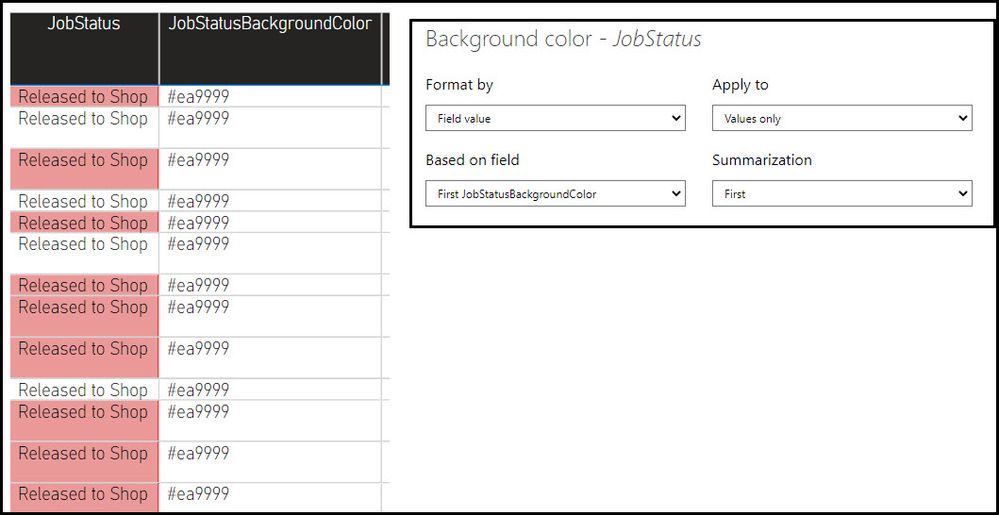
I have some conditional formatting rules setup to watch another column and obtain the background and text colors from that column. I see on the resulting report that the conditional formatting is not being applied to random rows. I have attached a sample of what I have setup. The Job Status column bacground should all be the same color in this screenshot according to the Background Color column. Can someone advise me on how to resolve this?
EDIT: I know it has something to do with the option to "Show all items with no data". If i uncheck that option, all rows have the same color but the result does not show all jobs in my database. I need it to apply to all rows, including rows with "no data". As you can see from the screenshot, it SHOULD be applying to all rows but its not.
Solved! Go to Solution.
Ok i figured it out. I had (2) columns with User Hours included on the visual. Although I am not summing the Hours, it still caused issues since some of the values were Null. I had to add (2) additional columns replacing the Null values with 0. Once i did that, I removed the orignal Hours column with Null values and replaced it with the new one containing 0's into the visual. That resolved my issue.
Check out the April 2026 Power BI update to learn about new features.
If you have recently started exploring Fabric, we'd love to hear how it's going. Your feedback can help with product improvements.
A new Power BI DataViz World Championship is coming this June! Don't miss out on submitting your entry.
| User | Count |
|---|---|
| 48 | |
| 46 | |
| 41 | |
| 20 | |
| 17 |
| User | Count |
|---|---|
| 70 | |
| 69 | |
| 32 | |
| 27 | |
| 26 |