Don't miss your chance to take the Fabric Data Engineer (DP-700) exam on us!
Learn moreNext up in the FabCon + SQLCon recap series: The roadmap for Microsoft SQL and Maximizing Developer experiences in Fabric. All sessions are available on-demand after the live show. Register now
Hi,
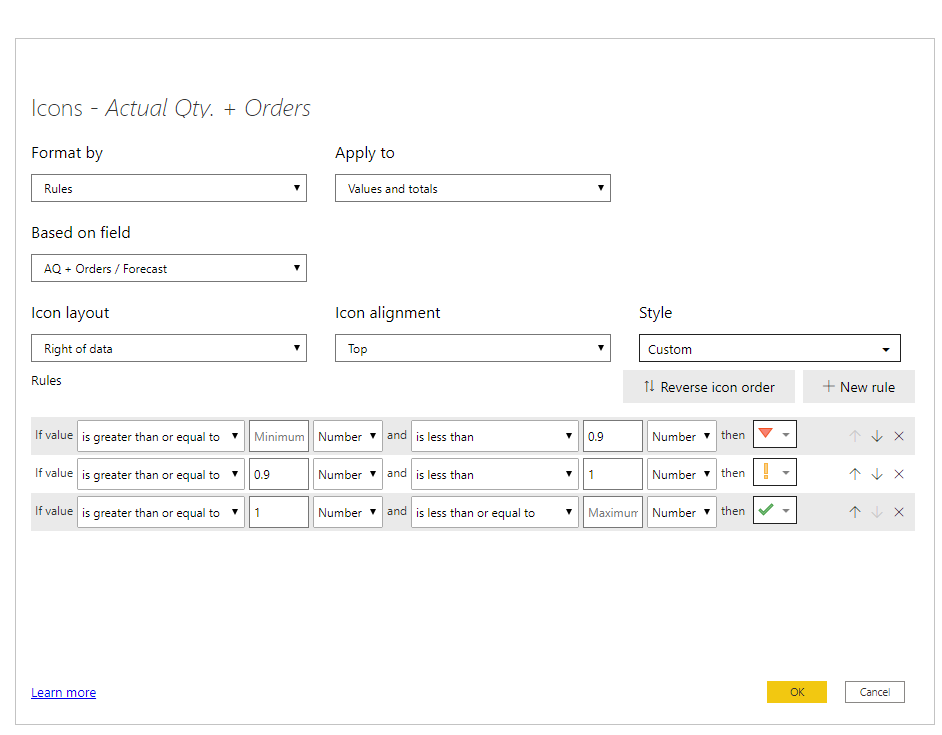
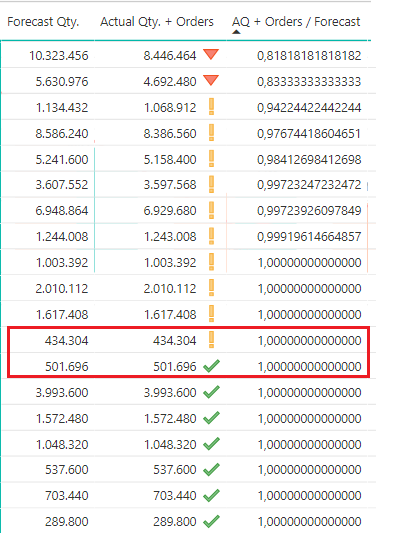
Created a simple Conditional Formatting rule, but sometimes value 1 shows Yellow which is incorrect, according to the rule value 1 shuld be Green always, where could be the problem? I posted like 14 decimal places but is still 1.
Thanks
hi @Vitalijus
If you change the data type from decimal number to Fixed decimal number and try it again.
and if you still have the problem, please share your sample pbix file for us have a test.
Regards,
Lin
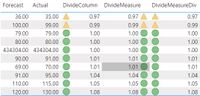
Agreed with Pragati11, check the data types. Is there DAX doing the calculation? If not, try coding the DAX one of three ways:
Hi @Vitalijus ,
Are values in "AQ+Orders / Forecast" decimal type?
They look like they are not. I see a comma in them rather than a dot which is for decimal numbers.
Check datatype of your column.
Thanks,
Pragati
@Vitalijus , Try this, if it can work. Create a rounded 2 or 3 decimal place number and have conditional formatting on that.
Also, log and check issue at :
If you have recently started exploring Fabric, we'd love to hear how it's going. Your feedback can help with product improvements.
A new Power BI DataViz World Championship is coming this June! Don't miss out on submitting your entry.
Share feedback directly with Fabric product managers, participate in targeted research studies and influence the Fabric roadmap.
| User | Count |
|---|---|
| 53 | |
| 45 | |
| 44 | |
| 20 | |
| 19 |
| User | Count |
|---|---|
| 73 | |
| 71 | |
| 34 | |
| 33 | |
| 31 |