
This time we’re going bigger than ever. Fabric, Power BI, SQL, AI and more. We're covering it all. You won't want to miss it.
Learn moreLevel up your Power BI skills this month - build one visual each week and tell better stories with data! Get started
I have a matrix that uses many different data points, all $dollars or perents.
I need to show anything negative (<0) as the Font Color Red.
When I attempt conditional formatting, I am only presented with the option of "if value is greater than or equal to", "if value is greater than" "if value is blank" and then it always makes me pick a second condition.
I literally just need to say "if <0, red, else black"
Solved! Go to Solution.
@bhmiller89 , You create a color measure like
Color sales = if(AVERAGE(Sales[Sales Amount])>0,"green","red")
And in conditional formatting use field option and choose this measure
https://radacad.com/dax-and-conditional-formatting-better-together-find-the-biggest-and-smallest-num...
https://docs.microsoft.com/en-us/power-bi/desktop-conditional-table-formatting#color-by-color-values
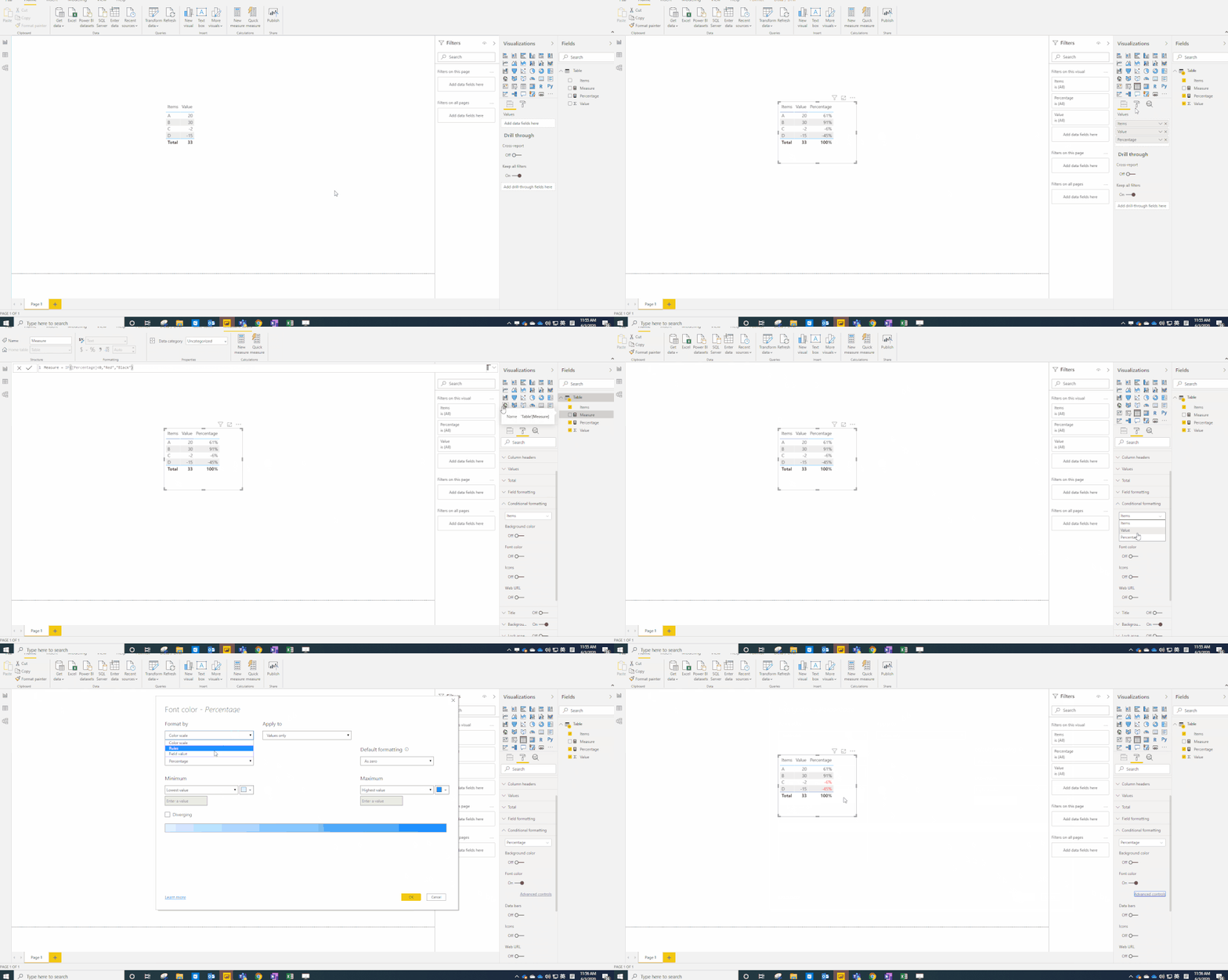
Hi @bhmiller89 ,
I agree with amitchandak. You could use a measure to implement it.
Measure = IF([Percentage]<0,"Red","Black")
Hi @bhmiller89 ,
Could you tell me if your problem has been solved? If it is, kindly mark the helpful answer as solution if you feel that makes sense. Welcome to share your own solution. More people will benefit from the thread.
Hi @bhmiller89 ,
I agree with amitchandak. You could use a measure to implement it.
Measure = IF([Percentage]<0,"Red","Black")
Hello,
using conditional formatting you can apply a single condition:
@bhmiller89 , You create a color measure like
Color sales = if(AVERAGE(Sales[Sales Amount])>0,"green","red")
And in conditional formatting use field option and choose this measure
https://radacad.com/dax-and-conditional-formatting-better-together-find-the-biggest-and-smallest-num...
https://docs.microsoft.com/en-us/power-bi/desktop-conditional-table-formatting#color-by-color-values
Check out the April 2026 Power BI update to learn about new features.
Sign up to receive a private message when registration opens and key events begin.
If you have recently started exploring Fabric, we'd love to hear how it's going. Your feedback can help with product improvements.
| User | Count |
|---|---|
| 35 | |
| 32 | |
| 26 | |
| 21 | |
| 18 |
| User | Count |
|---|---|
| 68 | |
| 37 | |
| 32 | |
| 25 | |
| 23 |