
cancel
Showing results for 
Search instead for 
Did you mean: 

We've captured the moments from FabCon & SQLCon that everyone is talking about, and we are bringing them to the community, live and on-demand. Starts on April 14th. Register now

Reply
bhmiller89
Helper V
Helper V

Conditional Formatting Issues

I have a matrix that uses many different data points, all $dollars or perents.


I need to show anything negative (<0) as the Font Color Red. 


When I attempt conditional formatting, I am only presented with the option of "if value is greater than or equal to", "if value is greater than" "if value is blank" and then it always makes me pick a second condition. 


I literally just need to say "if <0, red, else black" 

2 ACCEPTED SOLUTIONS
amitchandak
Super User
Super User

@bhmiller89 , You create a color measure like

Color sales = if(AVERAGE(Sales[Sales Amount])>0,"green","red")

And in conditional formatting use field option and choose this measure

https://radacad.com/dax-and-conditional-formatting-better-together-find-the-biggest-and-smallest-num...
https://docs.microsoft.com/en-us/power-bi/desktop-conditional-table-formatting#color-by-color-values


Share with Power BI Enthusiasts: Full Power BI Video (20 Hours) YouTube
Microsoft Fabric Series 60+ Videos YouTube
Microsoft Fabric Hindi End to End YouTube

View solution in original post

v-xuding-msft
Community Support
Community Support

Hi @bhmiller89 ,


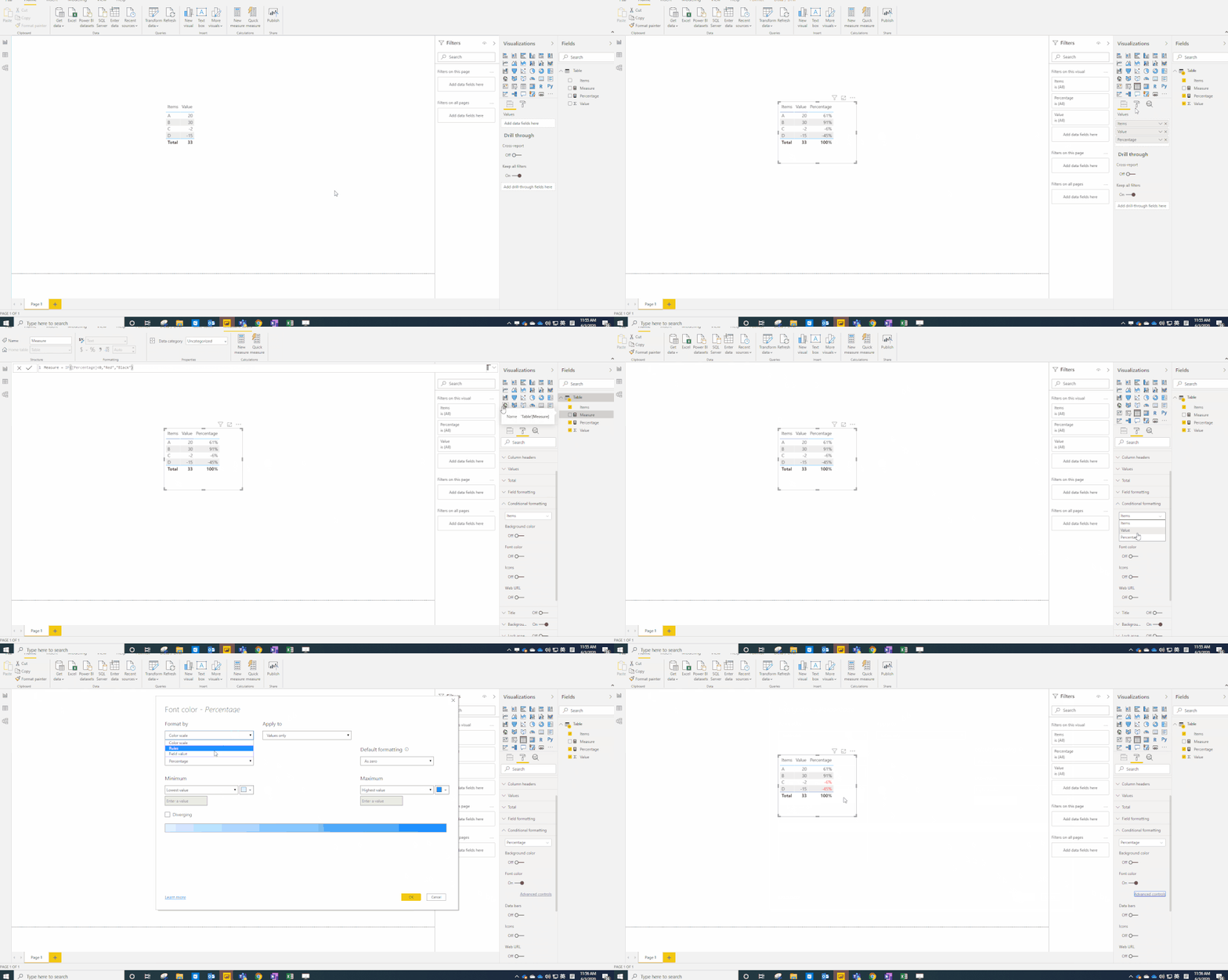
I agree with amitchandak. You could use a measure to implement it. 

Measure = IF([Percentage]<0,"Red","Black")

2.gif


Best Regards,
Xue Ding
If this post helps, then please consider Accept it as the solution to help the other members find it more quickly.

View solution in original post

4 REPLIES 4
v-xuding-msft
Community Support
Community Support

Hi @bhmiller89 ,


Could you tell me if your problem has been solved? If it is, kindly mark the helpful answer as solution if you feel that makes sense. Welcome to share your own solution. More people will benefit from the thread.


Best Regards,
Xue Ding
If this post helps, then please consider Accept it as the solution to help the other members find it more quickly.
v-xuding-msft
Community Support
Community Support

Hi @bhmiller89 ,


I agree with amitchandak. You could use a measure to implement it. 

Measure = IF([Percentage]<0,"Red","Black")

2.gif


Best Regards,
Xue Ding
If this post helps, then please consider Accept it as the solution to help the other members find it more quickly.
Anonymous
Not applicable

Hello,


using conditional formatting you can apply a single condition:

rule.jpg

amitchandak
Super User
Super User

@bhmiller89 , You create a color measure like

Color sales = if(AVERAGE(Sales[Sales Amount])>0,"green","red")

And in conditional formatting use field option and choose this measure

https://radacad.com/dax-and-conditional-formatting-better-together-find-the-biggest-and-smallest-num...
https://docs.microsoft.com/en-us/power-bi/desktop-conditional-table-formatting#color-by-color-values


Share with Power BI Enthusiasts: Full Power BI Video (20 Hours) YouTube
Microsoft Fabric Series 60+ Videos YouTube
Microsoft Fabric Hindi End to End YouTube

Helpful resources

Announcements
New to Fabric survey Carousel

New to Fabric Survey

If you have recently started exploring Fabric, we'd love to hear how it's going. Your feedback can help with product improvements.

Power BI DataViz World Championships carousel

Power BI DataViz World Championships - June 2026

A new Power BI DataViz World Championship is coming this June! Don't miss out on submitting your entry.

Join our Fabric User Panel

Join our Fabric User Panel

Share feedback directly with Fabric product managers, participate in targeted research studies and influence the Fabric roadmap.

March Power BI Update Carousel

Power BI Community Update - March 2026

Check out the March 2026 Power BI update to learn about new features.