This time we’re going bigger than ever. Fabric, Power BI, SQL, AI and more. We're covering it all. You won't want to miss it.
Learn moreDid you hear? There's a new SQL AI Developer certification (DP-800). Start preparing now and be one of the first to get certified. Register now
Hi! I was developing a Power BI Dashboard and i want to create a conditional formatting to add icons to a card.
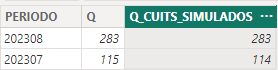
I have a table, which is a query from Teradata. It has a column called "Q_CUITS_SIMULADOS" which is basically an integer.
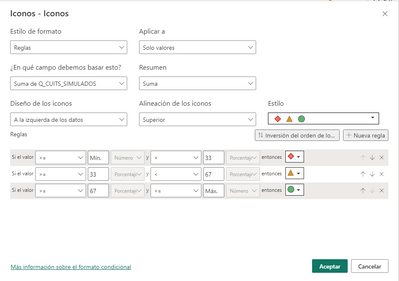
When I try to create the conditional formatting I have the next problem:
When I define the rules (min and max) I can´t select the data type (Number or Percentage), but my value is a number. The second rule is set to percentage so I don´t get what I want.
How I could solve that?
Thank you so much!
@Sergii24 Hi Sergi, i could sove that. I had to change "resume value as " : no resume. Now, I have the same problem but in this case for a measure. Do you know how to solve it?
Hi @Anonymous, can you share the measure code and some details of expected result?
Sorry for the delay. Yes, The measure is the next one:
SUM_CUITS =
SUM(Q_CUITS_SIMULADOS)
If SUM_CUITS > 0 THEN I WANT TO SEE THE RESULT OF SUM_CUITS AND THE GREEN CHECK MARK OF THE CELL ELEMENTS, ELSE I WANT A RED CROSS.
You'll need at least two measures:
Try it out and let us know in case of issues!
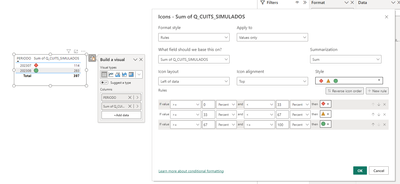
Hi @Anonymous, I've tried to replicate your case but it works fine:
I would suggest the following:
Good luck! 🙂
Hi! How are you? Thank you! I will try that. Can it be related to the query?
Check out the April 2026 Power BI update to learn about new features.
Sign up to receive a private message when registration opens and key events begin.
If you have recently started exploring Fabric, we'd love to hear how it's going. Your feedback can help with product improvements.
| User | Count |
|---|---|
| 34 | |
| 31 | |
| 25 | |
| 20 | |
| 16 |
| User | Count |
|---|---|
| 60 | |
| 48 | |
| 29 | |
| 23 | |
| 23 |