cancel
Showing results for 
Search instead for 
Did you mean: 

We've captured the moments from FabCon & SQLCon that everyone is talking about, and we are bringing them to the community, live and on-demand. Starts on April 14th. Register now

Reply
Anonymous
Not applicable

Conditional Formatting (Icons) using Absolute Values

Hello.

I have some variance measures where I want to apply conditional formatting such that:

1) If the variance is 0-5% (i.e., +/- 5%), then the icon is green

2) If the variance is 5-10% (+/- 5-10%), then the icon is yellow

3) If the variance is >10% (+/- >10%), then the icon is red.


I have never used conditional formatting with absolute values before.

Can you help please.

Thanks so much.

1 ACCEPTED SOLUTION
Anonymous
Not applicable

Hi @Anonymous ,


According to your description, here are my steps you can follow as a solution.

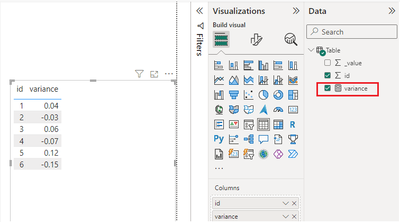
(1) This is my test data.  

vtangjiemsft_0-1708914929410.png

(2) We can create a measure. 

Arrow = 
// Variables to store arrow paths
var _1 = "<path d='M10 90 L50 10 L90 90 Z' fill='green' />"
var _2 = "<path d='M10 90 L50 10 L90 90 Z' fill='yellow' />"
var _3 ="<path d='M10 90 L50 10 L90 90 Z' fill='red' />"

// Select arrow to use
var arrow = SWITCH(TRUE(),
ABS([variance])>=0 && ABS([variance])<0.05,_1,
ABS([variance])>=0.05 && ABS([variance])<0.1,_2,
ABS([variance])>=0.1,_3)

// Insert arrow into SVG
var svg ="data&colon;image/svg+xml;utf8," &
         "<svg xmlns='http://www.w3.org/2000/svg' viewBox='0 0 100 100'>"
            & arrow & 
         "</svg>"

RETURN svg

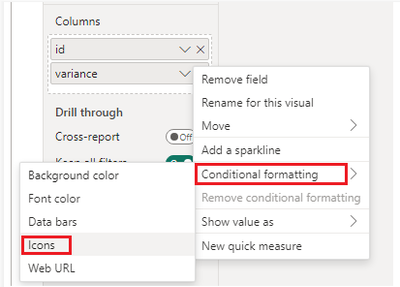
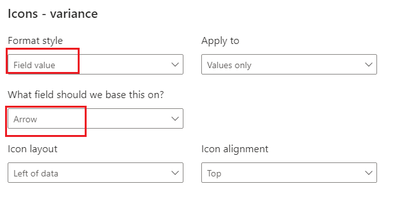
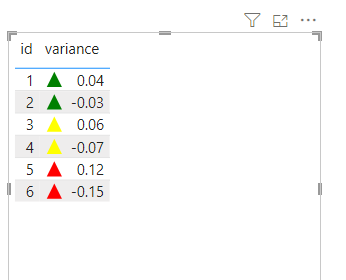
(3) Setting the Conditional Format and then the result is as follows.

vtangjiemsft_1-1708918097256.pngvtangjiemsft_2-1708918139327.pngvtangjiemsft_3-1708918148467.png

For more details, refer: Sharp Vector Collections - SVG Repo

Conditional Formatting Using Icons In Power BI 🔶 - Excelerator BI


Best Regards,

Neeko Tang

If this post  helps, then please consider Accept it as the solution  to help the other members find it more quickly. 

View solution in original post

2 REPLIES 2
Anonymous
Not applicable

Hi @Anonymous ,


According to your description, here are my steps you can follow as a solution.

(1) This is my test data.  

vtangjiemsft_0-1708914929410.png

(2) We can create a measure. 

Arrow = 
// Variables to store arrow paths
var _1 = "<path d='M10 90 L50 10 L90 90 Z' fill='green' />"
var _2 = "<path d='M10 90 L50 10 L90 90 Z' fill='yellow' />"
var _3 ="<path d='M10 90 L50 10 L90 90 Z' fill='red' />"

// Select arrow to use
var arrow = SWITCH(TRUE(),
ABS([variance])>=0 && ABS([variance])<0.05,_1,
ABS([variance])>=0.05 && ABS([variance])<0.1,_2,
ABS([variance])>=0.1,_3)

// Insert arrow into SVG
var svg ="data&colon;image/svg+xml;utf8," &
         "<svg xmlns='http://www.w3.org/2000/svg' viewBox='0 0 100 100'>"
            & arrow & 
         "</svg>"

RETURN svg

(3) Setting the Conditional Format and then the result is as follows.

vtangjiemsft_1-1708918097256.pngvtangjiemsft_2-1708918139327.pngvtangjiemsft_3-1708918148467.png

For more details, refer: Sharp Vector Collections - SVG Repo

Conditional Formatting Using Icons In Power BI 🔶 - Excelerator BI


Best Regards,

Neeko Tang

If this post  helps, then please consider Accept it as the solution  to help the other members find it more quickly. 

_AAndrade
Super User
Super User

Hi,


Read this article: https://community.fabric.microsoft.com/t5/Desktop/Changing-Number-Format/td-p/3710518#M1208645


If you need any additional help, please let me know.


Did I answer your question? Mark my post as a solution! Kudos are welcome.

Proud to be a Super User!


Helpful resources

Announcements
New to Fabric survey Carousel

New to Fabric Survey

If you have recently started exploring Fabric, we'd love to hear how it's going. Your feedback can help with product improvements.

Power BI DataViz World Championships carousel

Power BI DataViz World Championships - June 2026

A new Power BI DataViz World Championship is coming this June! Don't miss out on submitting your entry.

Join our Fabric User Panel

Join our Fabric User Panel

Share feedback directly with Fabric product managers, participate in targeted research studies and influence the Fabric roadmap.

March Power BI Update Carousel

Power BI Community Update - March 2026

Check out the March 2026 Power BI update to learn about new features.