- Power BI forums
- Get Help with Power BI
- Desktop
- Service
- Report Server
- Power Query
- Mobile Apps
- Developer
- DAX Commands and Tips
- Custom Visuals Development Discussion
- Health and Life Sciences
- Power BI Spanish forums
- Translated Spanish Desktop
- Training and Consulting
- Instructor Led Training
- Dashboard in a Day for Women, by Women
- Galleries
- Data Stories Gallery
- Themes Gallery
- Contests Gallery
- QuickViz Gallery
- Quick Measures Gallery
- Visual Calculations Gallery
- Notebook Gallery
- Translytical Task Flow Gallery
- TMDL Gallery
- R Script Showcase
- Webinars and Video Gallery
- Ideas
- Custom Visuals Ideas (read-only)
- Issues
- Issues
- Events
- Upcoming Events
Learn from the best! Meet the four finalists headed to the FINALS of the Power BI Dataviz World Championships! Register now
- Power BI forums
- Forums
- Get Help with Power BI
- Desktop
- Conditional Formatting Direct Query Different Tabl...
- Subscribe to RSS Feed
- Mark Topic as New
- Mark Topic as Read
- Float this Topic for Current User
- Bookmark
- Subscribe
- Printer Friendly Page

- Mark as New
- Bookmark
- Subscribe
- Mute
- Subscribe to RSS Feed
- Permalink
- Report Inappropriate Content
Conditional Formatting Direct Query Different Tables
Greetings,
I have two columns in a data table in Power BI from different tables using direct query:
- TableOne[Status]
- TableTwo[Instances]
I pull TableOne[Status] into the first column and then TableTwo[Instances] and then count the number of statuses based on the instances. The status columns contain Completed, Errored & Running. I want to change the colour of the counts based on the status such as:
- Completed = Green
- Running = Grey
- Errored = Red
Everything I am seeing thus far in Power BI is all about when a value is greater than, other than when the text is equal to X then apply the colour. Any pointers would be greatly appreciated 🙂
Solved! Go to Solution.
- Mark as New
- Bookmark
- Subscribe
- Mute
- Subscribe to RSS Feed
- Permalink
- Report Inappropriate Content
Hi @Anonymous ,
According to your description, I created some data to show:
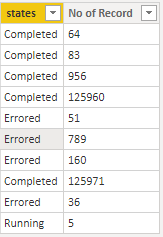
Here are the steps you can follow:
1. Create measure.
Measure =
SWITCH(
    TRUE(),
     MAX('Table'[states])="Completed","Green",
     MAX('Table'[states])="Running","Grey",
     MAX('Table'[states])="Errored","Red"
    )
2. Find format, search background color in the search bar, find conditional formatting, select the column name to change color, and turn on.
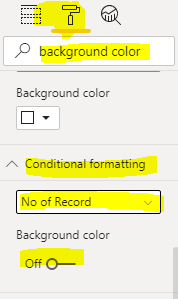
3. Select field value in format by and new measure in based on field
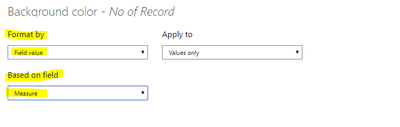
4. Result.
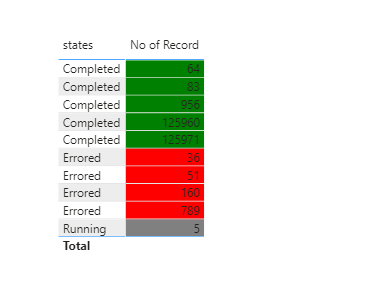
You can downloaded PBIX file from here.
Best Regards,
Liu Yang
If this post helps, then please consider Accept it as the solution to help the other members find it more quickly.
- Mark as New
- Bookmark
- Subscribe
- Mute
- Subscribe to RSS Feed
- Permalink
- Report Inappropriate Content
Hi @Anonymous ,
According to your description, I created some data to show:
Here are the steps you can follow:
1. Create measure.
Measure =
SWITCH(
    TRUE(),
     MAX('Table'[states])="Completed","Green",
     MAX('Table'[states])="Running","Grey",
     MAX('Table'[states])="Errored","Red"
    )
2. Find format, search background color in the search bar, find conditional formatting, select the column name to change color, and turn on.
3. Select field value in format by and new measure in based on field
4. Result.
You can downloaded PBIX file from here.
Best Regards,
Liu Yang
If this post helps, then please consider Accept it as the solution to help the other members find it more quickly.
- Mark as New
- Bookmark
- Subscribe
- Mute
- Subscribe to RSS Feed
- Permalink
- Report Inappropriate Content
Awesome, thank you, this has solved my problem 🙂
- Mark as New
- Bookmark
- Subscribe
- Mute
- Subscribe to RSS Feed
- Permalink
- Report Inappropriate Content
Hi @Anonymous ,
According to your description, I created some data to show:
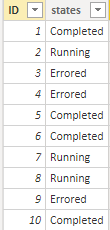
Here are the steps you can follow:
1. Create calculated column.
states_id =
SWITCH(
    TRUE(),
    'Table'[states]="Completed",1,
    'Table'[states]="Running",2,
    'Table'[states]="Errored",3)
2. Find format, search background color in the search bar, find conditional formatting, select the column name to change color, and turn off to on.

3. The background color interface appears
- Select format by as rules
- Change the condition of the following rules to is and number, and select the color
- After clicking new rule, continue the above operation

4. Result.
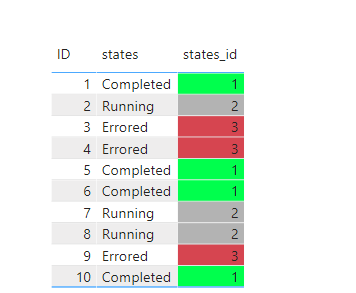
You can downloaded PBIX file from here.
Best Regards,
Liu Yang
If this post helps, then please consider Accept it as the solution to help the other members find it more quickly.
- Mark as New
- Bookmark
- Subscribe
- Mute
- Subscribe to RSS Feed
- Permalink
- Report Inappropriate Content
Thanks,
However, this creates a new column and I already have a column with the counts. Below is my visualization, I want the number of records to be coloured based on the status but each column is from another table. So if the status is Error I want the count to be Green, Amber or Red depending on the string.


- Mark as New
- Bookmark
- Subscribe
- Mute
- Subscribe to RSS Feed
- Permalink
- Report Inappropriate Content
@Anonymous , Create a color measure like this and use that in conditional formatting with the field value option
switch(true() ,
max(Table[status]) = "Completed" , "Green",
max(Table[status]) = "Running" , "Grey"
max(Table[status]) = "Errored" , "Red"
)
steps
https://radacad.com/dax-and-conditional-formatting-better-together-find-the-biggest-and-smallest-numbers-in-the-column
https://docs.microsoft.com/en-us/power-bi/desktop-conditional-table-formatting#color-by-color-values
- Mark as New
- Bookmark
- Subscribe
- Mute
- Subscribe to RSS Feed
- Permalink
- Report Inappropriate Content
Thanks for your reply,
I have since tried to apply this using the links given but the table does not update. Any suggestions?
Helpful resources

Power BI DataViz World Championships - June 2026
A new Power BI DataViz World Championship is coming this June! Don't miss out on submitting your entry.

Join our Fabric User Panel
Share feedback directly with Fabric product managers, participate in targeted research studies and influence the Fabric roadmap.

Power BI Community Update - March 2026
Check out the March 2026 Power BI update to learn about new features.

| User | Count |
|---|---|
| 45 | |
| 34 | |
| 27 | |
| 15 | |
| 15 |


| User | Count |
|---|---|
| 58 | |
| 56 | |
| 38 | |
| 22 | |
| 20 |


