cancel
Showing results for 
Search instead for 
Did you mean: 

Get Fabric certified for FREE! Don't miss your chance! Learn more

Reply
Chris_Evans
Frequent Visitor

Conditional Formatting Date in Card Visual

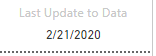
I have a card visual  that displays a date from a field in my data model. I would like to be able to use conditional formatting to change the color of either the background or the text if the date is beyond a certain threshold compared to today's date, ie color it red if greater than 30 days ago. I haven't been able to figure out if that is possible or not. I found the conditional formatting for the visual but was unable to successfully get it to work. Thanks for any help I can get.


Capture.PNG

1 ACCEPTED SOLUTION
amitchandak
Super User
Super User

@Chris_Evans , You can create a color measure and use that in conditional formatting


Color Date = if(FIRSTNONBLANK('Date'[Date],TODAY()) <today(),"lightgreen","red")

Or

Color Date =

Var _max =maxx(Table,Table[date])

return

if(FIRSTNONBLANK('Date'[Date],TODAY()) <_max ,"lightgreen","red")


Refer:https://radacad.com/dax-and-conditional-formatting-better-together-find-the-biggest-and-smallest-num...

Share with Power BI Enthusiasts: Full Power BI Video (20 Hours) YouTube
Microsoft Fabric Series 60+ Videos YouTube
Microsoft Fabric Hindi End to End YouTube

View solution in original post

2 REPLIES 2
amitchandak
Super User
Super User

@Chris_Evans , You can create a color measure and use that in conditional formatting


Color Date = if(FIRSTNONBLANK('Date'[Date],TODAY()) <today(),"lightgreen","red")

Or

Color Date =

Var _max =maxx(Table,Table[date])

return

if(FIRSTNONBLANK('Date'[Date],TODAY()) <_max ,"lightgreen","red")


Refer:https://radacad.com/dax-and-conditional-formatting-better-together-find-the-biggest-and-smallest-num...

Share with Power BI Enthusiasts: Full Power BI Video (20 Hours) YouTube
Microsoft Fabric Series 60+ Videos YouTube
Microsoft Fabric Hindi End to End YouTube

@amitchandak 


That worked perfectly. I just added -30 to the statement to get the results i needed. Thank you.


ColorDate = if(FIRSTNONBLANK(AgendaUpdates[last_update],TODAY()) <today() - 30,"red","black")

Helpful resources

Announcements
Join our Fabric User Panel

Join our Fabric User Panel

Share feedback directly with Fabric product managers, participate in targeted research studies and influence the Fabric roadmap.

January Power BI Update Carousel

Power BI Monthly Update - January 2026

Check out the January 2026 Power BI update to learn about new features.

FabCon Atlanta 2026 carousel

FabCon Atlanta 2026

Join us at FabCon Atlanta, March 16-20, for the ultimate Fabric, Power BI, AI and SQL community-led event. Save $200 with code FABCOMM.