cancel
Showing results for 
Search instead for 
Did you mean: 

Try your skills in the Power BI Dataviz World Championship! Round one ends June 26. Join now

Reply
Anonymous
Not applicable

Conditional Formatting Comparing Values by Year

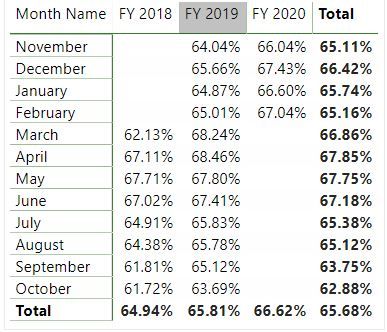
I have a table showing material utilization percentages over multiple fiscal years. I would like to apply conditional formatting to this table so that if the utilization percentage from one year is greater than the previous year it will show green, and red if it is lower. Below is the table I am working with. Any help you can offer would be greatly appreciated. Thank you in advance for your time!

example.JPG

1 ACCEPTED SOLUTION
Anonymous
Not applicable

@Anonymous I got it figured out.


First I created a measure using the SAMEPERIODLASTYEAR function to calculate the average utilization from the pervious year


utilizaiton LY = CALCULATE( [utilization] , SAMEPERIODLASTYEAR( [date] ))


Then I created a measure like you suggested to calculate the difference and eliminate false data caused by blanks


difference utilization = IF( ISBLANK( [utilization LY] ), BLANK(), [utlization] - [utilization LY] )

View solution in original post

2 REPLIES 2
Anonymous
Not applicable

You can start by creating a measure that calculates the difference between one year and another. When you apply the conditional formatting to the field, you can choose to conditionally format that field by a different field.


Ex: Difference2020 = FY2020 - FY2019


Format --> Conditional Formatting --> Choose field in dropdown --> advanced controls --> select rules under "Format by" dropdown --> select Difference2020 under the "Based on field" dropdown --> set your rules


I hope this helps, let me know if you need clarification.

Anonymous
Not applicable

@Anonymous I got it figured out.


First I created a measure using the SAMEPERIODLASTYEAR function to calculate the average utilization from the pervious year


utilizaiton LY = CALCULATE( [utilization] , SAMEPERIODLASTYEAR( [date] ))


Then I created a measure like you suggested to calculate the difference and eliminate false data caused by blanks


difference utilization = IF( ISBLANK( [utilization LY] ), BLANK(), [utlization] - [utilization LY] )

Helpful resources

Announcements
Fabric Data Days is here Carousel

Data Days 2026

Don't miss out on Data Days, June 15 through August 7. Learn Fabric, Power BI, SQL, AI and more.

May Power BI Update Carousel

Power BI Monthly Update - May 2026

Check out the May 2026 Power BI update to learn about new features.

Power BI DataViz World Championships carousel

Power BI DataViz World Championships - June 2026

A new Power BI DataViz World Championship is coming this June! Don't miss out on submitting your entry.