cancel
Showing results for 
Search instead for 
Did you mean: 

July 7 - July 17 | Round 2 of the Power BI Dataviz World Championships. Don't miss your chance! Learn more

Reply
petermb72
Helper IV
Helper IV

Conditional Formatting Based on a Table

I want to dislplay a Card and have the background show red if an occupancy level drops below a certain level.  The twist is that the locations have different thresholds of when they should be red.  Here are the table examples and what I would like for an outcome:

Location

Min Occupancy

North.90
South.75
East.65

West

.50


I would have a slicer for the Location and then a card that would show the current Occupancy rate.  The Card would also show a background color of Red if it drops below the Min. Occupancy.  For an example

North would show a card with Red if the Occupancy was at .88 but none of the other locations would be red, they would be green if they were at .88.  West would be green at .55 but East would be red.  How do I setup up the card to use the different thresholds for the different locations to determin the background color?

1 ACCEPTED SOLUTION
PaulDBrown
Community Champion
Community Champion

@petermb72 

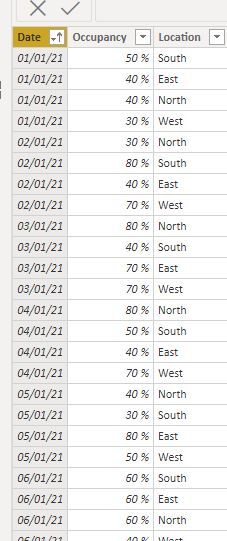
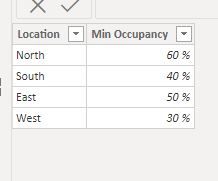
With these sample tables:

Fact Table.JPG


Threshold.JPG

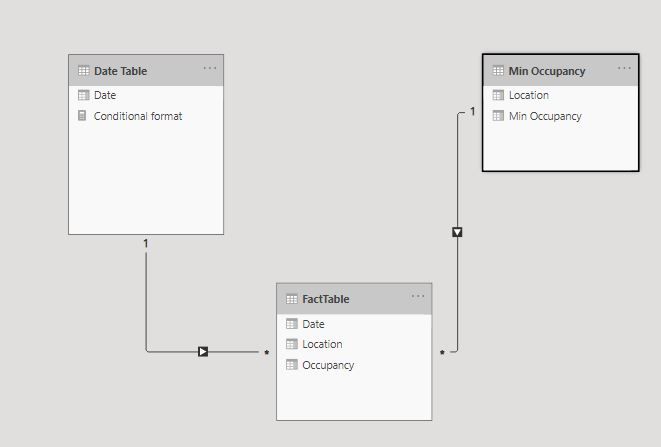
 and this model:Model.JPG


I've created the following measures:

Occupancy = SUM(FactTable[Occupancy])
Average Min Occ = AVERAGE('Min Occupancy'[Min Occupancy])


and to format the cards:

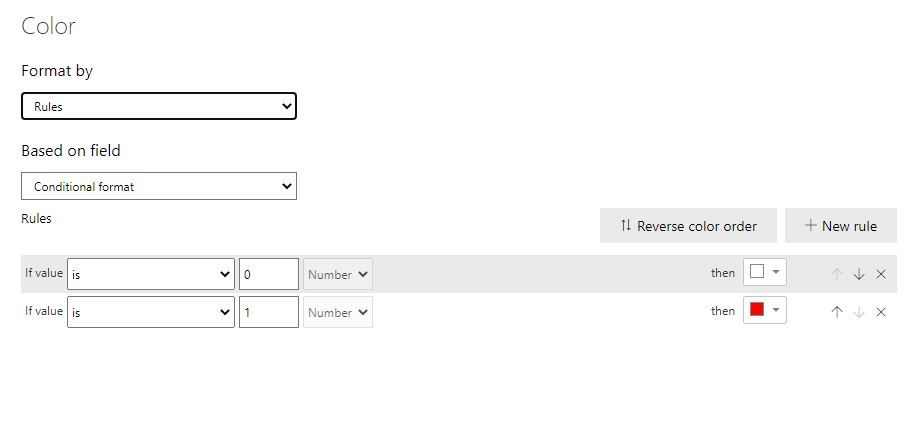
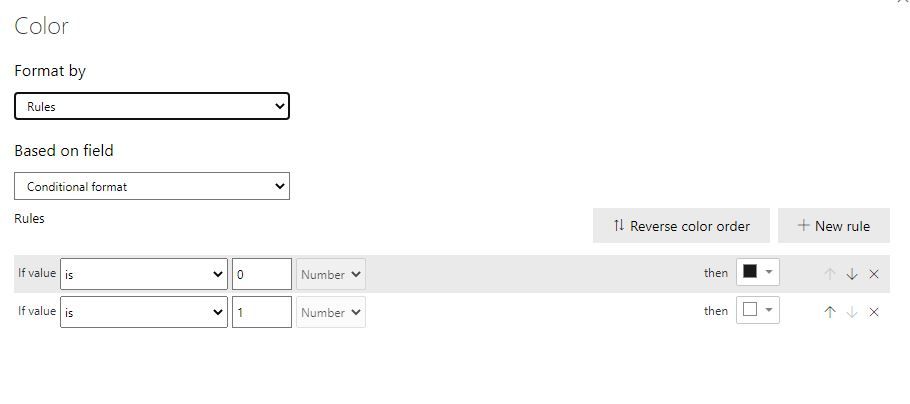
Conditional format = IF([Occupancy] < [Average Min Occ], 1, 0)


Use this [Conditional format] measure to format the different elements of the card. For example:

BackroundBackround


LabelLabel


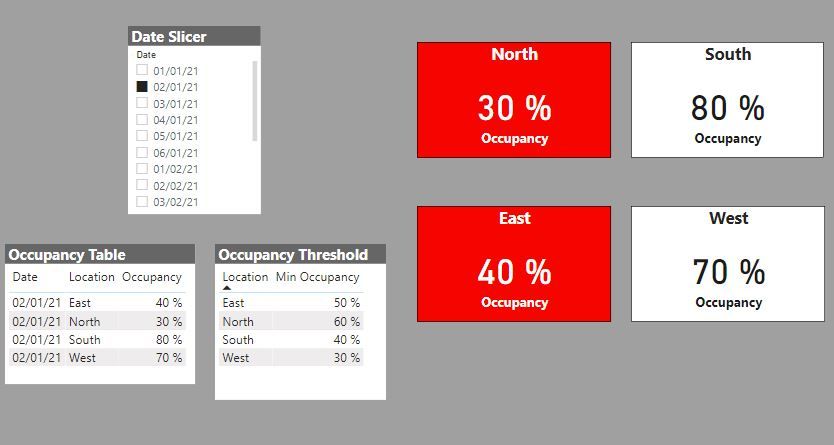
 and you get this

result.JPG


Occ format.gif


Did I answer your question? Mark my post as a solution!
In doing so, you are also helping me. Thank you!

Proud to be a Super User!
Paul on Linkedin.


View solution in original post

4 REPLIES 4
PaulDBrown
Community Champion
Community Champion

@petermb72 

With these sample tables:

Fact Table.JPG


Threshold.JPG

 and this model:Model.JPG


I've created the following measures:

Occupancy = SUM(FactTable[Occupancy])
Average Min Occ = AVERAGE('Min Occupancy'[Min Occupancy])


and to format the cards:

Conditional format = IF([Occupancy] < [Average Min Occ], 1, 0)


Use this [Conditional format] measure to format the different elements of the card. For example:

BackroundBackround


LabelLabel


 and you get this

result.JPG


Occ format.gif


Did I answer your question? Mark my post as a solution!
In doing so, you are also helping me. Thank you!

Proud to be a Super User!
Paul on Linkedin.


Does this allow us to choose a location as a slicer rather than the date?

@petermb72 


Sure...


Location Slicer.gif


I've attached the sample PBIX file for your reference


Did I answer your question? Mark my post as a solution!
In doing so, you are also helping me. Thank you!

Proud to be a Super User!
Paul on Linkedin.


petermb72
Helper IV
Helper IV

Also keep in mind I want to use a slicer to change the location and the card to display the correct backgound color, either Green or Red.  I will be doing other cards like this that will include Green Yellow Red depending on the % of a number.

Helpful resources

Announcements
FabCon and SQLCon Barcelona 2026

FabCon & SQLCon – Barcelona 2026

Join us in Barcelona for FabCon and SQLCon, the Fabric, Power BI, SQL, and AI community event. Save €200 with code FABCMTY200.

Fabric Community Sticker Design Challenge Barcelona Carousel

Fabric Community Sticker Challenge - Barcelona 2026

If you love stickers, then you will definitely want to check out our community sticker challenge, Barcelona edition!

July Power BI Update Carousel

Power BI Monthly Update - July 2026

Check out the July 2026 Power BI update to learn about new features.

Power BI DataViz World Championships carousel

Power BI DataViz World Championships - June 2026

A new Power BI DataViz World Championship is coming this June! Don't miss out on submitting your entry.

Top Solution Authors