cancel
Showing results for 
Search instead for 
Did you mean: 

Join the FabCon + SQLCon recap series. Up next: Power BI, Real-Time Intelligence, IQ and AI, and Data Factory take center stage. All sessions are available on-demand after the live show. Register now

Reply
Anonymous
Not applicable

Conditional Formatting - Background with Rules

I have a situation where the users want Gross Sales to be blacked out for certain products since there is no data.


I created custom columns to identify this situation.

Gross Sales Flag = if('table'[column]=2,1,0)
Product Flag = if('table'[Product]="abc",1,if('table'[Product]="xyz",1,0))
 
I then Created a measure I could check when applying the conditional formatting
Gross Sales Product = max('table'[Gross Sales Flag]) + Max('table'[Product]) - report is at this level.
 
Conditional Formatting
 
Gross Sales Product.JPG
However, since the measure value is blank(), it won't apply the formatting according to this rule.
 
I attempted to change my blank() to 0 when the Gross Sales Product=2, but it still doesn't work 100% of the time.
 
Any ideas? 
 
3 REPLIES 3
jsh121988
Microsoft Employee
Microsoft Employee

You could possibly do format by field, and have a measure output the color values like this:

_dm_Per_MeasureFormatColors = 
SWITCH(TRUE(),
    [_dm_Per_Measure] >= 0 && [_dm_Per_Measure] < .8, "#fd625e", // Red
    [_dm_Per_Measure] >= .8 && [_dm_Per_Measure] < .97, "#f2c80f", // Yellow
    [_dm_Per_Measure] >= .97, "#34c6bb", // Green
    "#eaeaea"
)

You can basically implement any logic you want into it, and it centralizes the formatting so you only have to make changes in a single location.

Greg_Deckler
Community Champion
Community Champion

Need to be able to play with this, can you post sample data and perhaps expected output? Please see this post regarding How to Get Your Question Answered Quickly: https://community.powerbi.com/t5/Community-Blog/How-to-Get-Your-Question-Answered-Quickly/ba-p/38490


Follow on LinkedIn
@ me in replies or I'll lose your thread!!!
Instead of a Kudo, please vote for this idea
Become an expert!: Enterprise DNA
External Tools: MSHGQM
YouTube Channel!: Microsoft Hates Greg
Latest book!:
DAX For Humans

DAX is easy, CALCULATE makes DAX hard...
Anonymous
Not applicable

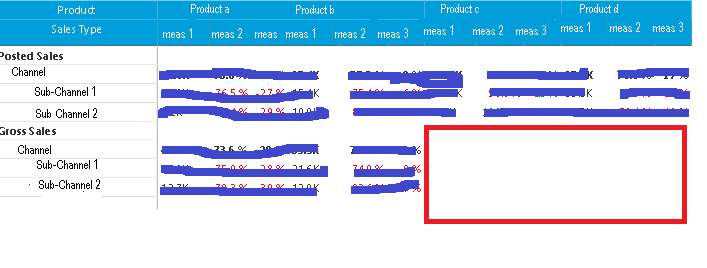
My report looks like this. the part with Red around it is what they want blanked out. There will never be any data

Data.png

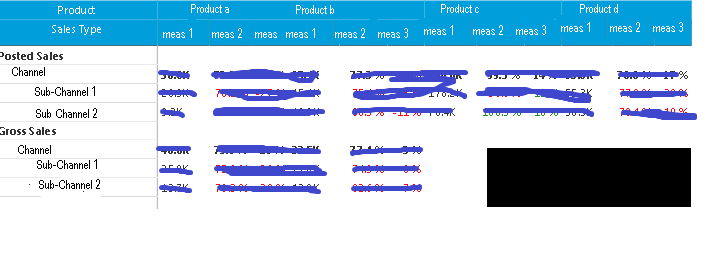
The users want it to look like this

Black out.png

I don't want every place to be black if blank, just this spot as indicated in orginal post. That is why I did the custom columns and measure.


When I change the measure to put " " instead of blank(), it worked in all but ONE case. I figured out, it doesn't work if there is NO row in the data base (with 0 or null).  The intersection on the matrix is where they want it blacked out.


I had played with the measures to get that far.

Helpful resources

Announcements
April Power BI Update Carousel

Power BI Monthly Update - April 2026

Check out the April 2026 Power BI update to learn about new features.

New to Fabric survey Carousel

New to Fabric Survey

If you have recently started exploring Fabric, we'd love to hear how it's going. Your feedback can help with product improvements.

Power BI DataViz World Championships carousel

Power BI DataViz World Championships - June 2026

A new Power BI DataViz World Championship is coming this June! Don't miss out on submitting your entry.

FabCon and SQLCon Highlights Carousel

FabCon &SQLCon Highlights

Experience the highlights from FabCon & SQLCon, available live and on-demand starting April 14th.