Join us at FabCon Atlanta from March 16 - 20, 2026, for the ultimate Fabric, Power BI, AI and SQL community-led event. Save $200 with code FABCOMM.
Register now!The Power BI Data Visualization World Championships is back! It's time to submit your entry. Live now!
I have a situation where the users want Gross Sales to be blacked out for certain products since there is no data.
I created custom columns to identify this situation.
You could possibly do format by field, and have a measure output the color values like this:
_dm_Per_MeasureFormatColors =
SWITCH(TRUE(),
[_dm_Per_Measure] >= 0 && [_dm_Per_Measure] < .8, "#fd625e", // Red
[_dm_Per_Measure] >= .8 && [_dm_Per_Measure] < .97, "#f2c80f", // Yellow
[_dm_Per_Measure] >= .97, "#34c6bb", // Green
"#eaeaea"
)You can basically implement any logic you want into it, and it centralizes the formatting so you only have to make changes in a single location.
Need to be able to play with this, can you post sample data and perhaps expected output? Please see this post regarding How to Get Your Question Answered Quickly: https://community.powerbi.com/t5/Community-Blog/How-to-Get-Your-Question-Answered-Quickly/ba-p/38490
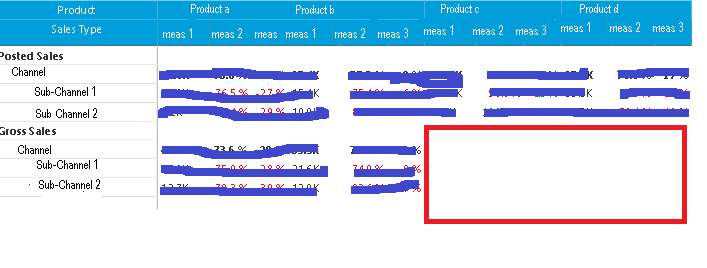
My report looks like this. the part with Red around it is what they want blanked out. There will never be any data
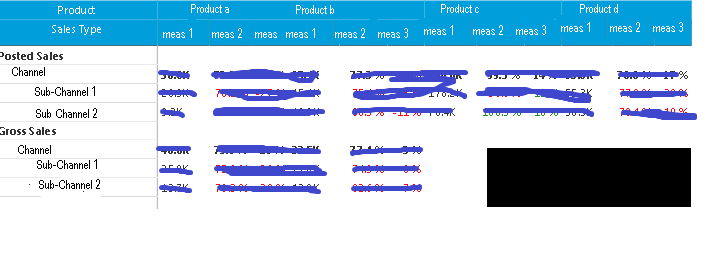
The users want it to look like this
I don't want every place to be black if blank, just this spot as indicated in orginal post. That is why I did the custom columns and measure.
When I change the measure to put " " instead of blank(), it worked in all but ONE case. I figured out, it doesn't work if there is NO row in the data base (with 0 or null). The intersection on the matrix is where they want it blacked out.
I had played with the measures to get that far.
The Power BI Data Visualization World Championships is back! It's time to submit your entry.
Check out the January 2026 Power BI update to learn about new features.
| User | Count |
|---|---|
| 61 | |
| 47 | |
| 39 | |
| 24 | |
| 23 |
| User | Count |
|---|---|
| 144 | |
| 106 | |
| 63 | |
| 38 | |
| 31 |