cancel
Showing results for 
Search instead for 
Did you mean: 

Learn from the best! Meet the four finalists headed to the FINALS of the Power BI Dataviz World Championships! Register now

Reply
DataAnalyst7
Frequent Visitor

Conditional Formating for Table Visualization in Power Bi Desktop

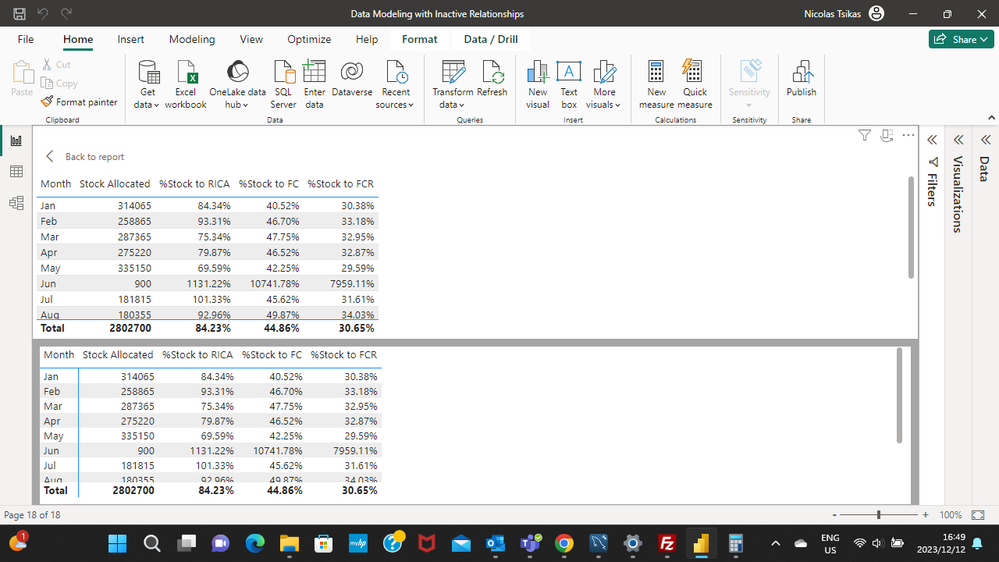
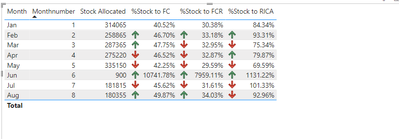
I have a table Visualization with percentages in power Bi. I want to format it in such a way that I can see an increase or decrease from the previous month. I am not sure how to go about it to be honest. But when I tried, I could see anything that could help me.PleaseScreenshot (28).png

2 ACCEPTED SOLUTIONS
Ritaf1983
Super User
Super User

Hi @DataAnalyst7 

Please refer to the linked discussion.

https://community.fabric.microsoft.com/t5/Desktop/Conditional-formatting-based-on-differences-betwee...

And the linked tutorial

https://radacad.com/month-over-month-calculation-in-power-bi-using-dax

If this post helps, then please consider Accepting it as the solution to help the other members find it more quickly.

Regards,
Rita Fainshtein | Microsoft MVP
https://www.linkedin.com/in/rita-fainshtein/
Blog : https://www.madeiradata.com/profile/ritaf/profile

View solution in original post

Anonymous
Not applicable

Hi @DataAnalyst7 

You can refer to the following solution.

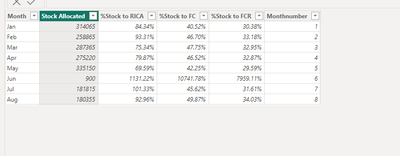
Sample data 

vxinruzhumsft_0-1702524075125.png

Create three measure


Format_fc =
VAR _preffc =
    CALCULATE (
        SUM ( 'Table'[%Stock to FC] ),
        'Table'[Monthnumber]
            = MAX ( 'Table'[Monthnumber] ) - 1,
        ALLSELECTED ( 'Table' )
    )
RETURN
    IF (
        NOT ( ISBLANK ( _preffc ) ),
        IF ( SUM ( 'Table'[%Stock to FC] ) - _preffc > 0, 1, 0 )
    )
Format_fcr =
VAR _preffcr =
    CALCULATE (
        SUM ( 'Table'[%Stock to FCR] ),
        'Table'[Monthnumber]
            = MAX ( 'Table'[Monthnumber] ) - 1,
        ALLSELECTED ( 'Table' )
    )
RETURN
    IF (
        NOT ( ISBLANK ( _preffcr ) ),
        IF ( SUM ( 'Table'[%Stock to FCR] ) - _preffcr > 0, 1, 0 )
    )
Format_rica =
VAR _prerica =
    CALCULATE (
        SUM ( 'Table'[%Stock to RICA] ),
        'Table'[Monthnumber]
            = MAX ( 'Table'[Monthnumber] ) - 1,
        ALLSELECTED ( 'Table' )
    )
RETURN
    IF (
        NOT ( ISBLANK ( _prerica ) ),
        IF ( SUM ( 'Table'[%Stock to RICA] ) - _prerica > 0, 1, 0 )
    )

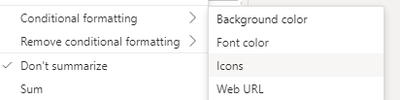
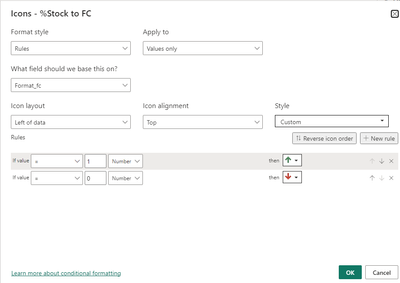
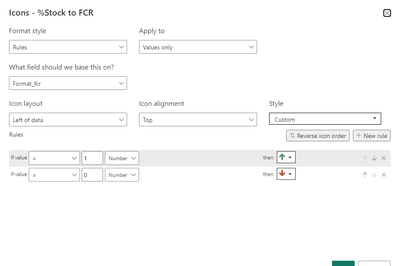
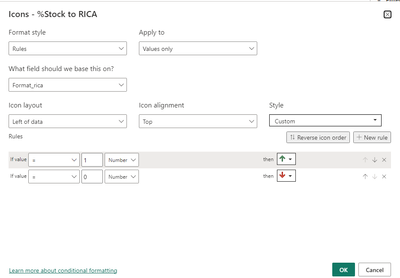
Then put them to the conditional formatting of the [%Stock to RICA],[%Stock to FC],[%Stock to FCR], select icons

vxinruzhumsft_0-1702531499462.png


vxinruzhumsft_1-1702531512437.png


vxinruzhumsft_2-1702531525951.png


vxinruzhumsft_3-1702531540571.png


Output

vxinruzhumsft_4-1702531550315.png


Best Regards!

Yolo Zhu

If this post helps, then please consider Accept it as the solution to help the other members find it more quickly.


View solution in original post

2 REPLIES 2
Anonymous
Not applicable

Hi @DataAnalyst7 

You can refer to the following solution.

Sample data 

vxinruzhumsft_0-1702524075125.png

Create three measure


Format_fc =
VAR _preffc =
    CALCULATE (
        SUM ( 'Table'[%Stock to FC] ),
        'Table'[Monthnumber]
            = MAX ( 'Table'[Monthnumber] ) - 1,
        ALLSELECTED ( 'Table' )
    )
RETURN
    IF (
        NOT ( ISBLANK ( _preffc ) ),
        IF ( SUM ( 'Table'[%Stock to FC] ) - _preffc > 0, 1, 0 )
    )
Format_fcr =
VAR _preffcr =
    CALCULATE (
        SUM ( 'Table'[%Stock to FCR] ),
        'Table'[Monthnumber]
            = MAX ( 'Table'[Monthnumber] ) - 1,
        ALLSELECTED ( 'Table' )
    )
RETURN
    IF (
        NOT ( ISBLANK ( _preffcr ) ),
        IF ( SUM ( 'Table'[%Stock to FCR] ) - _preffcr > 0, 1, 0 )
    )
Format_rica =
VAR _prerica =
    CALCULATE (
        SUM ( 'Table'[%Stock to RICA] ),
        'Table'[Monthnumber]
            = MAX ( 'Table'[Monthnumber] ) - 1,
        ALLSELECTED ( 'Table' )
    )
RETURN
    IF (
        NOT ( ISBLANK ( _prerica ) ),
        IF ( SUM ( 'Table'[%Stock to RICA] ) - _prerica > 0, 1, 0 )
    )

Then put them to the conditional formatting of the [%Stock to RICA],[%Stock to FC],[%Stock to FCR], select icons

vxinruzhumsft_0-1702531499462.png


vxinruzhumsft_1-1702531512437.png


vxinruzhumsft_2-1702531525951.png


vxinruzhumsft_3-1702531540571.png


Output

vxinruzhumsft_4-1702531550315.png


Best Regards!

Yolo Zhu

If this post helps, then please consider Accept it as the solution to help the other members find it more quickly.


Ritaf1983
Super User
Super User

Hi @DataAnalyst7 

Please refer to the linked discussion.

https://community.fabric.microsoft.com/t5/Desktop/Conditional-formatting-based-on-differences-betwee...

And the linked tutorial

https://radacad.com/month-over-month-calculation-in-power-bi-using-dax

If this post helps, then please consider Accepting it as the solution to help the other members find it more quickly.

Regards,
Rita Fainshtein | Microsoft MVP
https://www.linkedin.com/in/rita-fainshtein/
Blog : https://www.madeiradata.com/profile/ritaf/profile

Helpful resources

Announcements
New to Fabric survey Carousel

New to Fabric Survey

If you have recently started exploring Fabric, we'd love to hear how it's going. Your feedback can help with product improvements.

Power BI DataViz World Championships carousel

Power BI DataViz World Championships - June 2026

A new Power BI DataViz World Championship is coming this June! Don't miss out on submitting your entry.

Join our Fabric User Panel

Join our Fabric User Panel

Share feedback directly with Fabric product managers, participate in targeted research studies and influence the Fabric roadmap.

March Power BI Update Carousel

Power BI Community Update - March 2026

Check out the March 2026 Power BI update to learn about new features.