cancel
Showing results for 
Search instead for 
Did you mean: 

The Power BI Data Visualization World Championships is back! Get ahead of the game and start preparing now! Learn more

Reply
dearears
Helper I
Helper I

Conditional Format on Column Chart - Multiple locations

Hoping to get some insight on solving this problem.


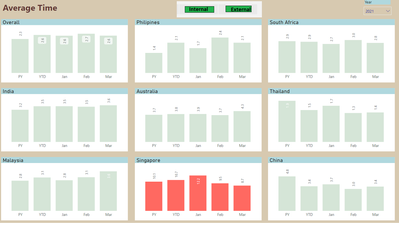
1. See attached layout of multiple column charts on a page.  I have two such pages : Average Time and Sales.

The value on the chart is obtained from a calculated measure. Also take note the the slicer to display "Internal" and "External" value.  Chart.png

 2.  This is a summary of what I am trying to achive.


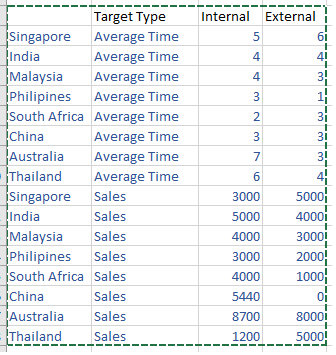
  • The target for each country will be maintained in a shaporeint table. The layout of this table is not rigid. Please feel free to suggest a suitable layout. For explanation, an example is shown herewith.Target.png


    I am hoping to find a solution where the color of the bar changes to either red or green based on whether the target was hot or miss.

Thanks in advance and much appreciated.


2 ACCEPTED SOLUTIONS

Hi @dearears ,


Create a table using below dax expression:

Table 2 = ADDCOLUMNS(CROSSJOIN(VALUES('Table'[Country]),UNION(ROW("Target Type","Average Time"),ROW("Target Type","Sales"))),"Internal",
  SWITCH(TRUE(),
  [Target Type]="Average Time",CALCULATE(AVERAGE('Table'[Time(days)]),FILTER('Table','Table'[Group]="Internal"&&'Table'[Country]=EARLIER('Table'[Country]))),
  [Target Type]="Sales",CALCULATE(SUM('Table'[Sales ('000)]),FILTER('Table','Table'[Group]="Internal"&&'Table'[Country]=EARLIER('Table'[Country])))),
  "External",
    SWITCH(TRUE(),
  [Target Type]="Average Time",CALCULATE(AVERAGE('Table'[Time(days)]),FILTER('Table','Table'[Group]="External"&&'Table'[Country]=EARLIER('Table'[Country]))),
  [Target Type]="Sales",CALCULATE(SUM('Table'[Sales ('000)]),FILTER('Table','Table'[Group]="External"&&'Table'[Country]=EARLIER('Table'[Country])))))

And you will see:
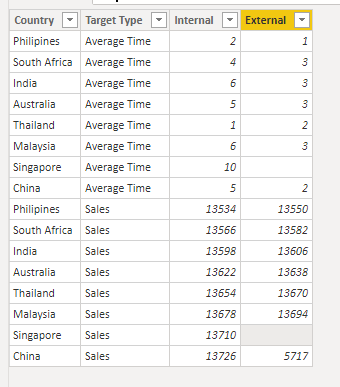
v-kelly-msft_0-1617066607288.png

For the related .pbix file,pls see attached.


Best Regards,
Kelly

Did I answer your question? Mark my post as a solution!

View solution in original post

Many thanks Kelly. Your solution partially answered my question and I could tweak it a little to suit my needs.


View solution in original post

4 REPLIES 4
v-kelly-msft
Community Support
Community Support

Hi @dearears ,


Could you pls provide a monthly data of each country for test?


Best Regards,
Kelly

Did I answer your question? Mark my post as a solution!

Hi, appreciate your effort.


DummyData 

Trust this will help.


Thanks in advance.

Hi @dearears ,


Create a table using below dax expression:

Table 2 = ADDCOLUMNS(CROSSJOIN(VALUES('Table'[Country]),UNION(ROW("Target Type","Average Time"),ROW("Target Type","Sales"))),"Internal",
  SWITCH(TRUE(),
  [Target Type]="Average Time",CALCULATE(AVERAGE('Table'[Time(days)]),FILTER('Table','Table'[Group]="Internal"&&'Table'[Country]=EARLIER('Table'[Country]))),
  [Target Type]="Sales",CALCULATE(SUM('Table'[Sales ('000)]),FILTER('Table','Table'[Group]="Internal"&&'Table'[Country]=EARLIER('Table'[Country])))),
  "External",
    SWITCH(TRUE(),
  [Target Type]="Average Time",CALCULATE(AVERAGE('Table'[Time(days)]),FILTER('Table','Table'[Group]="External"&&'Table'[Country]=EARLIER('Table'[Country]))),
  [Target Type]="Sales",CALCULATE(SUM('Table'[Sales ('000)]),FILTER('Table','Table'[Group]="External"&&'Table'[Country]=EARLIER('Table'[Country])))))

And you will see:

v-kelly-msft_0-1617066607288.png

For the related .pbix file,pls see attached.


Best Regards,
Kelly

Did I answer your question? Mark my post as a solution!
Many thanks Kelly. Your solution partially answered my question and I could tweak it a little to suit my needs.


Helpful resources

Announcements
Power BI DataViz World Championships

Power BI Dataviz World Championships

The Power BI Data Visualization World Championships is back! Get ahead of the game and start preparing now!

November Power BI Update Carousel

Power BI Monthly Update - November 2025

Check out the November 2025 Power BI update to learn about new features.

FabCon Atlanta 2026 carousel

FabCon Atlanta 2026

Join us at FabCon Atlanta, March 16-20, for the ultimate Fabric, Power BI, AI and SQL community-led event. Save $200 with code FABCOMM.