Get certified for free when you join Fabric Data Days 2026 and dive into Fabric, Power BI, SQL, AI, and other essential data skills.
Join nowData Days is here! Join us now for 60+ days of learning, challenges, and connection. Learn more
I have one table that I need to add a conditional column or other solution I haven't considered. I need to know for each customer, if any of their contacts is subscribed to any of the subscriptions. So one yes for Customer AAA in those 3 rows of 3 subscription types would be "YES" and customer BBB would be "NO" because their two contacts is not signed up for any subscriptions.
Is there a conditional column or new/merged query or grouping I would use to get there?
I am creating a dashboard that will have a red or green icon beside each custoemer to tell me that at least one person at that customer is signed up for an alert/subscription.
Current State
| Customer Name | User | Subscription 1 | Subscription 2 | Subscription 3 |
| AAA | Jen | Yes | No | No |
| AAA | Amy | No | No | No |
| AAA | Carl | No | Yes | No |
| BBB | Mark | No | No | No |
| BBB | Don | No | No | No |
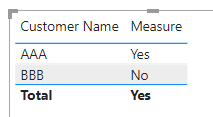
Needed Result
| Customer Name | Subscription |
| AAA | Yes |
| BBB | No |
Solved! Go to Solution.
Hi @Anonymous
Download this example PBIX file.
This measure does what you want.
Measure = IF(CALCULATE(COUNTROWS('Table'), FILTER('Table', 'Table'[Subscription 1] = "Yes" || 'Table'[Subscription 2] = "Yes" || 'Table'[Subscription 3] = "Yes")) > 0 , "Yes", "No")
Regards
Phil
Proud to be a Super User!
Hi @Anonymous ,
You can create a measure as below:
Subscription =
VAR _count =
CALCULATE (
DISTINCTCOUNT ( 'Table'[User] ),
FILTER (
'Table',
'Table'[Customer Name] = SELECTEDVALUE ( 'Table'[Customer Name] )
&& ( 'Table'[Subscription 1] = "Yes"
|| 'Table'[Subscription 2] = "Yes"
|| 'Table'[Subscription 3] = "Yes" )
)
)
RETURN
IF ( _count > 0, "Yes", "No" )
Best Regards
Hi @Anonymous
Download this example PBIX file.
This measure does what you want.
Measure = IF(CALCULATE(COUNTROWS('Table'), FILTER('Table', 'Table'[Subscription 1] = "Yes" || 'Table'[Subscription 2] = "Yes" || 'Table'[Subscription 3] = "Yes")) > 0 , "Yes", "No")
Regards
Phil
Proud to be a Super User!
Hi, if I may, I'm trying to do something similar, but I need to be able to store the output on my table. I tried using the same functions but instead of using a measure using a calculated column but it doesn't work (I believe calculated columns only evaluate row by row, right)
Would you have a suggestion on how to achieve something similar but to be able to save it on a table? I basically need to be able to a pie chart showing (trying to keep the same example as above) number of customer with and without subscriptions.
Thanks
Don't miss out on Data Days, June 15 through August 7. Learn Fabric, Power BI, SQL, AI and more.
Check out the May 2026 Power BI update to learn about new features.
| User | Count |
|---|---|
| 23 | |
| 23 | |
| 21 | |
| 17 | |
| 13 |
| User | Count |
|---|---|
| 58 | |
| 50 | |
| 37 | |
| 29 | |
| 24 |