This is best Fabric, Power BI, SQL and AI community event. How do we know? The last event sold out! Save €200 with code FABCMTY200.
Register nowA new Data Days event is coming soon! This time we’re going bigger than ever. Fabric, Power BI, SQL, AI and more. Don't miss out.
I have one table that I need to add a conditional column or other solution I haven't considered. I need to know for each customer, if any of their contacts is subscribed to any of the subscriptions. So one yes for Customer AAA in those 3 rows of 3 subscription types would be "YES" and customer BBB would be "NO" because their two contacts is not signed up for any subscriptions.
Is there a conditional column or new/merged query or grouping I would use to get there?
I am creating a dashboard that will have a red or green icon beside each custoemer to tell me that at least one person at that customer is signed up for an alert/subscription.
Current State
| Customer Name | User | Subscription 1 | Subscription 2 | Subscription 3 |
| AAA | Jen | Yes | No | No |
| AAA | Amy | No | No | No |
| AAA | Carl | No | Yes | No |
| BBB | Mark | No | No | No |
| BBB | Don | No | No | No |
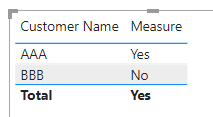
Needed Result
| Customer Name | Subscription |
| AAA | Yes |
| BBB | No |
Solved! Go to Solution.
Hi @Anonymous
Download this example PBIX file.
This measure does what you want.
Measure = IF(CALCULATE(COUNTROWS('Table'), FILTER('Table', 'Table'[Subscription 1] = "Yes" || 'Table'[Subscription 2] = "Yes" || 'Table'[Subscription 3] = "Yes")) > 0 , "Yes", "No")
Regards
Phil
Proud to be a Super User!
Hi @Anonymous ,
You can create a measure as below:
Subscription =
VAR _count =
CALCULATE (
DISTINCTCOUNT ( 'Table'[User] ),
FILTER (
'Table',
'Table'[Customer Name] = SELECTEDVALUE ( 'Table'[Customer Name] )
&& ( 'Table'[Subscription 1] = "Yes"
|| 'Table'[Subscription 2] = "Yes"
|| 'Table'[Subscription 3] = "Yes" )
)
)
RETURN
IF ( _count > 0, "Yes", "No" )
Best Regards
Hi @Anonymous
Download this example PBIX file.
This measure does what you want.
Measure = IF(CALCULATE(COUNTROWS('Table'), FILTER('Table', 'Table'[Subscription 1] = "Yes" || 'Table'[Subscription 2] = "Yes" || 'Table'[Subscription 3] = "Yes")) > 0 , "Yes", "No")
Regards
Phil
Proud to be a Super User!
Hi, if I may, I'm trying to do something similar, but I need to be able to store the output on my table. I tried using the same functions but instead of using a measure using a calculated column but it doesn't work (I believe calculated columns only evaluate row by row, right)
Would you have a suggestion on how to achieve something similar but to be able to save it on a table? I basically need to be able to a pie chart showing (trying to keep the same example as above) number of customer with and without subscriptions.
Thanks
Check out the May 2026 Power BI update to learn about new features.
Sign up to receive a private message when registration opens and key events begin.
If you have recently started exploring Fabric, we'd love to hear how it's going. Your feedback can help with product improvements.
| User | Count |
|---|---|
| 26 | |
| 25 | |
| 24 | |
| 21 | |
| 14 |
| User | Count |
|---|---|
| 53 | |
| 47 | |
| 23 | |
| 18 | |
| 18 |