cancel
Showing results for 
Search instead for 
Did you mean: 

Data Days is here! Join us now for 60+ days of learning, challenges, and connection. Learn more

Reply
DebbieE
Community Champion
Community Champion

Conditional Column Case sensitive

Im creating flags using Text.

But it seems that its case sensitive "microsoft", "Microsoft"


Is there anyway I can get rid of that? I dont want to add 2 conditions when i only need one?


Debbie

1 ACCEPTED SOLUTION

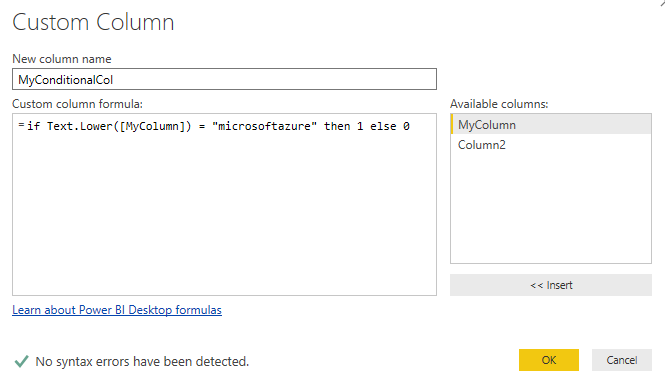
Create your conditional column exactly as you have been doing, then go to the formula bar and edit it to be something like:


= Table.AddColumn(#"Renamed Columns", "MyConditionalCol", each if Text.Lower([MyColumn]) = "microsoftazure" then 1 else 0)


The key bit is wrapping Text.Lower() around the column name and making sure the comparitor is also lowercase.


image.png

View solution in original post

5 REPLIES 5
DebbieE
Community Champion
Community Champion

Ive come up with a workaround

Create a duplicate column, change everything to lower case and use that. Then hide this column

Hi DebbieE,


Could you share some sample data and clarify more info about your expected result?


Regards,

Jimmy Tao

Yes, I have a twitter test field. If for example you had

1 MicrosoftAzure

2 microsoftazure

3 Microsoftazure

4 microsoftAzure


Currently it seems if you go to New Conditional Column. And Add a If Text Contains microsoftazure  Then 1 You will only get a flag set against 2


I dont want to set 4 conditions, which will potentially miss other mixes of capitals and none capitals. The only way around this I could think of is to Duplicate Text. Change to lower case and use this as the basis of the condition

Create your conditional column exactly as you have been doing, then go to the formula bar and edit it to be something like:


= Table.AddColumn(#"Renamed Columns", "MyConditionalCol", each if Text.Lower([MyColumn]) = "microsoftazure" then 1 else 0)


The key bit is wrapping Text.Lower() around the column name and making sure the comparitor is also lowercase.


image.png

DebbieE
Community Champion
Community Champion

Fantastic,


Thank you 

Helpful resources

Announcements
Fabric Data Days is here Carousel

Fabric Data Days 2026

Don't miss out on Data Days, June 15 through August 7. Learn Fabric, Power BI, SQL, AI and more.

May Power BI Update Carousel

Power BI Monthly Update - May 2026

Check out the May 2026 Power BI update to learn about new features.

Power BI DataViz World Championships carousel

Power BI DataViz World Championships - June 2026

A new Power BI DataViz World Championship is coming this June! Don't miss out on submitting your entry.