Don't miss your chance to take the Fabric Data Engineer (DP-600) exam for FREE! Find out how by watching the DP-600 session on-demand now through April 28th.
Learn moreJoin the FabCon + SQLCon recap series. Up next: Power BI, Real-Time Intelligence, IQ and AI, and Data Factory take center stage. All sessions are available on-demand after the live show. Register now
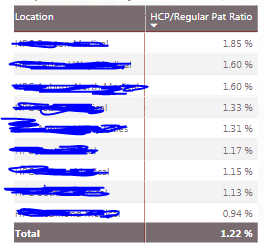
Hi I am trying to highlight a row of a matrix in Red if the ratio is higher than the organization ratio.
I have calculated the organization's ratio in a measure which is say =1.22%
I want to highlight below rows in Red which have a % ratio > 1.22%
i.e, first 5 rows.
The conditional formatting-->Background scales option assigns a scale of colors and not a single color as I want.
Solved! Go to Solution.
Hi @kdesai,
As ValentinBIA said, conditional formatting can be set based on value rules. However, you should type into the values manually, using a measure instead is not supported.
Best regards,
Yuliana Gu
Hi @kdesai,
As ValentinBIA said, conditional formatting can be set based on value rules. However, you should type into the values manually, using a measure instead is not supported.
Best regards,
Yuliana Gu
Yeah . Currently I am calculating the value of the measure and putting it in the "Rules" manually.
My only worrie is that, I have to keep a track of the measure value, in case it changes.
Thank You for your reply. 🙂
Hi @kdesai,
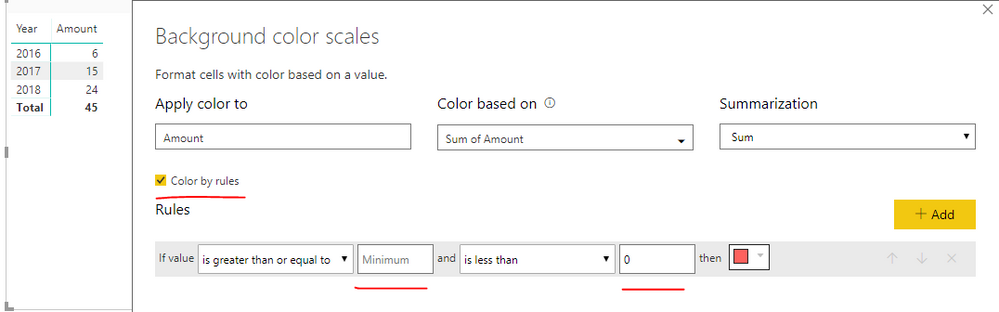
When you turn on the background color (in conditional formatting), it opens up a windows that lets you change the colour of the scale.
On the top left of this window you can see " Format by" Color Scale
Change it to "Format By" Rules, and there you can decide on a rule for your conditional formatting
Hope that helps
Best,
Valentin
Did I answer your question? Mark my post as a solution!
Check out the April 2026 Power BI update to learn about new features.
If you have recently started exploring Fabric, we'd love to hear how it's going. Your feedback can help with product improvements.
A new Power BI DataViz World Championship is coming this June! Don't miss out on submitting your entry.
| User | Count |
|---|---|
| 45 | |
| 38 | |
| 34 | |
| 21 | |
| 17 |
| User | Count |
|---|---|
| 66 | |
| 64 | |
| 31 | |
| 26 | |
| 26 |