Join us at FabCon Atlanta from March 16 - 20, 2026, for the ultimate Fabric, Power BI, AI and SQL community-led event. Save $200 with code FABCOMM.
Register now!The Power BI Data Visualization World Championships is back! Get ahead of the game and start preparing now! Learn more
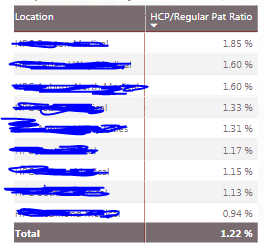
Hi I am trying to highlight a row of a matrix in Red if the ratio is higher than the organization ratio.
I have calculated the organization's ratio in a measure which is say =1.22%
I want to highlight below rows in Red which have a % ratio > 1.22%
i.e, first 5 rows.
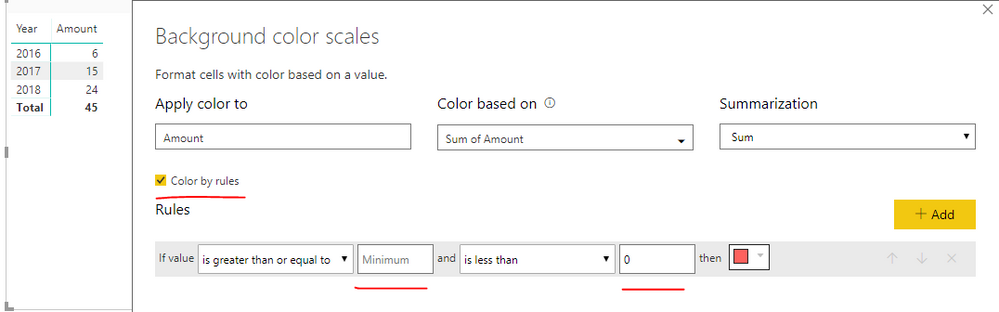
The conditional formatting-->Background scales option assigns a scale of colors and not a single color as I want.
Solved! Go to Solution.
Hi @kdesai,
As ValentinBIA said, conditional formatting can be set based on value rules. However, you should type into the values manually, using a measure instead is not supported.
Best regards,
Yuliana Gu
Hi @kdesai,
As ValentinBIA said, conditional formatting can be set based on value rules. However, you should type into the values manually, using a measure instead is not supported.
Best regards,
Yuliana Gu
Yeah . Currently I am calculating the value of the measure and putting it in the "Rules" manually.
My only worrie is that, I have to keep a track of the measure value, in case it changes.
Thank You for your reply. 🙂
Hi @kdesai,
When you turn on the background color (in conditional formatting), it opens up a windows that lets you change the colour of the scale.
On the top left of this window you can see " Format by" Color Scale
Change it to "Format By" Rules, and there you can decide on a rule for your conditional formatting
Hope that helps
Best,
Valentin
Did I answer your question? Mark my post as a solution!
The Power BI Data Visualization World Championships is back! Get ahead of the game and start preparing now!
| User | Count |
|---|---|
| 39 | |
| 35 | |
| 33 | |
| 32 | |
| 27 |
| User | Count |
|---|---|
| 136 | |
| 96 | |
| 77 | |
| 67 | |
| 65 |