Get certified for free when you join Fabric Data Days 2026 and dive into Fabric, Power BI, SQL, AI, and other essential data skills.
Join nowJuly 7 - July 17 | Round 2 of the Power BI Dataviz World Championships. Don't miss your chance! Learn more
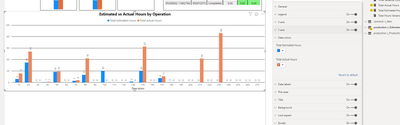
Is there a way to apply condtional color formatting a bar chart that contains 2 data set values? Currently I only see the opition to conditional format bar chart data with 1 value.
Solved! Go to Solution.
Hi @JasonBridges ,
You may submit this as an idea through below link.
https://ideas.powerbi.com/ideas/
Best Regards,
Jay
Hi @JasonBridges ,
You may submit this as an idea through below link.
https://ideas.powerbi.com/ideas/
Best Regards,
Jay
@JasonBridges - Can you post a screen shot of the visual and it's configuration/where you are seeing the 1 color formatting option?
When using single value I can go t o data colors and select conditional formatting (3 dots). However, once I add a 2nd data set the conditional formatting option goes away in the data color options. I am a beginner with coding and have not been able to see if a DAX code will work.
You cannot conditionally apply two bars on the same graph. at the moment Power BI doesn't have that possibility.
You can try two graphs or try store graphs that allow for more customization.
Join us in Barcelona for FabCon and SQLCon, the Fabric, Power BI, SQL, and AI community event. Save €200 with code FABCMTY200.
Join Fabric Data Days 2026: 60 days of free live/on-demand sessions, challenges, study groups, and certification opportunities.
| User | Count |
|---|---|
| 23 | |
| 19 | |
| 18 | |
| 17 | |
| 13 |
| User | Count |
|---|---|
| 60 | |
| 52 | |
| 47 | |
| 40 | |
| 38 |