cancel
Showing results for 
Search instead for 
Did you mean: 

The Power BI Data Visualization World Championships is back! Get ahead of the game and start preparing now! Learn more

Reply
Anonymous
Not applicable

Conditional Background Color Formatting Based On Field Rules Not Working Consistently

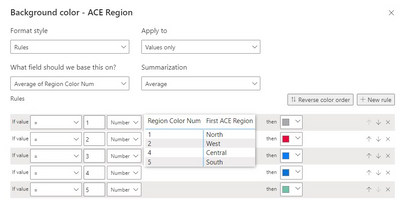
I have a Background Color Conditional Format for my Region column [see Rules below].

officeiq_0-1684937999230.png


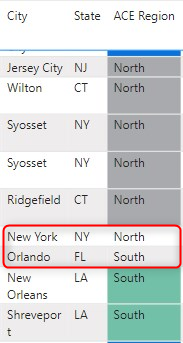
It is appling to the Regions for most of the table rows of data, but not for others [see below]

officeiq_1-1684938020873.png

I have tried changing the Region Color number to Decimal/Whole Number as well as amend Rule for Min/Max/Average. 


Has anyone seen this recently? Anyone have a suggestion for a work-around or fix?

1 REPLY 1
amitchandak
Super User
Super User

@Anonymous , You have applied that on Average of region color num , Try region color num  and Aggregation Max


If this does not help
Can you share a sample pbix after removing sensitive data.

Share with Power BI Enthusiasts: Full Power BI Video (20 Hours) YouTube
Microsoft Fabric Series 60+ Videos YouTube
Microsoft Fabric Hindi End to End YouTube

Helpful resources

Announcements
Power BI DataViz World Championships

Power BI Dataviz World Championships

The Power BI Data Visualization World Championships is back! Get ahead of the game and start preparing now!

December 2025 Power BI Update Carousel

Power BI Monthly Update - December 2025

Check out the December 2025 Power BI Holiday Recap!

FabCon Atlanta 2026 carousel

FabCon Atlanta 2026

Join us at FabCon Atlanta, March 16-20, for the ultimate Fabric, Power BI, AI and SQL community-led event. Save $200 with code FABCOMM.

Top Solution Authors