cancel
Showing results for 
Search instead for 
Did you mean: 

View all the Fabric Data Days sessions on demand. View schedule

Reply
Anonymous
Not applicable

Condition based formula

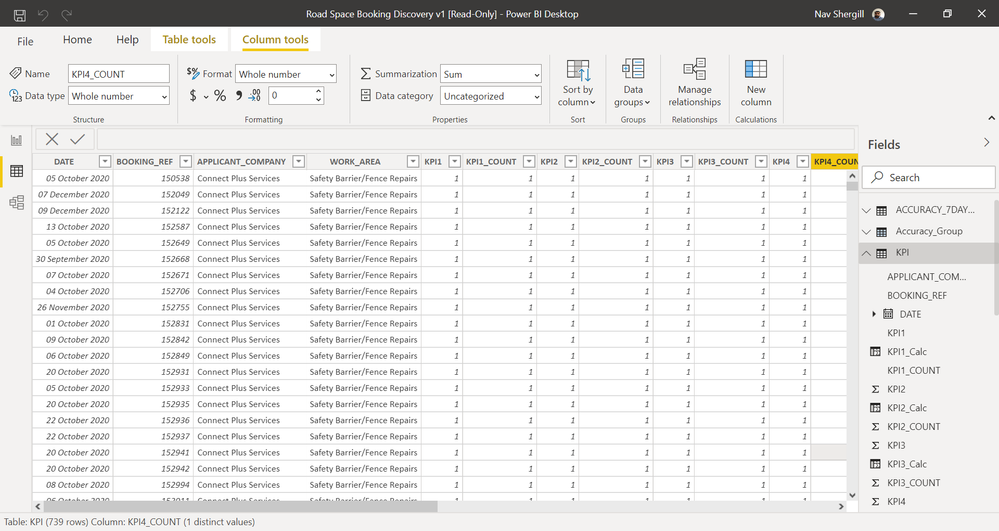
suppose I have data as illustrated in the picture link below. Does anyone know how I can embed the following formula 100(sum(KPI1)/sum(KPI1_COUNT))* as a new column. With the sum being based on each unique "Applicant_Company" and each month.screenshot.png

1 ACCEPTED SOLUTION

@Anonymous , earlier will kind of create a partition

This means a new column all Applicant_Company will same value if you replace it WORK_AREA, All WORK_AREA will have same will value .


You add too


Measn combination of [WORK_AREA] and Applicant_Company will have same value

divide(Sumx(filter(Table, [Applicant_Company] =earlier([Applicant_Company]) && [WORK_AREA] =earlier([WORK_AREA]) ),[KPI1]),Sumx(filter(Table, [Applicant_Company] =earlier([Applicant_Company]) && [WORK_AREA] =earlier([WORK_AREA])  ),[KPI1_COUNT])) *100


Share with Power BI Enthusiasts: Full Power BI Video (20 Hours) YouTube
Microsoft Fabric Series 60+ Videos YouTube
Microsoft Fabric Hindi End to End YouTube

View solution in original post

3 REPLIES 3
amitchandak
Super User
Super User

@Anonymous , A new column like

divide(Sumx(filter(Table, [Applicant_Company] =earlier([Applicant_Company])),[KPI1]),Sumx(filter(Table, [Applicant_Company] =earlier([Applicant_Company])),[KPI1_COUNT])) *100

Share with Power BI Enthusiasts: Full Power BI Video (20 Hours) YouTube
Microsoft Fabric Series 60+ Videos YouTube
Microsoft Fabric Hindi End to End YouTube
Anonymous
Not applicable

Thanks! Can I ask, would the formula you produced also work if I wanted the sum to be based on 'WORK_AREA' as well as 'APPLICANT_COMPANY'?

@Anonymous , earlier will kind of create a partition

This means a new column all Applicant_Company will same value if you replace it WORK_AREA, All WORK_AREA will have same will value .


You add too


Measn combination of [WORK_AREA] and Applicant_Company will have same value

divide(Sumx(filter(Table, [Applicant_Company] =earlier([Applicant_Company]) && [WORK_AREA] =earlier([WORK_AREA]) ),[KPI1]),Sumx(filter(Table, [Applicant_Company] =earlier([Applicant_Company]) && [WORK_AREA] =earlier([WORK_AREA])  ),[KPI1_COUNT])) *100


Share with Power BI Enthusiasts: Full Power BI Video (20 Hours) YouTube
Microsoft Fabric Series 60+ Videos YouTube
Microsoft Fabric Hindi End to End YouTube

Helpful resources

Announcements
November Power BI Update Carousel

Power BI Monthly Update - November 2025

Check out the November 2025 Power BI update to learn about new features.

Fabric Data Days Carousel

Fabric Data Days

Advance your Data & AI career with 50 days of live learning, contests, hands-on challenges, study groups & certifications and more!

FabCon Atlanta 2026 carousel

FabCon Atlanta 2026

Join us at FabCon Atlanta, March 16-20, for the ultimate Fabric, Power BI, AI and SQL community-led event. Save $200 with code FABCOMM.

Top Solution Authors
Top Kudoed Authors