cancel
Showing results for 
Search instead for 
Did you mean: 

The Power BI Data Visualization World Championships is back! Get ahead of the game and start preparing now! Learn more

Reply
Anonymous
Not applicable

Condition based formula

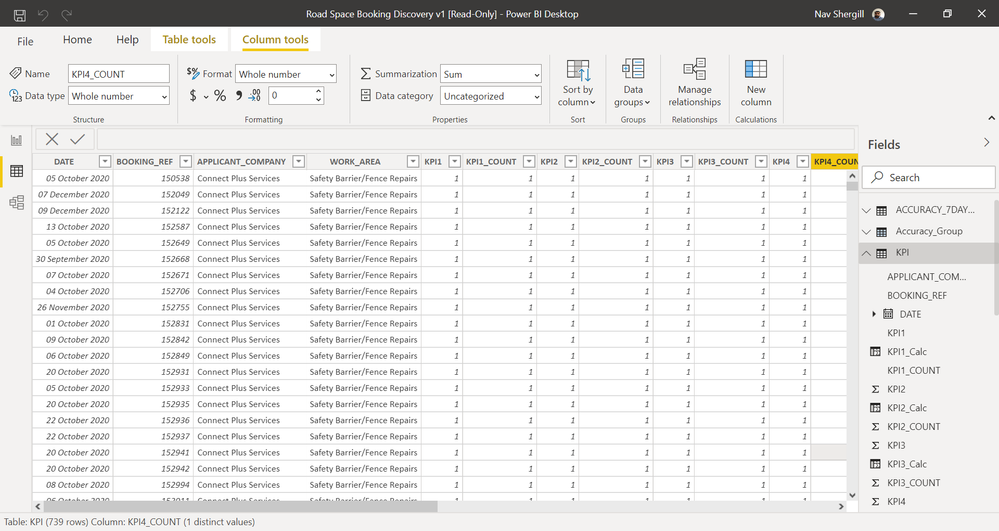
suppose I have data as illustrated in the picture link below. Does anyone know how I can embed the following formula 100(sum(KPI1)/sum(KPI1_COUNT))* as a new column. With the sum being based on each unique "Applicant_Company" and each month.screenshot.png

1 ACCEPTED SOLUTION

@Anonymous , earlier will kind of create a partition

This means a new column all Applicant_Company will same value if you replace it WORK_AREA, All WORK_AREA will have same will value .


You add too


Measn combination of [WORK_AREA] and Applicant_Company will have same value

divide(Sumx(filter(Table, [Applicant_Company] =earlier([Applicant_Company]) && [WORK_AREA] =earlier([WORK_AREA]) ),[KPI1]),Sumx(filter(Table, [Applicant_Company] =earlier([Applicant_Company]) && [WORK_AREA] =earlier([WORK_AREA])  ),[KPI1_COUNT])) *100


Share with Power BI Enthusiasts: Full Power BI Video (20 Hours) YouTube
Microsoft Fabric Series 60+ Videos YouTube
Microsoft Fabric Hindi End to End YouTube

View solution in original post

3 REPLIES 3
amitchandak
Super User
Super User

@Anonymous , A new column like

divide(Sumx(filter(Table, [Applicant_Company] =earlier([Applicant_Company])),[KPI1]),Sumx(filter(Table, [Applicant_Company] =earlier([Applicant_Company])),[KPI1_COUNT])) *100

Share with Power BI Enthusiasts: Full Power BI Video (20 Hours) YouTube
Microsoft Fabric Series 60+ Videos YouTube
Microsoft Fabric Hindi End to End YouTube
Anonymous
Not applicable

Thanks! Can I ask, would the formula you produced also work if I wanted the sum to be based on 'WORK_AREA' as well as 'APPLICANT_COMPANY'?

@Anonymous , earlier will kind of create a partition

This means a new column all Applicant_Company will same value if you replace it WORK_AREA, All WORK_AREA will have same will value .


You add too


Measn combination of [WORK_AREA] and Applicant_Company will have same value

divide(Sumx(filter(Table, [Applicant_Company] =earlier([Applicant_Company]) && [WORK_AREA] =earlier([WORK_AREA]) ),[KPI1]),Sumx(filter(Table, [Applicant_Company] =earlier([Applicant_Company]) && [WORK_AREA] =earlier([WORK_AREA])  ),[KPI1_COUNT])) *100


Share with Power BI Enthusiasts: Full Power BI Video (20 Hours) YouTube
Microsoft Fabric Series 60+ Videos YouTube
Microsoft Fabric Hindi End to End YouTube

Helpful resources

Announcements
Power BI DataViz World Championships

Power BI Dataviz World Championships

The Power BI Data Visualization World Championships is back! Get ahead of the game and start preparing now!

December 2025 Power BI Update Carousel

Power BI Monthly Update - December 2025

Check out the December 2025 Power BI Holiday Recap!

FabCon Atlanta 2026 carousel

FabCon Atlanta 2026

Join us at FabCon Atlanta, March 16-20, for the ultimate Fabric, Power BI, AI and SQL community-led event. Save $200 with code FABCOMM.