cancel
Showing results for 
Search instead for 
Did you mean: 

July 7 - July 17 | Round 2 of the Power BI Dataviz World Championships. Don't miss your chance! Learn more

Reply
Anonymous
Not applicable

Condition based formula

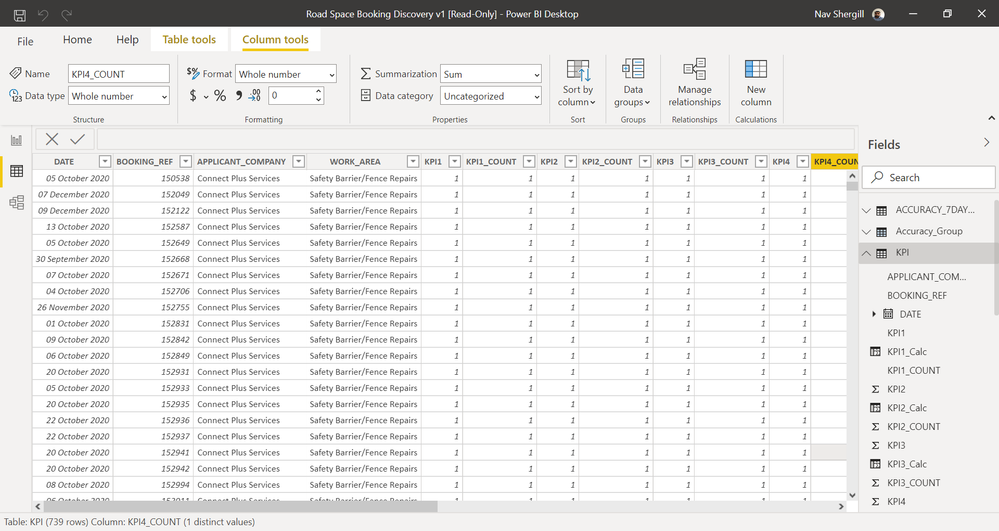
suppose I have data as illustrated in the picture link below. Does anyone know how I can embed the following formula 100(sum(KPI1)/sum(KPI1_COUNT))* as a new column. With the sum being based on each unique "Applicant_Company" and each month.screenshot.png

1 ACCEPTED SOLUTION

@Anonymous , earlier will kind of create a partition

This means a new column all Applicant_Company will same value if you replace it WORK_AREA, All WORK_AREA will have same will value .


You add too


Measn combination of [WORK_AREA] and Applicant_Company will have same value

divide(Sumx(filter(Table, [Applicant_Company] =earlier([Applicant_Company]) && [WORK_AREA] =earlier([WORK_AREA]) ),[KPI1]),Sumx(filter(Table, [Applicant_Company] =earlier([Applicant_Company]) && [WORK_AREA] =earlier([WORK_AREA])  ),[KPI1_COUNT])) *100


Share with Power BI Enthusiasts: Full Power BI Video (20 Hours) YouTube
Microsoft Fabric Series 60+ Videos YouTube
Microsoft Fabric Hindi End to End YouTube

View solution in original post

3 REPLIES 3
amitchandak
Super User
Super User

@Anonymous , A new column like

divide(Sumx(filter(Table, [Applicant_Company] =earlier([Applicant_Company])),[KPI1]),Sumx(filter(Table, [Applicant_Company] =earlier([Applicant_Company])),[KPI1_COUNT])) *100

Share with Power BI Enthusiasts: Full Power BI Video (20 Hours) YouTube
Microsoft Fabric Series 60+ Videos YouTube
Microsoft Fabric Hindi End to End YouTube
Anonymous
Not applicable

Thanks! Can I ask, would the formula you produced also work if I wanted the sum to be based on 'WORK_AREA' as well as 'APPLICANT_COMPANY'?

@Anonymous , earlier will kind of create a partition

This means a new column all Applicant_Company will same value if you replace it WORK_AREA, All WORK_AREA will have same will value .


You add too


Measn combination of [WORK_AREA] and Applicant_Company will have same value

divide(Sumx(filter(Table, [Applicant_Company] =earlier([Applicant_Company]) && [WORK_AREA] =earlier([WORK_AREA]) ),[KPI1]),Sumx(filter(Table, [Applicant_Company] =earlier([Applicant_Company]) && [WORK_AREA] =earlier([WORK_AREA])  ),[KPI1_COUNT])) *100


Share with Power BI Enthusiasts: Full Power BI Video (20 Hours) YouTube
Microsoft Fabric Series 60+ Videos YouTube
Microsoft Fabric Hindi End to End YouTube

Helpful resources

Announcements
FabCon and SQLCon Barcelona 2026

FabCon & SQLCon – Barcelona 2026

Join us in Barcelona for FabCon and SQLCon, the Fabric, Power BI, SQL, and AI community event. Save €200 with code FABCMTY200.

60 days of Data Days Carousel

Data Days 2026

Join Data Days 2026: 60 days of free live/on-demand sessions, challenges, study groups, and certification opportunities.

Power BI DataViz World Championships carousel

Power BI DataViz World Championships - June 2026

A new Power BI DataViz World Championship is coming this June! Don't miss out on submitting your entry.

Top Solution Authors