Share feedback directly with Fabric product managers, participate in targeted research studies and influence the Fabric roadmap.
Sign up nowGet Fabric certified for FREE! Don't miss your chance! Learn more
Hi
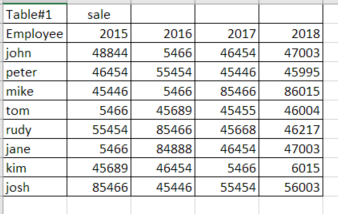
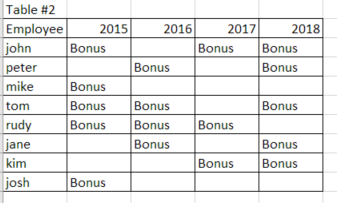
I would like to make visible in the table # 1 with sale per emplyee when they were eligible for bonus.
The bonus is based on other criteria than sale and it is showing displayed in the table #2. so the table #2 is the source of the conditions that should aply to the table #1
and this is how the end result should look like it can be also different font color
thank you
Hi @Anonymous,
Current power bi only support condditional formating by current value, it not supoort highlight cells by other table.
I try to look for custom visuals which has the similar feature but failed, so I'd like to suggest you share it to ideas forum.
Regards,
Xiaoxin Sheng
hi @Anonymous
Thank you for your qick response. I was affraid that woudl be the case.
Isnt there a way how to do this with help of DAX.
Lets say i have the total sale data in a different table where i would need to calculate it first
- something like
john sale = calculate (sum(table all sale,table all sale[2015]),filter(tabletable all sale[employee]="john")
and then
= if(table#2[2015]="Bonus", format("john sale", "red", text), "john sale"
i mean this is very simplistic but i am still very new to dax .. but you might get the idea and maybe you can help
thank you
Hi @Anonymous,
>>= if(table#2[2015]="Bonus", format("john sale", "red", text), "john sale"
Dax not a programming language, it not support to access/modify visual property.
Regards,
XIaoxin Sheng
If you love stickers, then you will definitely want to check out our Community Sticker Challenge!
Check out the January 2026 Power BI update to learn about new features.
| User | Count |
|---|---|
| 65 | |
| 65 | |
| 48 | |
| 21 | |
| 18 |
| User | Count |
|---|---|
| 119 | |
| 117 | |
| 38 | |
| 36 | |
| 27 |