This time we’re going bigger than ever. Fabric, Power BI, SQL, AI and more. We're covering it all. You won't want to miss it.
Learn moreLevel up your Power BI skills this month - build one visual each week and tell better stories with data! Get started
I have data relating to product price changes on specific days:
| Date | Price Change | Product |
| 01/01/2017 | 2 | Prod1 |
| 01/01/2017 | 4 | Prod2 |
| 01/01/2017 | 3 | Prod3 |
What i need is an aggregated view of the data:
| Date | Total Price Change | Products Changed |
| 01/01/2017 | 9 | Prod1, Prod2, Prod3 |
The aim is that I can include the products that have change on a given day as a value in the tool tip of a sales line chart.
Is this kind of concatenation of string values possible; all i can manage to produce is the first or last product name, not a list of all three?
Solved! Go to Solution.
Hi @Nickodemus,
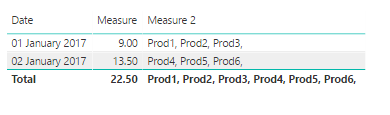
This should work for you:
Create measures as follows
Measure = SUM(Sheet1[Price Change]) //you can create this or just use your Price Change and select SUM, up to you.
Measure 2 = CONCATENATEX(Sheet1,Sheet1[Product]&", ")
Regards
Abduvali
Hi @Nickodemus,
This should work for you:
Create measures as follows
Measure = SUM(Sheet1[Price Change]) //you can create this or just use your Price Change and select SUM, up to you.
Measure 2 = CONCATENATEX(Sheet1,Sheet1[Product]&", ")
Regards
Abduvali
Check out the April 2026 Power BI update to learn about new features.
Sign up to receive a private message when registration opens and key events begin.
If you have recently started exploring Fabric, we'd love to hear how it's going. Your feedback can help with product improvements.
| User | Count |
|---|---|
| 36 | |
| 33 | |
| 31 | |
| 24 | |
| 18 |
| User | Count |
|---|---|
| 70 | |
| 50 | |
| 33 | |
| 24 | |
| 24 |