This time we’re going bigger than ever. Fabric, Power BI, SQL, AI and more. We're covering it all. You won't want to miss it.
Learn moreDid you hear? There's a new SQL AI Developer certification (DP-800). Start preparing now and be one of the first to get certified. Register now
I have data relating to product price changes on specific days:
| Date | Price Change | Product |
| 01/01/2017 | 2 | Prod1 |
| 01/01/2017 | 4 | Prod2 |
| 01/01/2017 | 3 | Prod3 |
What i need is an aggregated view of the data:
| Date | Total Price Change | Products Changed |
| 01/01/2017 | 9 | Prod1, Prod2, Prod3 |
The aim is that I can include the products that have change on a given day as a value in the tool tip of a sales line chart.
Is this kind of concatenation of string values possible; all i can manage to produce is the first or last product name, not a list of all three?
Solved! Go to Solution.
Hi @Nickodemus,
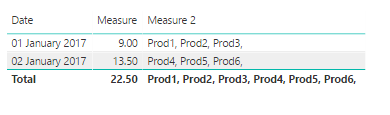
This should work for you:
Create measures as follows
Measure = SUM(Sheet1[Price Change]) //you can create this or just use your Price Change and select SUM, up to you.
Measure 2 = CONCATENATEX(Sheet1,Sheet1[Product]&", ")
Regards
Abduvali
Hi @Nickodemus,
This should work for you:
Create measures as follows
Measure = SUM(Sheet1[Price Change]) //you can create this or just use your Price Change and select SUM, up to you.
Measure 2 = CONCATENATEX(Sheet1,Sheet1[Product]&", ")
Regards
Abduvali
Check out the April 2026 Power BI update to learn about new features.
Sign up to receive a private message when registration opens and key events begin.
If you have recently started exploring Fabric, we'd love to hear how it's going. Your feedback can help with product improvements.
| User | Count |
|---|---|
| 34 | |
| 32 | |
| 25 | |
| 22 | |
| 16 |
| User | Count |
|---|---|
| 65 | |
| 50 | |
| 30 | |
| 23 | |
| 23 |