cancel
Showing results for 
Search instead for 
Did you mean: 

Join the FabCon + SQLCon recap series. Up next: Power BI, Real-Time Intelligence, IQ and AI, and Data Factory take center stage. All sessions are available on-demand after the live show. Register now

Reply
Anonymous
Not applicable

Complex Unpivot help needed

Hi Experts,


1. I need help to Un-Pivot the a lengthy pivot table in PBI.

2. See color coding in the input & Output. But Yellow colored is the Region name, see the link to excel / PBX file for what header IsEqual = what Region.

3. I may have to inlude more columns in any of the part of this excel. Hence, the solution may be a flexible to unpivot more columns.


Power BI PBX sample Files ->https://1drv.ms/u/s!AkBVVNsuRUvzbBndSCMWArFt8Zo


Sample file in Excel --> https://1drv.ms/x/s!AkBVVNsuRUvzcY-nNxEoK_Jouvw


UnPivotHelp.jpg


I am neither a developer nor a PBI expert. Help will be appreciated


P.S. : Just back to using PBI after a longtime 🙂

Thanks

Chandan.

1 ACCEPTED SOLUTION
v-lili6-msft
Community Support
Community Support

Hi@Chandan

According to your description ,follow my steps and give it a try as below: Step 1: Duplicate three table based on you input table like this:
25.PNG

Step 2:
In the first copy table, remove AmericasValueVariableUSD ,APACValueVariableUSD ,EuropeValueVariableUSD ,IndiaValueVariableUSD ,MEAAValueVariableUSD ,NonRgnlValueVariableUSD ,AmericasValueValueFixedUSD ,
APACValueValueFixedUSD ,EuropeValueValueFixedUSD ,IndiaValueValueFixedUSD ,MECAAValueValueFixedUSD , NonRgnlValueFixedUSD column.
then select  AmericasVertical ,APACVertical ,EuropeVertical ,IndiaVertical ,MECAAVertical ,NonRegionalVertical columns and "Unpivot only selected columns" .
filter value "N.A."
 
Step 3: Rename columns "Attribute"->"Headers_For_UnPivot",   "Value"->"Regional Verticals" and Replace values "Headers_For_UnPivot" by "Desired_Region"
 
Step 4:
In the second copy table, remove AmericasVertical ,APACVertical ,EuropeVertical ,IndiaVertical ,MECAAVertical ,NonRegionalVertical ,AmericasValueValueFixedUSD ,
APACValueValueFixedUSD ,EuropeValueValueFixedUSD ,IndiaValueValueFixedUSD ,MECAAValueValueFixedUSD , NonRgnlValueFixedUSD column.
then select  AmericasValueVariableUSD ,APACValueVariableUSD ,EuropeValueVariableUSD ,IndiaValueVariableUSD ,MEAAValueVariableUSD ,NonRgnlValueVariableUSD columns and "Unpivot only selected columns" .
filter value "-"
 
Step 5: Rename columns "Attribute"->"Headers_For_UnPivot",   "Value"->"RegionalValueVariableUSD" and Replace values "Headers_For_UnPivot" by "Desired_Region"
 
Step 6:
In the second copy table, remove AmericasVertical ,APACVertical ,EuropeVertical ,IndiaVertical ,MECAAVertical ,NonRegionalVertical ,
AmericasValueVariableUSD ,APACValueVariableUSD ,EuropeValueVariableUSD ,IndiaValueVariableUSD ,MEAAValueVariableUSD ,NonRgnlValueVariableUSD  column.
then select  AmericasValueValueFixedUSD ,APACValueValueFixedUSD ,EuropeValueValueFixedUSD ,IndiaValueValueFixedUSD ,MECAAValueValueFixedUSD , NonRgnlValueFixedUSD columns and "Unpivot only selected columns" .
filter value "-"
 
Step 7: 
Rename columns "Attribute"->"Headers_For_UnPivot",   "Value"->"RegionalValueValueFixedUSD" and Replace values "Headers_For_UnPivot" by "Desired_Region"
 
Step 8:
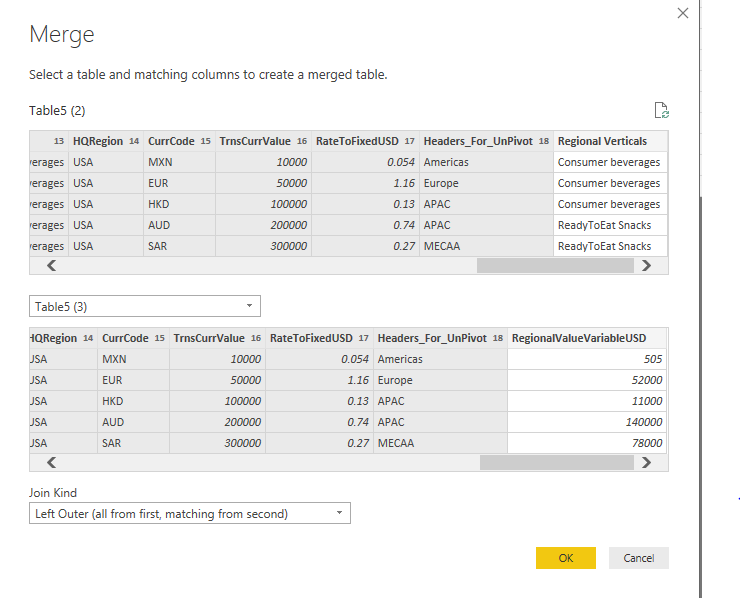
Use merge function (Home ->Combine ->Merge Queries) twice as below :
1.
21.PNG
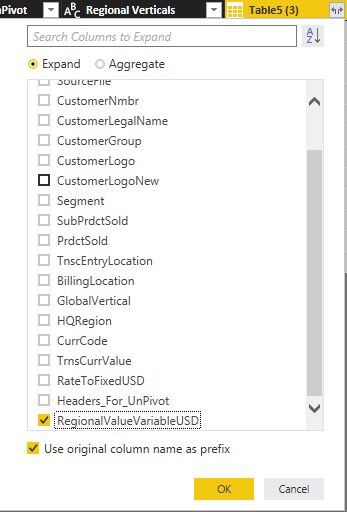
Expend data
22.PNG
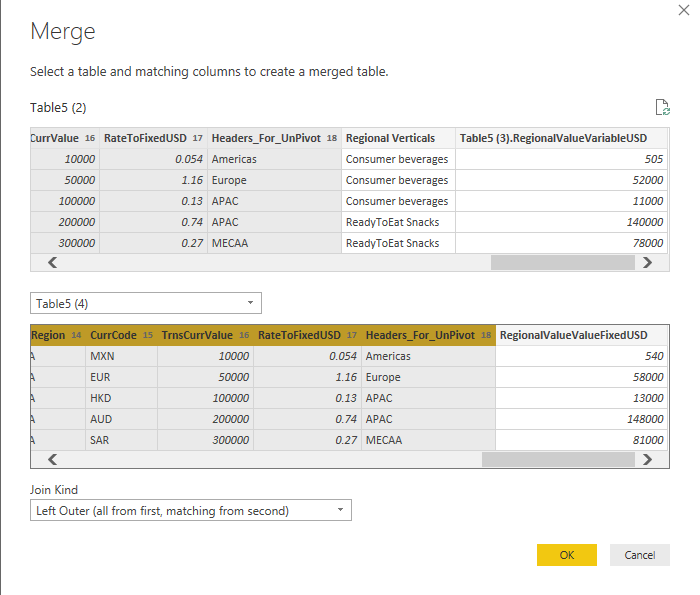
2.
23.PNG
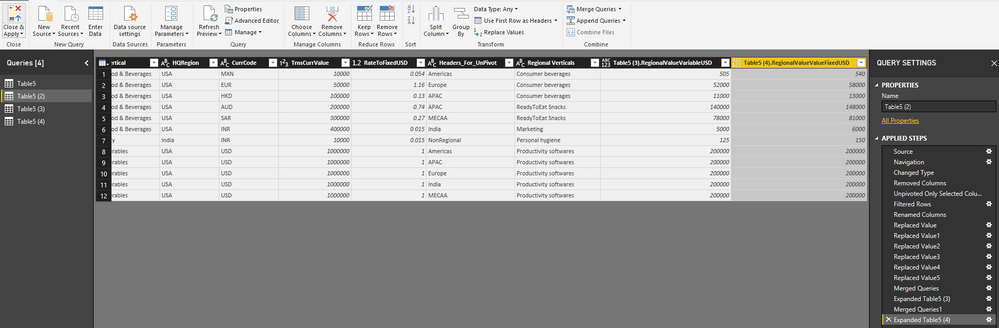
Expend data


Community Support Team _ Lin
If this post helps, then please consider Accept it as the solution to help the other members find it more quickly.

View solution in original post

4 REPLIES 4
v-lili6-msft
Community Support
Community Support

Hi@Chandan

According to your description ,follow my steps and give it a try as below: Step 1: Duplicate three table based on you input table like this:

25.PNG

Step 2:
In the first copy table, remove AmericasValueVariableUSD ,APACValueVariableUSD ,EuropeValueVariableUSD ,IndiaValueVariableUSD ,MEAAValueVariableUSD ,NonRgnlValueVariableUSD ,AmericasValueValueFixedUSD ,
APACValueValueFixedUSD ,EuropeValueValueFixedUSD ,IndiaValueValueFixedUSD ,MECAAValueValueFixedUSD , NonRgnlValueFixedUSD column.
then select  AmericasVertical ,APACVertical ,EuropeVertical ,IndiaVertical ,MECAAVertical ,NonRegionalVertical columns and "Unpivot only selected columns" .
filter value "N.A."
 
Step 3: Rename columns "Attribute"->"Headers_For_UnPivot",   "Value"->"Regional Verticals" and Replace values "Headers_For_UnPivot" by "Desired_Region"
 
Step 4:
In the second copy table, remove AmericasVertical ,APACVertical ,EuropeVertical ,IndiaVertical ,MECAAVertical ,NonRegionalVertical ,AmericasValueValueFixedUSD ,
APACValueValueFixedUSD ,EuropeValueValueFixedUSD ,IndiaValueValueFixedUSD ,MECAAValueValueFixedUSD , NonRgnlValueFixedUSD column.
then select  AmericasValueVariableUSD ,APACValueVariableUSD ,EuropeValueVariableUSD ,IndiaValueVariableUSD ,MEAAValueVariableUSD ,NonRgnlValueVariableUSD columns and "Unpivot only selected columns" .
filter value "-"
 
Step 5: Rename columns "Attribute"->"Headers_For_UnPivot",   "Value"->"RegionalValueVariableUSD" and Replace values "Headers_For_UnPivot" by "Desired_Region"
 
Step 6:
In the second copy table, remove AmericasVertical ,APACVertical ,EuropeVertical ,IndiaVertical ,MECAAVertical ,NonRegionalVertical ,
AmericasValueVariableUSD ,APACValueVariableUSD ,EuropeValueVariableUSD ,IndiaValueVariableUSD ,MEAAValueVariableUSD ,NonRgnlValueVariableUSD  column.
then select  AmericasValueValueFixedUSD ,APACValueValueFixedUSD ,EuropeValueValueFixedUSD ,IndiaValueValueFixedUSD ,MECAAValueValueFixedUSD , NonRgnlValueFixedUSD columns and "Unpivot only selected columns" .
filter value "-"
 
Step 7: 
Rename columns "Attribute"->"Headers_For_UnPivot",   "Value"->"RegionalValueValueFixedUSD" and Replace values "Headers_For_UnPivot" by "Desired_Region"
 
Step 8:
Use merge function (Home ->Combine ->Merge Queries) twice as below :
1.
21.PNG
Expend data
22.PNG
2.
23.PNG
Expend data


Community Support Team _ Lin
If this post helps, then please consider Accept it as the solution to help the other members find it more quickly.
Anonymous
Not applicable

Hi Lin @v-lili6-msft ,


While I am trying on my database your suggestion, is it possible to post the excel fiile that you have used ?

I tried to us my excel through edit queries however, there is this two error of Key / Table.


Thanks,

Chandan

Hi,@Chandan

 This is the excel fiile :

https://www.dropbox.com/s/drekyxfz1fb63sh/New%20Microsoft%20Excel%20Worksheet.xlsx?dl=0


Best Regards,
Lin
Community Support Team _ Lin
If this post helps, then please consider Accept it as the solution to help the other members find it more quickly.
Anonymous
Not applicable

Thank You @v-lili6-msft Lin for the solution !

Helpful resources

Announcements
April Power BI Update Carousel

Power BI Monthly Update - April 2026

Check out the April 2026 Power BI update to learn about new features.

New to Fabric survey Carousel

New to Fabric Survey

If you have recently started exploring Fabric, we'd love to hear how it's going. Your feedback can help with product improvements.

Power BI DataViz World Championships carousel

Power BI DataViz World Championships - June 2026

A new Power BI DataViz World Championship is coming this June! Don't miss out on submitting your entry.

FabCon and SQLCon Highlights Carousel

FabCon &SQLCon Highlights

Experience the highlights from FabCon & SQLCon, available live and on-demand starting April 14th.