Hi@Chandan
According to your description ,follow my steps and give it a try as below: Step 1: Duplicate three table based on you input table like this:
Step 2:
In the first copy table, remove AmericasValueVariableUSD ,APACValueVariableUSD ,EuropeValueVariableUSD ,IndiaValueVariableUSD ,MEAAValueVariableUSD ,NonRgnlValueVariableUSD ,AmericasValueValueFixedUSD ,
APACValueValueFixedUSD ,EuropeValueValueFixedUSD ,IndiaValueValueFixedUSD ,MECAAValueValueFixedUSD , NonRgnlValueFixedUSD column.
then select AmericasVertical ,APACVertical ,EuropeVertical ,IndiaVertical ,MECAAVertical ,NonRegionalVertical columns and "Unpivot only selected columns" .
filter value "N.A."
Step 3: Rename columns "Attribute"->"Headers_For_UnPivot", "Value"->"Regional Verticals" and Replace values "Headers_For_UnPivot" by "Desired_Region"
Step 4:
In the second copy table, remove AmericasVertical ,APACVertical ,EuropeVertical ,IndiaVertical ,MECAAVertical ,NonRegionalVertical ,AmericasValueValueFixedUSD ,
APACValueValueFixedUSD ,EuropeValueValueFixedUSD ,IndiaValueValueFixedUSD ,MECAAValueValueFixedUSD , NonRgnlValueFixedUSD column.
then select AmericasValueVariableUSD ,APACValueVariableUSD ,EuropeValueVariableUSD ,IndiaValueVariableUSD ,MEAAValueVariableUSD ,NonRgnlValueVariableUSD columns and "Unpivot only selected columns" .
filter value "-"
Step 5: Rename columns "Attribute"->"Headers_For_UnPivot", "Value"->"RegionalValueVariableUSD" and Replace values "Headers_For_UnPivot" by "Desired_Region"
Step 6:
In the second copy table, remove AmericasVertical ,APACVertical ,EuropeVertical ,IndiaVertical ,MECAAVertical ,NonRegionalVertical ,
AmericasValueVariableUSD ,APACValueVariableUSD ,EuropeValueVariableUSD ,IndiaValueVariableUSD ,MEAAValueVariableUSD ,NonRgnlValueVariableUSD column.
then select AmericasValueValueFixedUSD ,APACValueValueFixedUSD ,EuropeValueValueFixedUSD ,IndiaValueValueFixedUSD ,MECAAValueValueFixedUSD , NonRgnlValueFixedUSD columns and "Unpivot only selected columns" .
filter value "-"
Step 7:
Rename columns "Attribute"->"Headers_For_UnPivot", "Value"->"RegionalValueValueFixedUSD" and Replace values "Headers_For_UnPivot" by "Desired_Region"
Step 8:
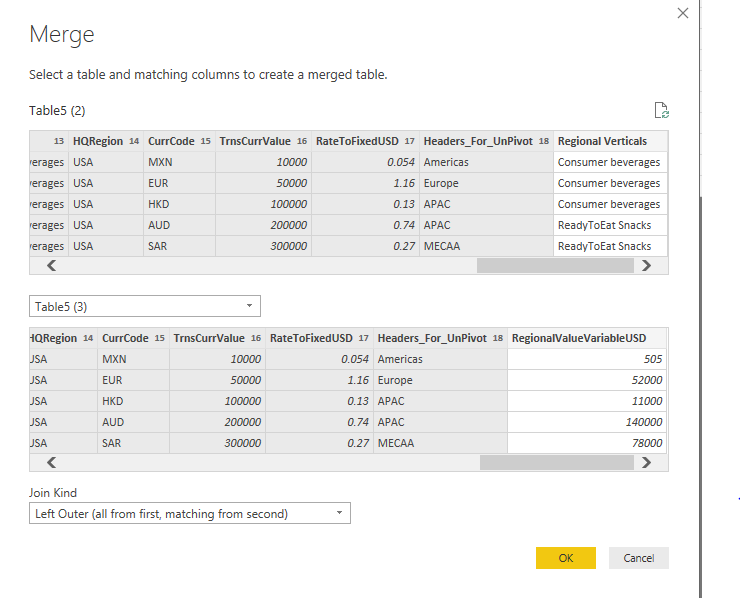
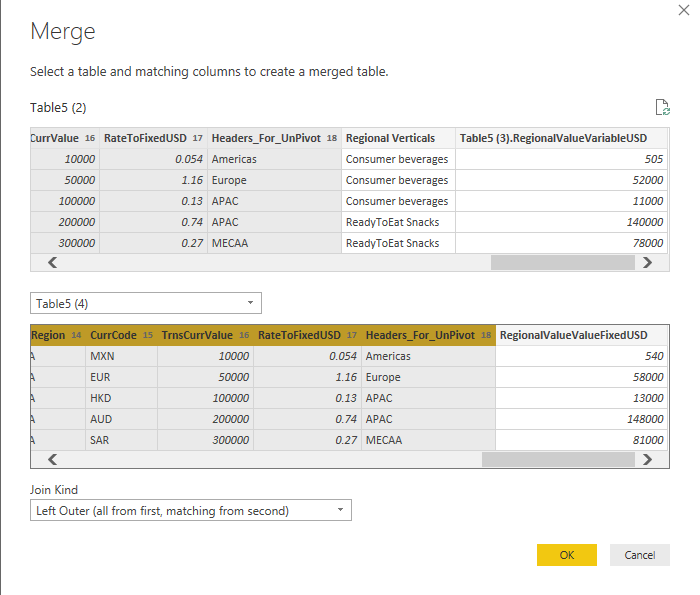
Use merge function (Home ->Combine ->Merge Queries) twice as below :
1.
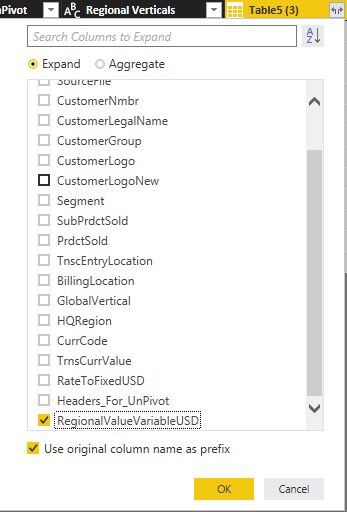
Expend data
2.
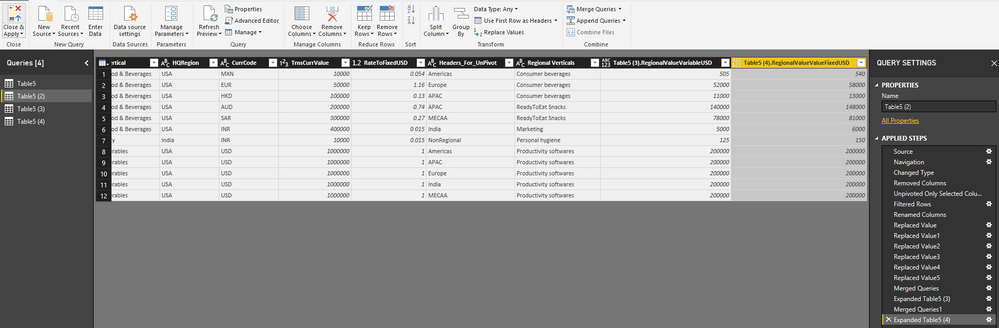
Expend data

Here is DEMO , please try it.
Community Support Team _ Lin
If this post helps, then please consider Accept it as the solution to help the other members find it more quickly.