Join us at FabCon Atlanta from March 16 - 20, 2026, for the ultimate Fabric, Power BI, AI and SQL community-led event. Save $200 with code FABCOMM.
Register now!The Power BI Data Visualization World Championships is back! It's time to submit your entry. Live now!
Hello,
Im trying to achive a slightly more complex security model than just a single filter.
The idea is to filter the table named "Security" using RLS with USERPRINCIPLANAME() to filter that table.
The security levels are 1 to 4 with 1 being the highest and 4 the lowest.
So:
I have attached a link to an example file that works perfect for just the single project level filtering but I need to involve the security columns too.
Can anyone offer any advice on how this could be done?
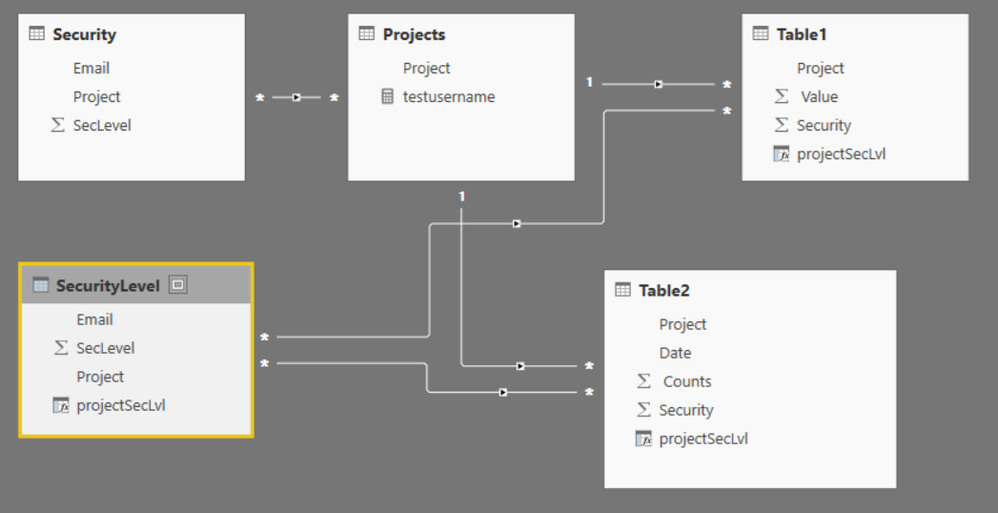
Hi Chris_k, you could try to split up your security table in to parts, one cointaining the project a user is entitled to see and one with the security level of the users for each project.
In the security level table, create a new column which is a combination of project and security level, projectSecLvl. Create the same column in table 1 and table 2. Add many-to-many filters between security level table and table 1 and table 2, with filter direction from securityLevel to table1/table2.
Add filter in the manage role window on both security and securityLevel where email=userprincipalname().
It works with the simple example file you provided, but I have not tested it for larger data sets so not sure if that works.
Your sample file does not contain any examples of the type security level 1 should see all other levels. A way to solve this could be to add all the levels for a user in the security level table. E.g. if user1 has security level 1 = 1 on project X7, then add rows to the security level table for user 1 for project X7 level 2,3 and 4.
regards,
Sturla
The Power BI Data Visualization World Championships is back! It's time to submit your entry.
Check out the January 2026 Power BI update to learn about new features.
| User | Count |
|---|---|
| 56 | |
| 40 | |
| 38 | |
| 21 | |
| 21 |
| User | Count |
|---|---|
| 141 | |
| 105 | |
| 63 | |
| 36 | |
| 35 |