Share feedback directly with Fabric product managers, participate in targeted research studies and influence the Fabric roadmap.
Sign up nowGet Fabric certified for FREE! Don't miss your chance! Learn more
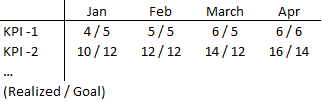
My goal is to create a table like the one below.
The problem is, that each 'cell' should include three elements:
1) & 2 ) a combination of two different variables (Realized and Goal)
3) separated by a ' / '
It's easily done in excel, but can it be replicated in Power BI?
Thanks.
Solved! Go to Solution.
HI, @Anonymous
You could get in a matrix visual.
Realized and Goal are two measure? if so use this formula to create a new measure to combine them together.
New Measure = [Realized]&"/"&[Goal]Then drag it to matrix visual.
HI, @Anonymous
You could get in a matrix visual.
Realized and Goal are two measure? if so use this formula to create a new measure to combine them together.
New Measure = [Realized]&"/"&[Goal]Then drag it to matrix visual.
Table =
ADDCOLUMNS (
SUMMARIZE ( 'KPI', 'KPI'[Detailed] ),
"APR", CALCULATE ( MAX ( 'KPI'[Realised] ), 'KPI'[Month] = "APR" ) & "/"
& CALCULATE ( MAX ( 'KPI'[Goal] ), 'KPI'[Month] = "APR" ),
"MAY", CALCULATE ( MAX ( 'KPI'[Realised] ), 'KPI'[Month] = "MAY" ) & "/"
& CALCULATE ( MAX ( 'KPI'[Goal] ), 'KPI'[Month] = "MAY" ),
"JUN", CALCULATE ( MAX ( 'KPI'[Realised] ), 'KPI'[Month] = "JUN" ) & "/"
& CALCULATE ( MAX ( 'KPI'[Goal] ), 'KPI'[Month] = "JUN" )
)
hI.,
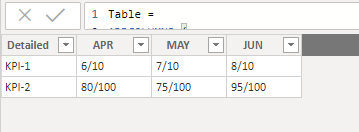
I used above dax code to create temp table as u want. hope will solve your issue.i got the result as attached image.
Share feedback directly with Fabric product managers, participate in targeted research studies and influence the Fabric roadmap.
| User | Count |
|---|---|
| 63 | |
| 62 | |
| 42 | |
| 19 | |
| 16 |
| User | Count |
|---|---|
| 113 | |
| 105 | |
| 36 | |
| 28 | |
| 28 |