This time we’re going bigger than ever. Fabric, Power BI, SQL, AI and more. We're covering it all. You won't want to miss it.
Learn moreLevel up your Power BI skills this month - build one visual each week and tell better stories with data! Get started
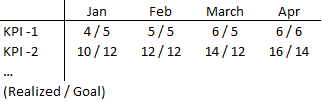
My goal is to create a table like the one below.
The problem is, that each 'cell' should include three elements:
1) & 2 ) a combination of two different variables (Realized and Goal)
3) separated by a ' / '
It's easily done in excel, but can it be replicated in Power BI?
Thanks.
Solved! Go to Solution.
HI, @Anonymous
You could get in a matrix visual.
Realized and Goal are two measure? if so use this formula to create a new measure to combine them together.
New Measure = [Realized]&"/"&[Goal]Then drag it to matrix visual.
HI, @Anonymous
You could get in a matrix visual.
Realized and Goal are two measure? if so use this formula to create a new measure to combine them together.
New Measure = [Realized]&"/"&[Goal]Then drag it to matrix visual.
Table =
ADDCOLUMNS (
SUMMARIZE ( 'KPI', 'KPI'[Detailed] ),
"APR", CALCULATE ( MAX ( 'KPI'[Realised] ), 'KPI'[Month] = "APR" ) & "/"
& CALCULATE ( MAX ( 'KPI'[Goal] ), 'KPI'[Month] = "APR" ),
"MAY", CALCULATE ( MAX ( 'KPI'[Realised] ), 'KPI'[Month] = "MAY" ) & "/"
& CALCULATE ( MAX ( 'KPI'[Goal] ), 'KPI'[Month] = "MAY" ),
"JUN", CALCULATE ( MAX ( 'KPI'[Realised] ), 'KPI'[Month] = "JUN" ) & "/"
& CALCULATE ( MAX ( 'KPI'[Goal] ), 'KPI'[Month] = "JUN" )
)
hI.,
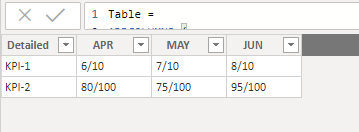
I used above dax code to create temp table as u want. hope will solve your issue.i got the result as attached image.
Check out the April 2026 Power BI update to learn about new features.
Sign up to receive a private message when registration opens and key events begin.
If you have recently started exploring Fabric, we'd love to hear how it's going. Your feedback can help with product improvements.
| User | Count |
|---|---|
| 30 | |
| 24 | |
| 23 | |
| 17 | |
| 16 |
| User | Count |
|---|---|
| 61 | |
| 35 | |
| 29 | |
| 23 | |
| 22 |