Get certified for free when you join Fabric Data Days 2026 and dive into Fabric, Power BI, SQL, AI, and other essential data skills.
Join nowData Days is here! Join us now for 60+ days of learning, challenges, and connection. Learn more
Hi, i'm quite new to Power BI, i manage to make some pages with several Matrix and slicers.
The thing is that now i want to filter on the whole page in the Slicer butreferencing another column.
For ex.
Date |Product|Price|Type
01-04-2018 |a | 10 | Z
01-01-2019 |b |11 | X
01-03-2017 |c |13 | Z
01-01-2018 |a |12 | Z
01-05-2017 |d |15 | X
The type Column is not displayed on the report.
I want to make a Slicer based on the Date that if i choose >=01-01-2019 it filter to show only X type.
If i choose < 01-01-2019 it shows only Z type.
Is there a way to achieve this?
I hope my explanation is clear.
Thank you very much!
Solved! Go to Solution.
Hi @marcos_osorio,
Please check the following steps as below.
1. Create a date table. Then create relationship between it and the fact table.
DATE = CALENDARAUTO()
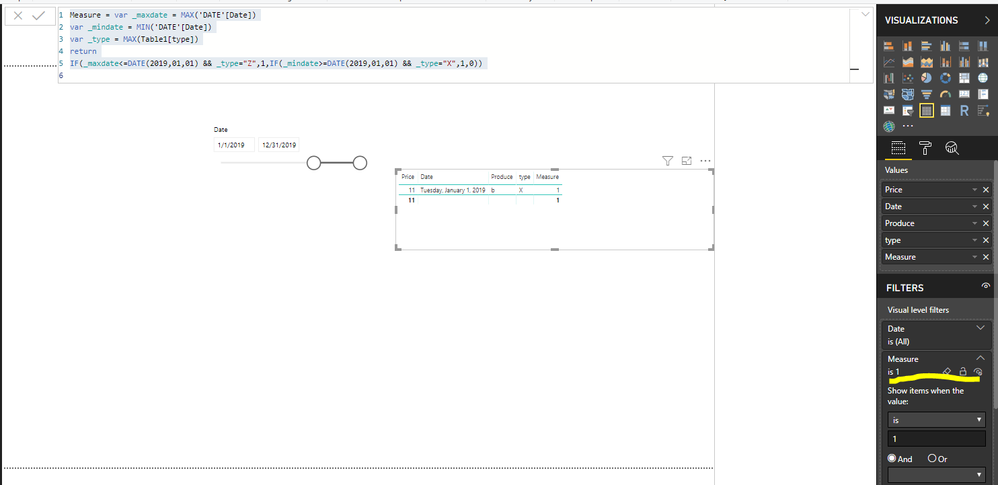
2. Create a measure as below and make the table visual filtered by the measure.
Measure = var _maxdate = MAX('DATE'[Date])
var _mindate = MIN('DATE'[Date])
var _type = MAX(Table1[type])
return
IF(_maxdate<=DATE(2019,01,01) && _type="Z",1,IF(_mindate>=DATE(2019,01,01) && _type="X",1,0))
For more details, please check the pbix as attached.
Regards,
Frank
Hi @marcos_osorio,
Please check the following steps as below.
1. Create a date table. Then create relationship between it and the fact table.
DATE = CALENDARAUTO()
2. Create a measure as below and make the table visual filtered by the measure.
Measure = var _maxdate = MAX('DATE'[Date])
var _mindate = MIN('DATE'[Date])
var _type = MAX(Table1[type])
return
IF(_maxdate<=DATE(2019,01,01) && _type="Z",1,IF(_mindate>=DATE(2019,01,01) && _type="X",1,0))
For more details, please check the pbix as attached.
Regards,
Frank
Thank you very much, this is what i wanted.
Don't miss out on Data Days, June 15 through August 7. Learn Fabric, Power BI, SQL, AI and more.
Check out the May 2026 Power BI update to learn about new features.
| User | Count |
|---|---|
| 23 | |
| 21 | |
| 20 | |
| 18 | |
| 13 |
| User | Count |
|---|---|
| 58 | |
| 50 | |
| 38 | |
| 31 | |
| 27 |