cancel
Showing results for 
Search instead for 
Did you mean: 

A new Data Days event is coming soon! This time we’re going bigger than ever. Fabric, Power BI, SQL, AI and more. Don't miss out.

Reply
marcos_osorio
Helper II
Helper II

Complex Custom Filtering

Hi, i'm quite new to Power BI, i manage to make some pages with several Matrix and slicers. 

The thing is that now i want to filter on the whole page in the Slicer butreferencing another column.


For ex.


Date             |Product|Price|Type

01-04-2018  |a           | 10  |  Z

01-01-2019  |b           |11   |  X

01-03-2017  |c           |13   |  Z

01-01-2018  |a           |12   |  Z

01-05-2017  |d           |15   | X

The type Column is not displayed on the report.

I want to make a Slicer based on the Date that if i choose >=01-01-2019 it filter to show only X type.

If i choose < 01-01-2019 it shows only Z type. 

Is there a way to achieve this?


I hope my explanation is clear. 


Thank you very much!

1 ACCEPTED SOLUTION
v-frfei-msft
Community Support
Community Support

Hi @marcos_osorio,


Please check the following steps as below.


1. Create a date table. Then create relationship between it and the fact table.


DATE = CALENDARAUTO()

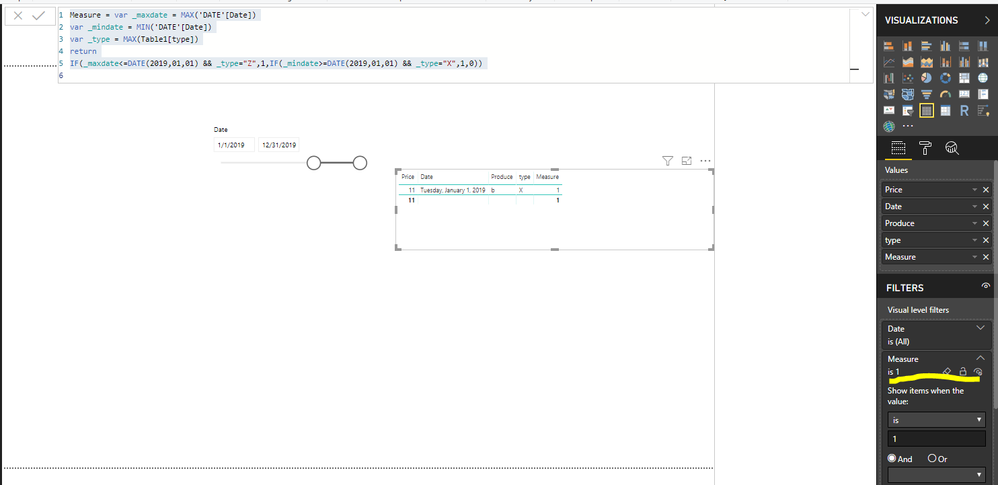
2. Create a measure as below and make the table visual filtered by the measure.


Measure = var _maxdate = MAX('DATE'[Date])
var _mindate = MIN('DATE'[Date])
var _type = MAX(Table1[type])
return
IF(_maxdate<=DATE(2019,01,01) && _type="Z",1,IF(_mindate>=DATE(2019,01,01) && _type="X",1,0))

Capture.PNG


For more details, please check the pbix as attached.


Regards,

Frank

Community Support Team _ Frank
If this post helps, then please consider Accept it as the solution to help the others find it more quickly.

View solution in original post

2 REPLIES 2
v-frfei-msft
Community Support
Community Support

Hi @marcos_osorio,


Please check the following steps as below.


1. Create a date table. Then create relationship between it and the fact table.


DATE = CALENDARAUTO()

2. Create a measure as below and make the table visual filtered by the measure.


Measure = var _maxdate = MAX('DATE'[Date])
var _mindate = MIN('DATE'[Date])
var _type = MAX(Table1[type])
return
IF(_maxdate<=DATE(2019,01,01) && _type="Z",1,IF(_mindate>=DATE(2019,01,01) && _type="X",1,0))

Capture.PNG


For more details, please check the pbix as attached.


Regards,

Frank

Community Support Team _ Frank
If this post helps, then please consider Accept it as the solution to help the others find it more quickly.

Thank you very much, this is what i wanted.


Helpful resources

Announcements
May Power BI Update Carousel

Power BI Monthly Update - May 2026

Check out the May 2026 Power BI update to learn about new features.

Fabric SQL PBI Data Days

Data Days 2026 coming soon!

Sign up to receive a private message when registration opens and key events begin.

New to Fabric survey Carousel

New to Fabric Survey

If you have recently started exploring Fabric, we'd love to hear how it's going. Your feedback can help with product improvements.

Power BI DataViz World Championships carousel

Power BI DataViz World Championships - June 2026

A new Power BI DataViz World Championship is coming this June! Don't miss out on submitting your entry.