Join us at FabCon Atlanta from March 16 - 20, 2026, for the ultimate Fabric, Power BI, AI and SQL community-led event. Save $200 with code FABCOMM.
Register now!The Power BI Data Visualization World Championships is back! It's time to submit your entry. Live now!
Hi All,
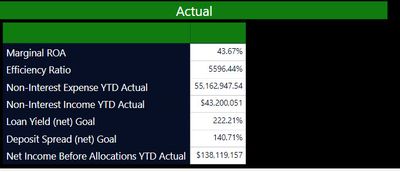
I am trying to show a comparison between Actuals vs Plan. I am using a Matrix table and for some reason only the Actuals shows up. In my source data (Excel) I have both a column for Actual and Plan and I would like to display them side by side. Is a Matrix table the right solution ? How can I get the Plan section to display next to the Actuals ?
Solved! Go to Solution.
Hi @Anonymous ,
What is the structure of your source data?
If Actual and Plan columns are in one table, create a table visual or matrix visual like @az38 said.
If they are in two tables, create correct relationship between the two tables. Then create a table visual or matrix visual like @az38 said.
Best Regards,
Icey
If this post helps, then please consider Accept it as the solution to help the other members find it more quickly.
Hi @Anonymous ,
What is the structure of your source data?
If Actual and Plan columns are in one table, create a table visual or matrix visual like @az38 said.
If they are in two tables, create correct relationship between the two tables. Then create a table visual or matrix visual like @az38 said.
Best Regards,
Icey
If this post helps, then please consider Accept it as the solution to help the other members find it more quickly.
@Anonymous
You may have to create a table like this
union(
summarize (Table,"Name","Marginal ROA","Actual",[Marginal ROA Actual],"Target",[Marginal ROA Actual]),
summarize (Table,"Name","Effciency Ratio","Actual",[Effciency Ratio Actual],"Target",[Effciency Ratio Actual])
)
Or Convert measure to dimension values
Hi @Anonymous
add both of fields, Actual and Plan to Values in Visual Pane
The Power BI Data Visualization World Championships is back! It's time to submit your entry.
| User | Count |
|---|---|
| 50 | |
| 43 | |
| 36 | |
| 33 | |
| 30 |
| User | Count |
|---|---|
| 138 | |
| 126 | |
| 60 | |
| 59 | |
| 56 |