cancel
Showing results for 
Search instead for 
Did you mean: 

Vote for your favorite vizzies from the Power BI Dataviz World Championship submissions. Vote now!

Reply
Anonymous
Not applicable

Comparison report

 Hi Guys


I am trying to create  version comparison report in  country table based on load date .

I would like to have filters like  Loaddate source , Loaddate to be compared and Country filter 

Only input is Country table lok below 


Cid           Cname    CountryDesc          Loaddate 

1                 India        Bharath India        01-04-2020

1                 India        India                     20-04-2020 


My report should be 

Loaddate source (01-04-2020 )                    Load date to compared  (20-04-2020)         Country (India ) *optional filter 


Source report                                                           Comparison report 

Cid  Cname    Cdesc                Loaddate                   Cid   Cname    Cdesc            Loaddate         Status 

1      India      Bharath India    01-04-2020                1      India        India              20-04-2020     Changes available 


So here in the Comparison report it has lookup with source report on  Cid   Cname    Cdesc  column .

If source and compare table  Cid   Cname    Cdesc  values are same then " No changes " else " Chanes avaiable " 


I have tried with natual join by giving seleted date filter slicer value to source table , but it seems we can't derive table dynamically by giving selected slicer value as input .


Could you anyone help me on this ?


5 REPLIES 5
amitchandak
Super User
Super User

@Anonymous , Not very clear. But this blog and video of mine can help

https://community.powerbi.com/t5/Community-Blog/Comparing-Data-Across-Date-Ranges/ba-p/823601


How to use two Date/Period slicers: https://youtu.be/WSeZr_-MiTg

Share with Power BI Enthusiasts: Full Power BI Video (20 Hours) YouTube
Microsoft Fabric Series 60+ Videos YouTube
Microsoft Fabric Hindi End to End YouTube
Anonymous
Not applicable

HI Team ,


Could you anyone help me here to fix this issue , i am struggling for long period


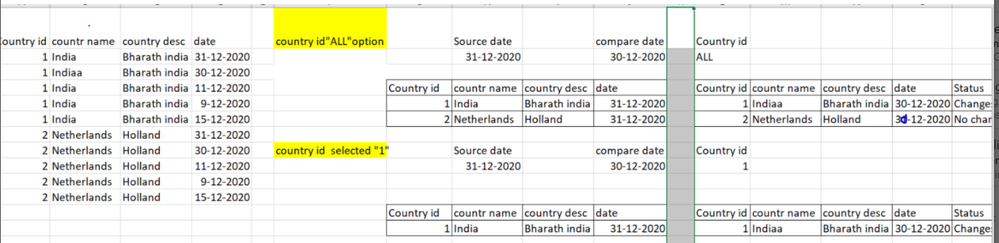
attached my sample expected report here 


Left side  : Sample country table data :   


After yellow remark expected 2 table visual Capture1.PNG


Hi,

Sorry but cannot understand your question at all.


Regards,
Ashish Mathur
http://www.ashishmathur.com
https://www.linkedin.com/in/excelenthusiasts/
Anonymous
Not applicable

@amitchandak  , Thanks for your help . In your post comparing only sales amount data , but for me i have to compare both source and compare table on each column basis like mentioned above   Cid   Cname    Cdesc   . For my case also i created 2 independent date . Hope i have shared enugh of information

Anonymous
Not applicable

@amitchandak   Reuirement is dirct , business wants to compare country details change based on version date . 

Sometime country name may or country code or country desc like that , So selected period the data has to be compared on this 3 columns

Helpful resources

Announcements
Power BI DataViz World Championships

Power BI Dataviz World Championships

Vote for your favorite vizzies from the Power BI World Championship submissions!

Sticker Challenge 2026 Carousel

Join our Community Sticker Challenge 2026

If you love stickers, then you will definitely want to check out our Community Sticker Challenge!

January Power BI Update Carousel

Power BI Monthly Update - January 2026

Check out the January 2026 Power BI update to learn about new features.

FabCon Atlanta 2026 carousel

FabCon Atlanta 2026

Join us at FabCon Atlanta, March 16-20, for the ultimate Fabric, Power BI, AI and SQL community-led event. Save $200 with code FABCOMM.