Get certified for free when you join Fabric Data Days 2026 and dive into Fabric, Power BI, SQL, AI, and other essential data skills.
Join nowData Days is here! Join us now for 60+ days of learning, challenges, and connection. Learn more
Hi All,
The chart below contains a measure with the distinct count of Customers & the Legend is Product:
Current Customer Uptake =
CALCULATE(
DISTINCTCOUNT(DATA[Customer),
LASTDATE(DATA[LAST_DAY_OF_WEEK]))
Each product has a unique go live date and is used to calculate the X asis "Weeks from go live" within a custom column.
Problem:
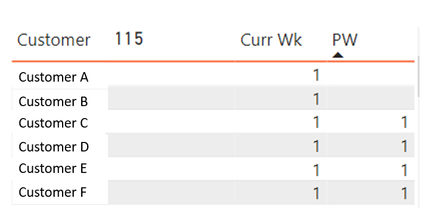
I would like to select a particular data point in this chart and see the increase/ decrease of customers within a table format, see image below. However, when a particular data point is selected the previous weeks data disappears.
What is the best way to calculate/visualise this? Suggestions welome 🙂
Refer to my file which uses rank to find Last week
https://www.dropbox.com/s/d9898a48e76wmvl/sales_analytics_weekWise.pbix?dl=0
Don't miss out on Data Days, June 15 through August 7. Learn Fabric, Power BI, SQL, AI and more.
Check out the May 2026 Power BI update to learn about new features.
| User | Count |
|---|---|
| 23 | |
| 23 | |
| 21 | |
| 17 | |
| 13 |
| User | Count |
|---|---|
| 58 | |
| 51 | |
| 39 | |
| 29 | |
| 24 |