cancel
Showing results for 
Search instead for 
Did you mean: 

Learn from the best! Meet the four finalists headed to the FINALS of the Power BI Dataviz World Championships! Register now

Reply
kalyan209
Frequent Visitor

Comparing 2 columns

HI,


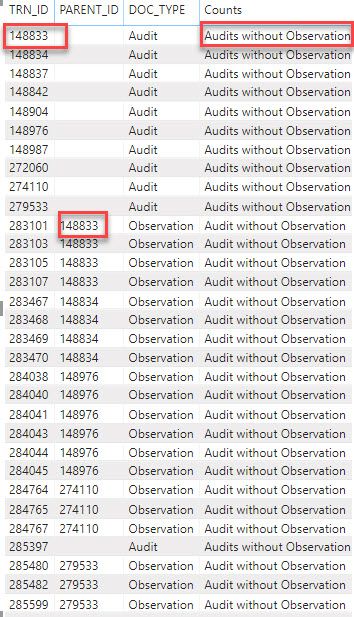
I am comparing 2 columns and displaying the required text in the new column using the specs below.


  • IF Doc Type = Observation THEN “Audit Report without Observation”
  • IF Doc Type = Audit AND TRN ID is in  Parent ID Field THEN “Audit Report with Observation”
  • IF Doc Type =Audit AND  TRN is not in Parent ID Field THEN “Audit Report without Observation”


From the image below i need to check if 148833 is present in PARENT_ID and display "Audits with observation". 
The formula i used is: 
 
Counts = IF('Audit and Obs Data'[DOC_TYPE] = "Observation", "Audit without Observation", IF('Audit and Obs Data'[DOC_TYPE]="Audit" && CONTAINS('Audit and Obs Data','Audit and Obs Data'[TRN_ID],'Audit and Obs Data'[PARENT_ID]), "Audit","Audits without Observation"))
2019-12-04_13-57-08.jpg
1 ACCEPTED SOLUTION
parry2k
Super User
Super User

@kalyan209 you can containsrow function to find if TRN_ID exists in PARENT_ID or not


Is Parent Exists = 
CONTAINSROW( VALUES('Table'[Parent_Id] ), 'Table'[TRN_ID] )


Subscribe to the @PowerBIHowTo YT channel for an upcoming video on List and Record functions in Power Query!!

Learn Power BI and Fabric - subscribe to our YT channel - Click here: @PowerBIHowTo

If my solution proved useful, I'd be delighted to receive Kudos. When you put effort into asking a question, it's equally thoughtful to acknowledge and give Kudos to the individual who helped you solve the problem. It's a small gesture that shows appreciation and encouragement! ❤


Did I answer your question? Mark my post as a solution. Proud to be a Super User! Appreciate your Kudos 🙂
Feel free to email me with any of your BI needs.

View solution in original post

3 REPLIES 3
parry2k
Super User
Super User

@kalyan209 you can containsrow function to find if TRN_ID exists in PARENT_ID or not


Is Parent Exists = 
CONTAINSROW( VALUES('Table'[Parent_Id] ), 'Table'[TRN_ID] )


Subscribe to the @PowerBIHowTo YT channel for an upcoming video on List and Record functions in Power Query!!

Learn Power BI and Fabric - subscribe to our YT channel - Click here: @PowerBIHowTo

If my solution proved useful, I'd be delighted to receive Kudos. When you put effort into asking a question, it's equally thoughtful to acknowledge and give Kudos to the individual who helped you solve the problem. It's a small gesture that shows appreciation and encouragement! ❤


Did I answer your question? Mark my post as a solution. Proud to be a Super User! Appreciate your Kudos 🙂
Feel free to email me with any of your BI needs.

@kalyan209 did you tried the formula? Put this new column in your table visual and you will find out if it is working or not.


Subscribe to the @PowerBIHowTo YT channel for an upcoming video on List and Record functions in Power Query!!

Learn Power BI and Fabric - subscribe to our YT channel - Click here: @PowerBIHowTo

If my solution proved useful, I'd be delighted to receive Kudos. When you put effort into asking a question, it's equally thoughtful to acknowledge and give Kudos to the individual who helped you solve the problem. It's a small gesture that shows appreciation and encouragement! ❤


Did I answer your question? Mark my post as a solution. Proud to be a Super User! Appreciate your Kudos 🙂
Feel free to email me with any of your BI needs.

@parry2k it worked 

thanks for the formual 

Helpful resources

Announcements
Join our Fabric User Panel

Join our Fabric User Panel

Share feedback directly with Fabric product managers, participate in targeted research studies and influence the Fabric roadmap.

February Power BI Update Carousel

Power BI Monthly Update - February 2026

Check out the February 2026 Power BI update to learn about new features.

FabCon Atlanta 2026 carousel

FabCon Atlanta 2026

Join us at FabCon Atlanta, March 16-20, for the ultimate Fabric, Power BI, AI and SQL community-led event. Save $200 with code FABCOMM.