Join us in Barcelona for FabCon and SQLCon, September 28 - October 1, 2026.
This is best Fabric, Power BI, SQL and AI community event. How do we know? The last event sold out! Save €200 with code FABCMTY200.
Register now- Power BI forums
- Get Help with Power BI
- Desktop
- Service
- Report Server
- Power Query
- Mobile Apps
- Developer
- DAX Commands and Tips
- Custom Visuals Development Discussion
- Health and Life Sciences
- Power BI Spanish forums
- Translated Spanish Desktop
- Training and Consulting
- Instructor Led Training
- Dashboard in a Day for Women, by Women
- Galleries
- Data Stories Gallery
- Themes Gallery
- Contests Gallery
- QuickViz Gallery
- Quick Measures Gallery
- Visual Calculations Gallery
- Fabric Apps Gallery
- Notebook Gallery
- Translytical Task Flow Gallery
- TMDL Gallery
- R Script Showcase
- Webinars and Video Gallery
- Ideas
- Custom Visuals Ideas (read-only)
- Issues
- Issues
- Events
- Upcoming Events
The Fabric community is upgrading! Read all of the details including the timeline and what you can expect. Learn more
- Power BI forums
- Forums
- Get Help with Power BI
- Desktop
- Re: Compare two Columns
- Subscribe to RSS Feed
- Mark Topic as New
- Mark Topic as Read
- Float this Topic for Current User
- Bookmark
- Subscribe
- Printer Friendly Page

- Mark as New
- Bookmark
- Subscribe
- Mute
- Subscribe to RSS Feed
- Permalink
- Report Inappropriate Content
Compare two Columns
Guys, I have tried hard to figure out a formula to do this, but I'm unsuccessful. I need to compare two columns in a single table, and produce the results which follow. I don't know if I have a preference that it be a calculated column vs. a measure:
ProductsCustomers
| product 1 | customer 1 |
| product 2 | customer 1 |
| product 1 | customer 1 |
| product 2 | customer 2 |
| product 3 | customer 2 |
| product 4 | customer 1 |
| product 2 | customer 2 |
| product 1 | customer 1 |
| product 4 | customer 1 |
CustomersProductsNum Purchases
| Customer 1 | Product 1 | 3 |
| Customer 1 | Product 2 | 1 |
| Customer 1 | Product 3 | null |
| Customer 1 | Product 4 | 2 |
| Customer 2 | Product 1 | null |
| Customer 2 | Product 2 | 2 |
| Customer 2 | Product 3 | 1 |
| Customer 2 | Product 4 | null |
Thanks in advance
Solved! Go to Solution.


- Mark as New
- Bookmark
- Subscribe
- Mute
- Subscribe to RSS Feed
- Permalink
- Report Inappropriate Content
Hi @jp5481 ,
You can modify @Greg_Deckler 's DAX expression like this:
Table 10 =
VAR __table =
    GENERATEALL (
        DISTINCT ( SELECTCOLUMNS ( 'Table', "__customer", [Customers] ) ),
        DISTINCT ( SELECTCOLUMNS ( 'Table', "__product", [Products] ) )
    )
VAR __table1 =
    ADDCOLUMNS (
        __table,
        "number", COUNTROWS (
            FILTER ( 'Table', [Products] = [__product] && [Customers] = [__customer] )
        )
    )
RETURN
    __table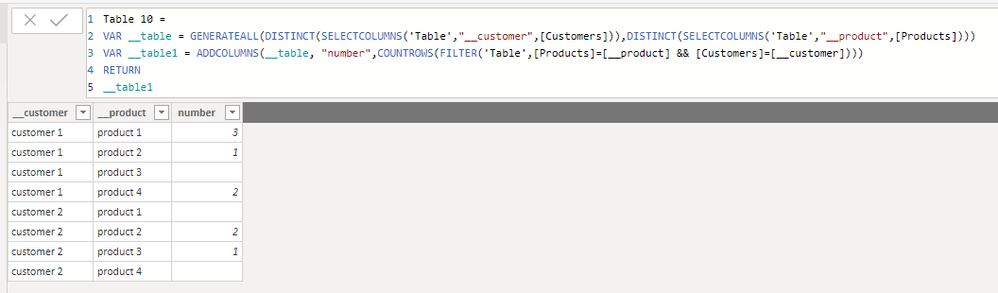
Best Regards,
Icey
If this post helps, then please consider Accept it as the solution to help the other members find it more quickly.
- Mark as New
- Bookmark
- Subscribe
- Mute
- Subscribe to RSS Feed
- Permalink
- Report Inappropriate Content
Hi @jp5481 ,


- Mark as New
- Bookmark
- Subscribe
- Mute
- Subscribe to RSS Feed
- Permalink
- Report Inappropriate Content
Here is a DAX table expression for it:
Table 10 =
VAR __table = GENERATEALL(DISTINCT(SELECTCOLUMNS('Table 9',"__product",[Products])),DISTINCT(SELECTCOLUMNS('Table 9',"__customer",[Customers])))
VAR __table1 = ADDCOLUMNS(__table,"number",COUNTROWS(FILTER('Table 9',[Products]=[__product] && [Customers]=[__customer])))
RETURN
__table1
Follow on LinkedIn
@ me in replies or I'll lose your thread!!!
Instead of a Kudo, please vote for this idea
Become an expert!: Enterprise DNA
External Tools: MSHGQM
YouTube Channel!: Microsoft Hates Greg
Latest book!: DAX For Humans
DAX is easy, CALCULATE makes DAX hard...
- Mark as New
- Bookmark
- Subscribe
- Mute
- Subscribe to RSS Feed
- Permalink
- Report Inappropriate Content
@Greg_Deckler wrote:Here is a DAX table expression for it:
Table 10 =
VAR __table = GENERATEALL(DISTINCT(SELECTCOLUMNS('Table 9',"__product",[Products])),DISTINCT(SELECTCOLUMNS('Table 9',"__customer",[Customers])))
VAR __table1 = ADDCOLUMNS(__table,"number",COUNTROWS(FILTER('Table 9',[Products]=[__product] && [Customers]=[__customer])))
RETURN
__table1
You are correct. This expression produces the intended results. However, what I was hoping to get was a result that only displayed customers who purchased multiple products, along with a list of the products they purchased. I don't know how to ask that question properly.
- Mark as New
- Bookmark
- Subscribe
- Mute
- Subscribe to RSS Feed
- Permalink
- Report Inappropriate Content
Hi @jp5481 ,
You can modify @Greg_Deckler 's DAX expression like this:
Table 10 =
VAR __table =
    GENERATEALL (
        DISTINCT ( SELECTCOLUMNS ( 'Table', "__customer", [Customers] ) ),
        DISTINCT ( SELECTCOLUMNS ( 'Table', "__product", [Products] ) )
    )
VAR __table1 =
    ADDCOLUMNS (
        __table,
        "number", COUNTROWS (
            FILTER ( 'Table', [Products] = [__product] && [Customers] = [__customer] )
        )
    )
RETURN
    __table
Best Regards,
Icey
If this post helps, then please consider Accept it as the solution to help the other members find it more quickly.

- Mark as New
- Bookmark
- Subscribe
- Mute
- Subscribe to RSS Feed
- Permalink
- Report Inappropriate Content
Not sure why you can't just put both the columns in the row section of the matrix, and have the values be a count of the rows?
- Mark as New
- Bookmark
- Subscribe
- Mute
- Subscribe to RSS Feed
- Permalink
- Report Inappropriate Content
@jthomson wrote:Not sure why you can't just put both the columns in the row section of the matrix, and have the values be a count of the rows?
You are correct. However, I can't get what I really wanted this way -- I wanted to data to filter down to only who me customers that purchased multiple products, and to display the product names. Thank you for the suggestion.

Helpful resources

FabCon & SQLCon – Barcelona 2026
Join us in Barcelona for FabCon and SQLCon, the Fabric, Power BI, SQL, and AI community event. Save €200 with code FABCMTY200.

Power BI DataViz World Championships - June 2026
A new Power BI DataViz World Championship is coming this June! Don't miss out on submitting your entry.

| User | Count |
|---|---|
| 23 | |
| 22 | |
| 14 | |
| 14 | |
| 13 |


| User | Count |
|---|---|
| 45 | |
| 38 | |
| 24 | |
| 22 | |
| 20 |


