Join us at FabCon Atlanta from March 16 - 20, 2026, for the ultimate Fabric, Power BI, AI and SQL community-led event. Save $200 with code FABCOMM.
Register now!Get Fabric Certified for FREE during Fabric Data Days. Don't miss your chance! Request now
Hi all,
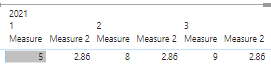
Im trying to create a matrix with headers like the following image, in order to be able to compare data from different months for the same measure side by side:
Each column ( Enviado Tipo Normal, Facturacion Neta and Ingresos x Cupon) are measures created from diferent 2 different fact tables that contain about 9 and 3 million rows.
I have been trying to find different solutions for quite a long time with no avail, any clues on how to solve this?
Thank you for your time.
Solved! Go to Solution.
Hi @Anonymous ,
As far as I know, this is impossible. Measure is calculated based on the current row context. The measure in the value field only corresponds to the current context, not the current context and different values are displayed repeatedly.
Best Regards,
Liang
If this post helps, then please consider Accept it as the solution to help the other members find it more quickly.
Hi @Anonymous ,
As far as I know, this is impossible. Measure is calculated based on the current row context. The measure in the value field only corresponds to the current context, not the current context and different values are displayed repeatedly.
Best Regards,
Liang
If this post helps, then please consider Accept it as the solution to help the other members find it more quickly.
Thank you for your quick response,
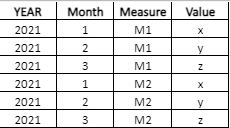
Could this be achieved using a table such as the following, and using the measure column as a column in the matrix:
If the answer is yes, could I achieve this using a DAX formula?
Check out the November 2025 Power BI update to learn about new features.
Advance your Data & AI career with 50 days of live learning, contests, hands-on challenges, study groups & certifications and more!