Get Fabric or SQL Certified for Free.
Get certified for free when you join Fabric Data Days 2026 and dive into Fabric, Power BI, SQL, AI, and other essential data skills.
Join now- Power BI forums
- Get Help with Power BI
- Desktop
- Service
- Report Server
- Power Query
- Mobile Apps
- Developer
- DAX Commands and Tips
- Custom Visuals Development Discussion
- Health and Life Sciences
- Power BI Spanish forums
- Translated Spanish Desktop
- Training and Consulting
- Instructor Led Training
- Dashboard in a Day for Women, by Women
- Galleries
- Data Stories Gallery
- Themes Gallery
- Contests Gallery
- QuickViz Gallery
- Quick Measures Gallery
- Visual Calculations Gallery
- Fabric Apps Gallery
- Notebook Gallery
- Translytical Task Flow Gallery
- TMDL Gallery
- R Script Showcase
- Webinars and Video Gallery
- Ideas
- Custom Visuals Ideas (read-only)
- Issues
- Issues
- Events
- Upcoming Events
July 7 - July 17 | Round 2 of the Power BI Dataviz World Championships. Don't miss your chance! Learn more
- Power BI forums
- Forums
- Get Help with Power BI
- Desktop
- Re: Compare Two Tables
- Subscribe to RSS Feed
- Mark Topic as New
- Mark Topic as Read
- Float this Topic for Current User
- Bookmark
- Subscribe
- Printer Friendly Page


- Mark as New
- Bookmark
- Subscribe
- Mute
- Subscribe to RSS Feed
- Permalink
- Report Inappropriate Content
Compare Two Tables
I have two tables containing application data, Table1 and Table2. They are related to each other using the common column, APP_NUM. Table1 has only one row per APP_NUM while Table2 can have 1 or more rows per APP_NUM. Each table contains a phone number. In Table1 the phone number belongs to the originator of the application. In Table2 the phone numbers belong to each applicant. What I would like to do is compare the two tables using the APP_NUM and indicate on Table2 if the phone number of any of the applicants is the same phone number as that of the originator on Table1.
Here is the table structure of each table
| Table1 | |
| APP_NUM | PHONE_NUM |
| 12345 | 8885551111 |
| 77777 | 3333333333 |
| Table2 | ||
| APP_NUM | ROLE | PHONE |
| 12345 | APPLICANT 1 | 1111111111 |
| 12345 | APPLICANT 2 | 2222222222 |
| 77777 | APPLICANT 1 | 8888888888 |
| 77777 | APPLICANT 2 | 3333333333 |
I would like to add a column to Table2 that indicates if there is a match between PHONE and PHONE_NUM using APP_NUM to join the two tables. So it would look like this
| Table2 | |||
| APP_NUM | ROLE | PHONE | MATCH |
| 12345 | APPLICANT 1 | 1111111111 | No |
| 12345 | APPLICANT 2 | 2222222222 | No |
| 77777 | APPLICANT 1 | 8888888888 | No |
| 77777 | APPLICANT 2 | 3333333333 | Yes |
Any suggestion on how to accomplish this, either in Power Query or a DAX measure?
Thanks in advance!
Solved! Go to Solution.

- Mark as New
- Bookmark
- Subscribe
- Mute
- Subscribe to RSS Feed
- Permalink
- Report Inappropriate Content
Hi @SteveG_91 ,
Try this:
MATCH = CONTAINSSTRING('Table (2)'[PHONE],RELATED('Table'[PHONE_NUM]))
Output:

Best Regards,
Yolo Zhu
If this post helps, then please consider Accept it as the solution to help the other members find it more quickly.
- Mark as New
- Bookmark
- Subscribe
- Mute
- Subscribe to RSS Feed
- Permalink
- Report Inappropriate Content
Hi @SteveG_91
You can try this:
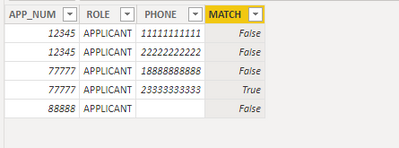
Best Regards!
Yolo
- Mark as New
- Bookmark
- Subscribe
- Mute
- Subscribe to RSS Feed
- Permalink
- Report Inappropriate Content
I have two tables containing application data, Table1 and Table2. They are related to each other using the common column, APP_NUM. Table1 has only one row per APP_NUM while Table2 can have 1 or more rows per APP_NUM. Each table contains a phone number. In Table1 the phone number belongs to the originator of the application. In Table2 the phone numbers belong to each applicant. What I would like to do is compare the two tables using the APP_NUM and indicate on Table2 if the phone number of any of the applicants is the same phone number as that of the originator on Table1.
Here is the table structure of each table
| Table1 | |
| APP_NUM | PHONE_NUM |
| 12345 | 8885551111 |
| 77777 | 3333333333 |
| Table2 | ||
| APP_NUM | ROLE | PHONE |
| 12345 | APPLICANT 1 | 1111111111 |
| 12345 | APPLICANT 2 | 2222222222 |
| 77777 | APPLICANT 1 | 8888888888 |
| 77777 | APPLICANT 2 | 3333333333 |
I would like to add a column to Table2 that indicates if there is a match between PHONE and PHONE_NUM using APP_NUM to join the two tables. So it would look like this
| Table2 | |||
| APP_NUM | ROLE | PHONE | MATCH |
| 12345 | APPLICANT 1 | 1111111111 | No |
| 12345 | APPLICANT 2 | 2222222222 | No |
| 77777 | APPLICANT 1 | 8888888888 | No |
| 77777 | APPLICANT 2 | 3333333333 | Yes |
Any suggestion on how to accomplish this, either in Power Query or a DAX measure?
Thanks in advance!


- Mark as New
- Bookmark
- Subscribe
- Mute
- Subscribe to RSS Feed
- Permalink
- Report Inappropriate Content
Hi @SteveG_91 , create this relationship:
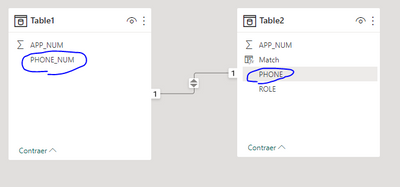
And create this calculate column:
Match = if(RELATED(Table1[APP_NUM])=BLANK(),"No","Yes")The result:

Best Regards
- Mark as New
- Bookmark
- Subscribe
- Mute
- Subscribe to RSS Feed
- Permalink
- Report Inappropriate Content
So I already have a one to many relationship between these two tables on the APP_NUM and the PHONE and PHONE_NUM would be a many to many since the phone number can appear multiple times on each table. When I look to see if the phone number is on both tables it has to be specific to the same APP_NUM. In other words, for APP_NUM 12345 on Table1 I only want to compare the phone numbers to APP_NUM 12345 on Table2. Then compare the phone numbers for APP_NUM 77777, etc.
- Mark as New
- Bookmark
- Subscribe
- Mute
- Subscribe to RSS Feed
- Permalink
- Report Inappropriate Content
Hi @SteveG_91 ,
Try this:
MATCH = CONTAINSSTRING('Table (2)'[PHONE],RELATED('Table'[PHONE_NUM]))
Output:
Best Regards,
Yolo Zhu
If this post helps, then please consider Accept it as the solution to help the other members find it more quickly.
- Mark as New
- Bookmark
- Subscribe
- Mute
- Subscribe to RSS Feed
- Permalink
- Report Inappropriate Content
One follow-up question. In some instances the phone number is missing (null) from Table1 but is on Table2. The measure is returning True for those. How can I make it return False?
- Mark as New
- Bookmark
- Subscribe
- Mute
- Subscribe to RSS Feed
- Permalink
- Report Inappropriate Content
Hi @SteveG_91
You can try this:
Best Regards!
Yolo
- Mark as New
- Bookmark
- Subscribe
- Mute
- Subscribe to RSS Feed
- Permalink
- Report Inappropriate Content
Thanks again, this worked perfectly!
- Mark as New
- Bookmark
- Subscribe
- Mute
- Subscribe to RSS Feed
- Permalink
- Report Inappropriate Content
This does just what I needed. Thank you!!!
Helpful resources

FabCon & SQLCon – Barcelona 2026
Join us in Barcelona for FabCon and SQLCon, the Fabric, Power BI, SQL, and AI community event. Save €200 with code FABCMTY200.

Power BI Monthly Update - July 2026
Check out the July 2026 Power BI update to learn about new features.

Data Days 2026
Join Data Days 2026: 60 days of free live/on-demand sessions, challenges, study groups, and certification opportunities.

Power BI DataViz World Championships - June 2026
A new Power BI DataViz World Championship is coming this June! Don't miss out on submitting your entry.

| User | Count |
|---|---|
| 29 | |
| 23 | |
| 22 | |
| 21 | |
| 13 |


| User | Count |
|---|---|
| 49 | |
| 32 | |
| 19 | |
| 17 | |
| 17 |


