Share feedback directly with Fabric product managers, participate in targeted research studies and influence the Fabric roadmap.
Sign up nowGet Fabric certified for FREE! Don't miss your chance! Learn more
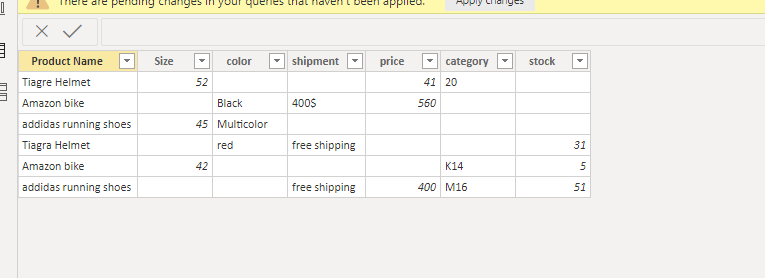
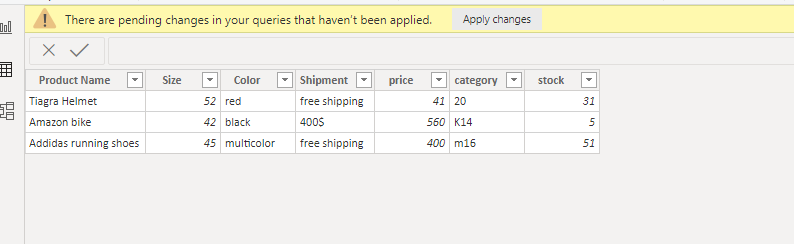
Hi guys i`m trying to combine a sheet in which some cells are completly empty as an example the product name is my unique identifier and i want to make one combined row for each uniqueID" Product name" to collect all the rows together to have one complete infromative row,
PS: rows are exactly the same as belw mentioned " either have value or completly empty"
How can i do so in power query specially if the data is being refreshed from sharepoint sourceBefore ( Scattered Data)
After ( Collected Data)
Thanks in Advance.
Hi @oabd0250 ,
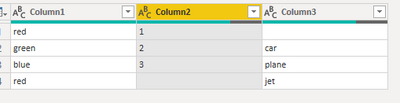
If I understand the issue. You want to go from here to
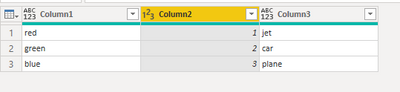
here.
Here is my pbix just go to table(2) and look at the steps. Not sure how the is affected by a file in SharePoint.
Combine rows
Let me know if you have any questions.
If this solves your issues, please mark it as the solution, so that others can find it easily. Kudos are nice too.
Nathaniel
Proud to be a Super User!
Hi Nathenial,
Thank you so much for your quick reply, however what i`m trying to do is a bit more complicated, as my real table got completely messy by transposing the table , also splitting the column by delimiter after being merged together will get my data more messy,
what i`m trying to do.. is as follows
1- Keep only duplicated unique ID and remove the rest ( taking into consideration the refresh.. as some new data may make one of the old unique IDs dublicated )
2-Merge rows for the duplicated leaving only one row with all the information
So far thank you so much for your assistance.
Omar
If you love stickers, then you will definitely want to check out our Community Sticker Challenge!
Check out the January 2026 Power BI update to learn about new features.
| User | Count |
|---|---|
| 62 | |
| 60 | |
| 48 | |
| 21 | |
| 18 |
| User | Count |
|---|---|
| 119 | |
| 116 | |
| 37 | |
| 34 | |
| 30 |