Don't miss your chance to take the Fabric Data Engineer (DP-700) exam on us!
Learn moreWe've captured the moments from FabCon & SQLCon that everyone is talking about, and we are bringing them to the community, live and on-demand. Starts on April 14th. Register now
Hello,
Currently migrating a KPI (adherence by SKU) from Excel to PBI and having difficulties, here is the definition:
Where:
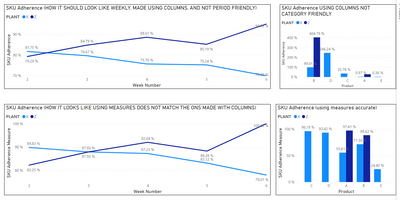
Made a replica using columns but is not what im looking for because it is not scalable, or relative to other categories and only works as intended using the participation baseline ( currently a week):

Made a version with measures and it not working properly even on weeks:
Here is the comparison:
Here are my Measures:
Planned Amount =
If(
CALCULATE(SUMX(SKU_TEST,SKU_TEST[PLAN]),DATESYTD(SKU_TEST[Date]))=0,
BLANK(),
CALCULATE(SUMx(VALUES(SKU_TEST[PLAN]),Calculate(SUM(SKU_TEST[PLAN]),DATESYTD(SKU_TEST[Date])))))
//////////////////////////////////////////////////////////////////////////////////////////
Real Amount =
If(
CALCULATE(SUMX(SKU_TEST,SKU_TEST[PLAN]),DATESYTD(SKU_TEST[Date]))=0,
BLANK(),
CALCULATE(SUMx(VALUES(SKU_TEST[REAL]),Calculate(SUM(SKU_TEST[REAL]),DATESYTD(SKU_TEST[Date])))))
///////////////////////////////////////////////////////////////////////////////
Adherence =
If(
[Planned Amount]=0,
BLANK(),
IF(
DIVIDE([Real Amount],[Planned Amount])>1,
1,
DIVIDE([Real Amount],[Planned Amount])))
////////////////////////////////////////////////////////////////////////
Total Plan of Selected Period =
If(
[Planned Amount]=0,
BLANK(),
CALCULATE([Planned Amount] ,
ALLEXCEPT(SKU_TEST,
SKU_TEST[Date],SKU_TEST[PROGRAMA],SKU_TEST[DT],SKU_TEST[Product],SKU_TEST[AREA], SKU_TEST[PLANT], 'Calendar'[Date],'Calendar'[Week Number],'Calendar'[Month],'Calendar'[Year])
))
//////////////////////////////////////////////////////////////////////////////////
Participation =
If(
[Planned Amount]=0,
BLANK(),
DIVIDE([Planned Amount],[Total Plan of Selected Period]))
///////////////////////////////////////////////////////////////////////////////////////
SKU Adherence Measure = 'Measure'[Adherence]*[Participation]
Basically Im looking to get the result from the columns in the weeks graphs but with the flexibility of Measures.
Attaching data samples and Test File https://we.tl/t-U21qCp613h
Appreciate the help in advance.
Best Regards
RT
Solved! Go to Solution.
Hi @RTERCERO ,
Change your corresponding measures like below:
Total Plan of Selected Period 2 =
CALCULATE (
SUM ( SKU_TEST[PLAN] ),
ALLEXCEPT ( SKU_TEST, SKU_TEST[PLANT], SKU_TEST[Planned Week] )
)
Participation 2 =
IF (
[Planned Amount] = 0,
BLANK (),
DIVIDE ( [Planned Amount], [Total Plan of Selected Period 2] )
)
SKU Adherence Measure 2 =
VAR t_ =
ADDCOLUMNS ( SKU_TEST, "a_", [% Adherence], "b_", [Participation 2] )
RETURN
SUMX ( t_, [a_] * [b_] )
Best Regards,
Icey
If this post helps, then please consider Accept it as the solution to help the other members find it more quickly.
Hi @RTERCERO ,
Change your corresponding measures like below:
Total Plan of Selected Period 2 =
CALCULATE (
SUM ( SKU_TEST[PLAN] ),
ALLEXCEPT ( SKU_TEST, SKU_TEST[PLANT], SKU_TEST[Planned Week] )
)
Participation 2 =
IF (
[Planned Amount] = 0,
BLANK (),
DIVIDE ( [Planned Amount], [Total Plan of Selected Period 2] )
)
SKU Adherence Measure 2 =
VAR t_ =
ADDCOLUMNS ( SKU_TEST, "a_", [% Adherence], "b_", [Participation 2] )
RETURN
SUMX ( t_, [a_] * [b_] )
Best Regards,
Icey
If this post helps, then please consider Accept it as the solution to help the other members find it more quickly.
Hello @Icey ,
Thanks for the help, this solution works to replicate whats done using columns however, It takes a lot more time to calculate and still does not the flexibility when changing between Days/ Weeks/ Months, Works on weeks only.
Q1 Is there another option to make it Faster?
Q2 can We make it flexible between Time periods?
I was considering maybe in "Total Plan of Selected Period 2" Is where I have the Oportunity.
What do you think?
RT
Adding an "ALLSELECTED( SKU_TEST )", did the trick here: "Total Plan of Selected Period 2"
If you have recently started exploring Fabric, we'd love to hear how it's going. Your feedback can help with product improvements.
A new Power BI DataViz World Championship is coming this June! Don't miss out on submitting your entry.
Share feedback directly with Fabric product managers, participate in targeted research studies and influence the Fabric roadmap.
| User | Count |
|---|---|
| 52 | |
| 38 | |
| 37 | |
| 19 | |
| 18 |
| User | Count |
|---|---|
| 67 | |
| 67 | |
| 34 | |
| 32 | |
| 29 |