cancel
Showing results for 
Search instead for 
Did you mean: 

The Power BI Data Visualization World Championships is back! Get ahead of the game and start preparing now! Learn more

Reply
RTERCERO
Helper I
Helper I

Combined iteration of two measures ( multiply row by row between two measures)

Hello,

Currently migrating a KPI (adherence by SKU) from Excel to PBI and having difficulties, here is the definition:


RTERCERO_0-1648910918485.png


Where: 

RTERCERO_1-1648911062893.png


RTERCERO_2-1648911072963.png


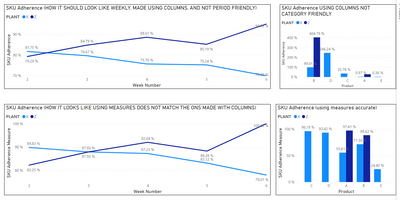
Made a replica using columns but is not what im looking for because it is not scalable, or relative to other categories and only works as intended using the participation baseline ( currently a week):

RTERCERO_4-1648914091010.png


Made a version with measures and it not working properly even on weeks:
Here is the comparison:
 

RTERCERO_5-1648914651370.png

Here are my Measures:

Planned Amount = 
If(
    CALCULATE(SUMX(SKU_TEST,SKU_TEST[PLAN]),DATESYTD(SKU_TEST[Date]))=0,
    BLANK(),
CALCULATE(SUMx(VALUES(SKU_TEST[PLAN]),Calculate(SUM(SKU_TEST[PLAN]),DATESYTD(SKU_TEST[Date])))))

//////////////////////////////////////////////////////////////////////////////////////////

Real Amount = 
If(
    CALCULATE(SUMX(SKU_TEST,SKU_TEST[PLAN]),DATESYTD(SKU_TEST[Date]))=0,
    BLANK(),
CALCULATE(SUMx(VALUES(SKU_TEST[REAL]),Calculate(SUM(SKU_TEST[REAL]),DATESYTD(SKU_TEST[Date])))))

///////////////////////////////////////////////////////////////////////////////

Adherence = 
If(
    [Planned Amount]=0,
    BLANK(),
IF( 
    DIVIDE([Real Amount],[Planned Amount])>1,
    1,
DIVIDE([Real Amount],[Planned Amount])))

////////////////////////////////////////////////////////////////////////

Total Plan of Selected Period = 
If(
   [Planned Amount]=0,
    BLANK(),
CALCULATE([Planned Amount] ,
ALLEXCEPT(SKU_TEST,
SKU_TEST[Date],SKU_TEST[PROGRAMA],SKU_TEST[DT],SKU_TEST[Product],SKU_TEST[AREA], SKU_TEST[PLANT], 'Calendar'[Date],'Calendar'[Week Number],'Calendar'[Month],'Calendar'[Year])
))

//////////////////////////////////////////////////////////////////////////////////

Participation = 
If(
   [Planned Amount]=0,
    BLANK(),
DIVIDE([Planned Amount],[Total Plan of Selected Period]))

///////////////////////////////////////////////////////////////////////////////////////

SKU Adherence Measure = 'Measure'[Adherence]*[Participation]


Basically Im looking to get the result from the columns in the weeks graphs but with the flexibility of Measures.


Attaching data samples and Test File https://we.tl/t-U21qCp613h 


Appreciate the help in advance.

Best Regards

RT


1 ACCEPTED SOLUTION
Icey
Community Support
Community Support

Hi @RTERCERO ,


Change your corresponding measures like below:

Total Plan of Selected Period 2 =
CALCULATE (
    SUM ( SKU_TEST[PLAN] ),
    ALLEXCEPT ( SKU_TEST, SKU_TEST[PLANT], SKU_TEST[Planned Week] )
)
Participation 2 =
IF (
    [Planned Amount] = 0,
    BLANK (),
    DIVIDE ( [Planned Amount], [Total Plan of Selected Period 2] )
)
SKU Adherence Measure 2 = 
VAR t_ =
    ADDCOLUMNS ( SKU_TEST, "a_", [% Adherence], "b_", [Participation 2] )
RETURN
    SUMX ( t_, [a_] * [b_] )

Icey_0-1649155389380.png


Best Regards,

Icey


If this post helps, then please consider Accept it as the solution to help the other members find it more quickly.

View solution in original post

3 REPLIES 3
Icey
Community Support
Community Support

Hi @RTERCERO ,


Change your corresponding measures like below:

Total Plan of Selected Period 2 =
CALCULATE (
    SUM ( SKU_TEST[PLAN] ),
    ALLEXCEPT ( SKU_TEST, SKU_TEST[PLANT], SKU_TEST[Planned Week] )
)
Participation 2 =
IF (
    [Planned Amount] = 0,
    BLANK (),
    DIVIDE ( [Planned Amount], [Total Plan of Selected Period 2] )
)
SKU Adherence Measure 2 = 
VAR t_ =
    ADDCOLUMNS ( SKU_TEST, "a_", [% Adherence], "b_", [Participation 2] )
RETURN
    SUMX ( t_, [a_] * [b_] )

Icey_0-1649155389380.png


Best Regards,

Icey


If this post helps, then please consider Accept it as the solution to help the other members find it more quickly.

Hello @Icey ,


Thanks for the help, this solution works to replicate whats done using columns however, It takes a lot more time to calculate and still does not the flexibility when changing between Days/ Weeks/ Months, Works on weeks only.


Q1 Is there another option to make it Faster?


Q2 can We make it flexible between Time periods?


I was considering maybe in "Total Plan of Selected Period 2" Is where I have the Oportunity.


What do you think?


RT


Adding an "ALLSELECTED( SKU_TEST )", did the trick here: "Total Plan of Selected Period 2"

Helpful resources

Announcements
Power BI DataViz World Championships

Power BI Dataviz World Championships

The Power BI Data Visualization World Championships is back! Get ahead of the game and start preparing now!

December 2025 Power BI Update Carousel

Power BI Monthly Update - December 2025

Check out the December 2025 Power BI Holiday Recap!

FabCon Atlanta 2026 carousel

FabCon Atlanta 2026

Join us at FabCon Atlanta, March 16-20, for the ultimate Fabric, Power BI, AI and SQL community-led event. Save $200 with code FABCOMM.