Join us at FabCon Atlanta from March 16 - 20, 2026, for the ultimate Fabric, Power BI, AI and SQL community-led event. Save $200 with code FABCOMM.
Register now!The Power BI Data Visualization World Championships is back! Get ahead of the game and start preparing now! Learn more
Hi,
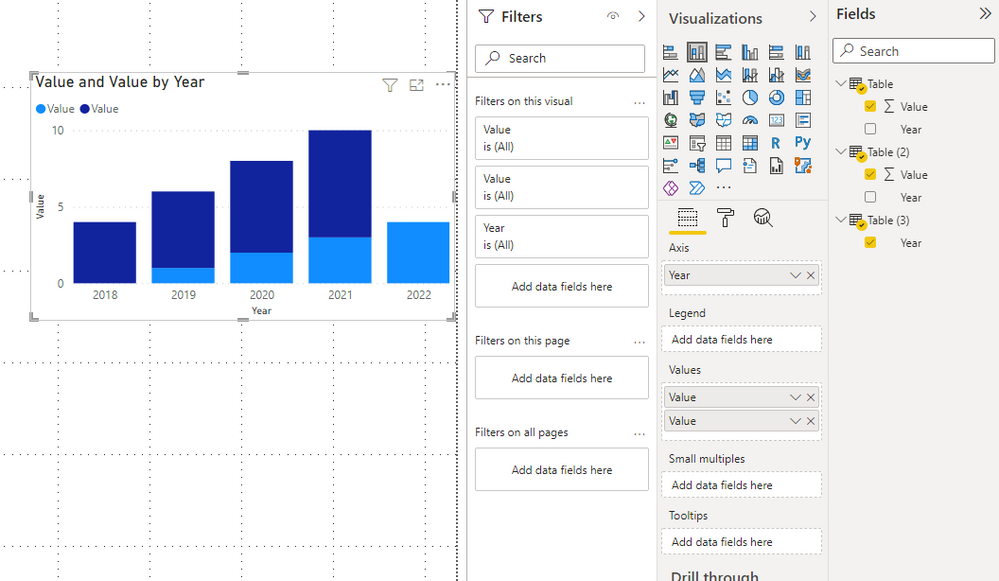
is it theoretically possible to combine two visuals with the same format and the same x and y axis into one visual?
The sources for each visual is different, just the visual itself has the same format.
It is bothering me that each visual displays the same x and y axis.
I could do this manually by removing the axis for all but one and move the visuals around manually, but I would like a more sophisticated solution. There are similar threads but as far as I can tell they dont specifically answer my problem..
thank you !
Solved! Go to Solution.
Hi @Anonymous ,
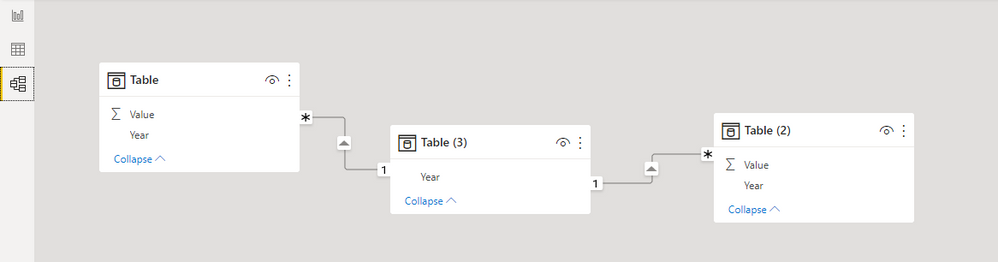
How about creating a third table to join the two sources?
Might be a bit like a star schema.
Understand star schema and the importance for Power BI - Power BI | Microsoft Docs
Best Regards,
Stephen Tao
If this post helps, then please consider Accept it as the solution to help the other members find it more quickly.
Hi @Anonymous ,
How about creating a third table to join the two sources?
Might be a bit like a star schema.
Understand star schema and the importance for Power BI - Power BI | Microsoft Docs
Best Regards,
Stephen Tao
If this post helps, then please consider Accept it as the solution to help the other members find it more quickly.
The Power BI Data Visualization World Championships is back! Get ahead of the game and start preparing now!
| User | Count |
|---|---|
| 38 | |
| 36 | |
| 33 | |
| 32 | |
| 29 |
| User | Count |
|---|---|
| 129 | |
| 88 | |
| 79 | |
| 68 | |
| 63 |