FabCon is coming to Atlanta
Join us at FabCon Atlanta from March 16 - 20, 2026, for the ultimate Fabric, Power BI, AI and SQL community-led event. Save $200 with code FABCOMM.
Register now!- Power BI forums
- Get Help with Power BI
- Desktop
- Service
- Report Server
- Power Query
- Mobile Apps
- Developer
- DAX Commands and Tips
- Custom Visuals Development Discussion
- Health and Life Sciences
- Power BI Spanish forums
- Translated Spanish Desktop
- Training and Consulting
- Instructor Led Training
- Dashboard in a Day for Women, by Women
- Galleries
- Data Stories Gallery
- Themes Gallery
- Contests Gallery
- QuickViz Gallery
- Quick Measures Gallery
- Visual Calculations Gallery
- Notebook Gallery
- Translytical Task Flow Gallery
- TMDL Gallery
- R Script Showcase
- Webinars and Video Gallery
- Ideas
- Custom Visuals Ideas (read-only)
- Issues
- Issues
- Events
- Upcoming Events
The Power BI Data Visualization World Championships is back! Get ahead of the game and start preparing now! Learn more
- Power BI forums
- Forums
- Get Help with Power BI
- Desktop
- Combine Years for Quarter
- Subscribe to RSS Feed
- Mark Topic as New
- Mark Topic as Read
- Float this Topic for Current User
- Bookmark
- Subscribe
- Printer Friendly Page


- Mark as New
- Bookmark
- Subscribe
- Mute
- Subscribe to RSS Feed
- Permalink
- Report Inappropriate Content
Combine Years for Quarter
Appologies if this has been covered but I cant find anything to show how to do this when doing a search!
I have Quarters that run in the following order:
Jan - March = Q4
April - June = Q1
July - September = Q2
October - December = Q3
I need to build a column that shows the years as follows, in order to filter the visuals by Quarter Year
Date Month Quarter Year QYear
01/01/17 1 Q4 2017 2016 - 2017
01/01/18 1 Q4 2018 2017 - 2018
01/01/19 1 Q4 2019 2018 - 2019
Any help greratfully recived
Solved! Go to Solution.


- Mark as New
- Bookmark
- Subscribe
- Mute
- Subscribe to RSS Feed
- Permalink
- Report Inappropriate Content
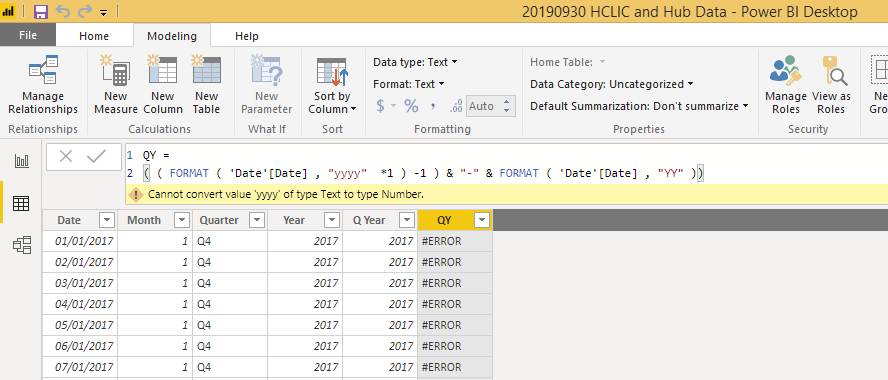
Position of * 1 is wrong
Year = ((FORMAT('Date'[Date],"YYYY") *1) -1) & "-"&FORMAT('Date'[Date],"YY")It should be after format close )
- Mark as New
- Bookmark
- Subscribe
- Mute
- Subscribe to RSS Feed
- Permalink
- Report Inappropriate Content
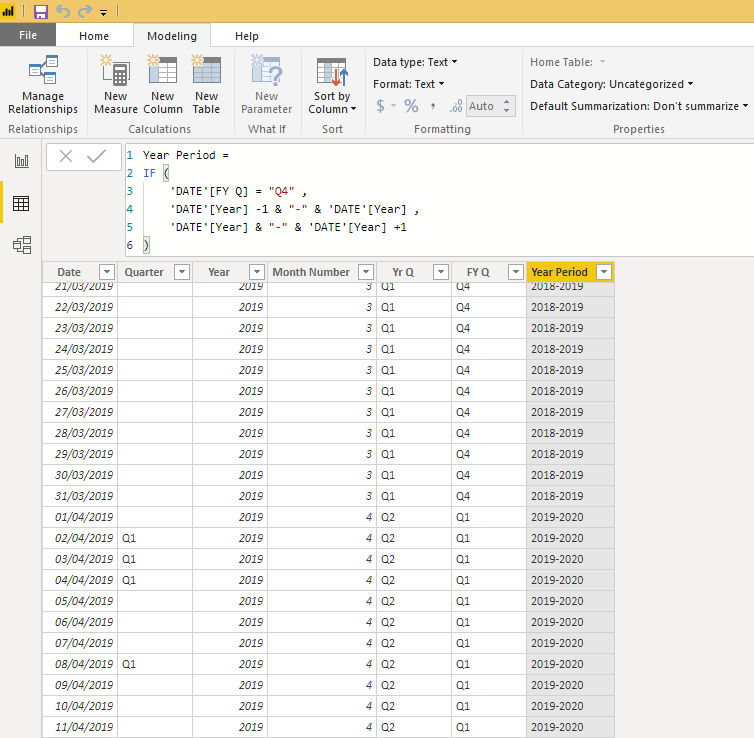
For completeness of this thread, I solved the issues with a couple of columns for year quarter and FY quarter and then combined the year from the year coloumn to match them up in order to produce slicers.
Year Q (Jan - Dec) = Yr Q = "Q" & INT ( FORMAT ( 'DATE'[Date] , "q" ) )
and
FYQ (April - March UK) =
IF (
'DATE'[Month Number] <= 3,
"Q4",
IF (
'DATE'[Month Number] <= 6,
"Q1",
IF (
'DATE'[Month Number] <= 9,
"Q2",
IF (
'DATE'[Month Number] <= 12,
"Q3"
)
)
)
)
then used the following DAX
- Mark as New
- Bookmark
- Subscribe
- Mute
- Subscribe to RSS Feed
- Permalink
- Report Inappropriate Content
- Mark as New
- Bookmark
- Subscribe
- Mute
- Subscribe to RSS Feed
- Permalink
- Report Inappropriate Content
@amitchandak
Thanks for the quick response, but the code whilst its on the lines I was working on (With format ), is not quite right. Could you check please
- Mark as New
- Bookmark
- Subscribe
- Mute
- Subscribe to RSS Feed
- Permalink
- Report Inappropriate Content
- Mark as New
- Bookmark
- Subscribe
- Mute
- Subscribe to RSS Feed
- Permalink
- Report Inappropriate Content
Thanks for that, I was missing the ( ........ *1 ) -1 ) from my coding to get it to work.
To understand the logic , how does this part of the code work?
- Mark as New
- Bookmark
- Subscribe
- Mute
- Subscribe to RSS Feed
- Permalink
- Report Inappropriate Content
- Mark as New
- Bookmark
- Subscribe
- Mute
- Subscribe to RSS Feed
- Permalink
- Report Inappropriate Content
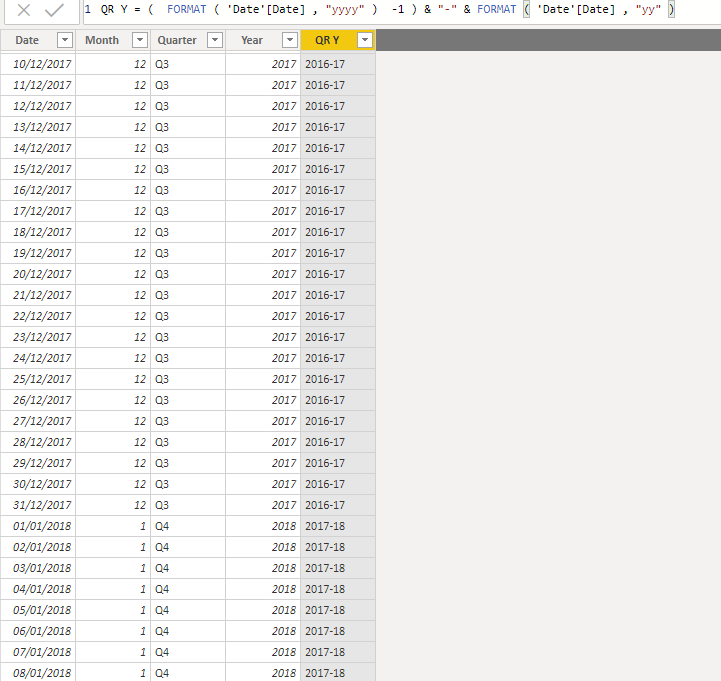
Thanks for the explination, I had an play with those numbers to see how it affected the result.
Now I just need to fix the cross over years, as currently it is not giving the corect set of Quarters the correct years.
Q1 should then change to 2017-18 not when the year changes in the year column

- Mark as New
- Bookmark
- Subscribe
- Mute
- Subscribe to RSS Feed
- Permalink
- Report Inappropriate Content
For completeness of this thread, I solved the issues with a couple of columns for year quarter and FY quarter and then combined the year from the year coloumn to match them up in order to produce slicers.
Year Q (Jan - Dec) = Yr Q = "Q" & INT ( FORMAT ( 'DATE'[Date] , "q" ) )
and
FYQ (April - March UK) =
IF (
'DATE'[Month Number] <= 3,
"Q4",
IF (
'DATE'[Month Number] <= 6,
"Q1",
IF (
'DATE'[Month Number] <= 9,
"Q2",
IF (
'DATE'[Month Number] <= 12,
"Q3"
)
)
)
)
then used the following DAX

Helpful resources

Power BI Dataviz World Championships
The Power BI Data Visualization World Championships is back! Get ahead of the game and start preparing now!

Power BI Monthly Update - December 2025
Check out the December 2025 Power BI Holiday Recap!

FabCon Atlanta 2026
Join us at FabCon Atlanta, March 16-20, for the ultimate Fabric, Power BI, AI and SQL community-led event. Save $200 with code FABCOMM.

| User | Count |
|---|---|
| 41 | |
| 38 | |
| 36 | |
| 30 | |
| 28 |


| User | Count |
|---|---|
| 128 | |
| 88 | |
| 79 | |
| 67 | |
| 62 |


